pvecenter
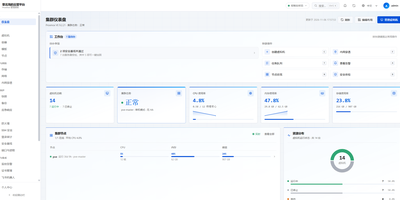
Handing a teammate the keys to a Proxmox cluster usually means handing over far too much, so pvecenter puts a narrower, self-service web panel in front of it. The dashboard shows node health, CPU, memory, storage, and recent tasks, and several Proxmox hosts can be managed from one place. Virtual machines are created through a guided wizard or in batches, then powered, cloned, migrated, resized, snapshotted, and reached through an in-browser console. LXC containers get their own pages, and a template pipeline builds cloud-init templates from cloud images. Bridges, VLANs, address pools, and the native Proxmox firewall are managed with rule templates pushed to many guests at once. Backups can run now or on a schedule, with restore, delete protection, and integrity checks. Administrators define reusable resource sizes, per-user quotas, roles, two-factor sign-in, and an audit log of every write. A security baseline scores hosts and offers guided hardening, SSH brute-force protection bans repeat offenders, and an AI inspection assistant explains findings and asks approval for every change. Alerts reach email, Feishu, and webhooks, and certificates renew automatically. The interface is Chinese-first, with a language switch and an English guide. Running on a dedicated VPS on RepoCloud with guaranteed CPU, RAM, and SSD, full root SSH access, and a browser serial console. Apache-2.0 licensed.
Depl0y
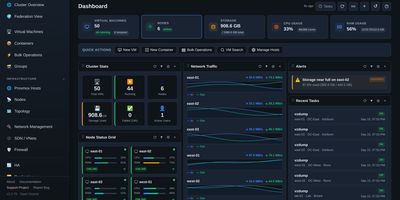
Three Proxmox sites, a lab host in the corner, and a rack of Dell and HPE servers can all share one screen when Depl0y runs the show. The dashboard totals virtual machines, containers, CPU, RAM, storage, and network traffic across every registered endpoint, with draggable widgets, alerts, and recent task feeds. Virtual machine pages cover start, stop, restart, snapshots, cloning, migration, templates, and a browser console, and node pages add metric charts, storage, networking, and update status. A guided failover wizard checks quorum, storage, and disks, then protects a guest so it restarts on another node if its host fails. A topology view maps hosts, guests, bridges, storage, and BMCs, with PNG, SVG, and draw.io export. Hardware pages poll iDRAC and iLO for health, temperature, power draw, DIMMs, drives, and firmware, and power controls reach machines that are fully off. Deployment tools build VMs from cloud images, import OVA, VMDK, and QCOW2 files, and launch self-hosted LLM guests. Admin, Operator, and Viewer roles, TOTP, host pinning, and a searchable audit log keep access tidy. MSPs managing client clusters, homelabs with several nodes, and data center teams that want hypervisor and hardware status together are the target audience. Running on a dedicated VPS on RepoCloud with guaranteed CPU, RAM, and SSD, full root SSH access, and a browser serial console. MIT licensed.
Apache CloudStack
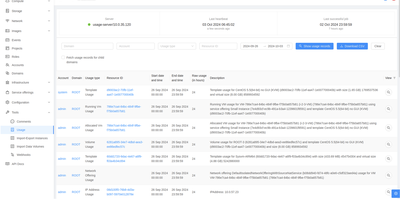
Your racks of hypervisor hosts become one private cloud with Apache CloudStack, the open-source IaaS platform that deploys and manages large networks of virtual machines behind a single web interface and API. One cloud can mix hypervisors side by side, running KVM, XenServer or XCP-ng, and VMware vSphere clusters under the same control plane, each organized into regions, zones, pods, and clusters that mirror your physical datacenters and racks. Administrators provision instances from templates and ISO images, take volume and VM snapshots on schedules, and migrate running instances between hosts in a cluster without downtime. Built-in networking spans isolated and shared networks, VPCs with tiered virtual routers, load balancers with SSL offloading, VPNs, and firewall rules, all exposed both to admins and to end users through separate, customizable interfaces. Multi-tenancy is native: domains, accounts, usage metering, and resource quotas let providers bill departments or customers for what they consume. The 4.22 LTS release strengthens backup and disaster recovery, adds a CSI driver for CloudStack Kubernetes Service, and streamlines VMware-to-KVM migrations for teams consolidating onto open virtualization. Running on a dedicated VPS on RepoCloud with guaranteed CPU, RAM, and SSD, full root SSH access, and a browser serial console. Apache-2.0 licensed.
Cozystack
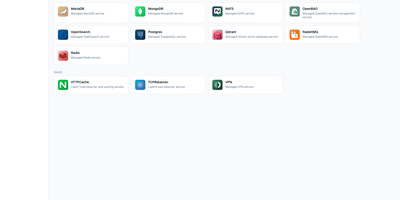
A rack of ordinary servers becomes your own cloud, with tenants ordering real infrastructure from a catalogue instead of filing tickets. Cozystack is an open-source, Kubernetes-based cloud platform that turns bare metal into a self-service system for spawning Kubernetes clusters, databases, virtual machines, load balancers, object storage, and HTTP caching services through a standard REST API. Hosting providers use it to sell managed services on hardware they already own, platform teams use it to give developers isolated environments inside quotas, and organizations leaving VMware run virtual machines and containers side by side with live migration and replicated storage. Tenants stay separated, GPU capacity can be shared between groups, and every service instance ships with preconfigured monitoring dashboards and alerts, gathered per tenant or into one hub. Because services are requested as Kubernetes resources, a billing system integrates by submitting a manifest, and platform packages are plain YAML delivered by FluxCD, so extending the catalogue means editing files your team already understands. Installation bootstraps immutable nodes over PXE or ISO, and the built-in web dashboard deploys applications and shows what the platform is doing without hiding the API underneath. The whole control plane runs on your hardware, auditable end to end. Running on a dedicated VPS on RepoCloud with guaranteed CPU, RAM, and SSD, full root SSH access, and a browser serial console. Apache-2.0 licensed.
OpenNebula
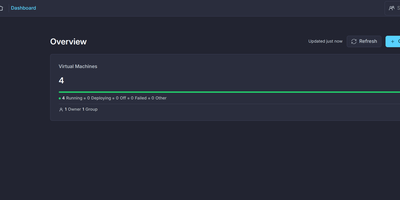
One front-end server can run your entire cloud: OpenNebula orchestrates KVM virtual machines and LXC containers across clusters of hosts, presenting everything through the FireEdge Sunstone web interface and a full API. Operators define VM templates once and instantiate them anywhere, attaching disks and networks, taking snapshots, scheduling actions, and opening remote consoles through Guacamole without leaving the browser. The OneDRS distributed resource scheduler reads historical and real-time metrics to predict demand spikes and migrate workloads before contention bites, with customizable policies and automation levels. GPU passthrough and PCI device hotplugging serve AI and accelerator workloads, while OVA import through the oneswap command ingests virtual machines exported from VMware vCenter for re-virtualization projects. Edge Clusters deploy on demand on premises or at remote providers, extending the same management model to hybrid and distributed sites without a separate stack. The 7.4 Helix release redesigns Sunstone with a slide-in side drawer and richer resource visualizations, and brings OneKS managed Kubernetes plus LVM storage to the Community Edition. Ceph and LVM datastores, incremental backups, cluster-level and generic quotas for resources like vGPUs, and OneFlow service orchestration for multi-VM applications round out daily operations. Running on a dedicated VPS on RepoCloud with guaranteed CPU, RAM, and SSD, full root SSH access, and a browser serial console. Apache-2.0 licensed.