OpenFlowKit
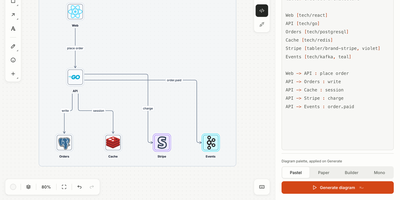
Draw it, write it as code, or hand it to your AI agent: OpenFlowKit is an open-source diagram canvas where the picture and the text behind it are always the same diagram. Drag shapes on the canvas or type a few forgiving lines, and each side regenerates the other as a single undo step. Ten diagram types share that one language: architecture with C4 views and cloud icons, sequence, flowchart, entity-relationship, state, class, mind maps, git graphs, charts, and wireframes. Paste Mermaid, Structurizr, or D2 and it converts into editable shapes, and Copy as Mermaid sends a flowchart or sequence back out for your README. Paste a GitHub repository instead and Map mode draws its architecture for you, with every arrow citing the exact file and line behind it, and a CLI that maps a local checkout for private repos. Connect Claude Code, Cursor, or any MCP client and the agent draws on your live canvas, restyles what is there, and screenshots its own work to check it. A built-in assistant works with your own key from Claude, OpenAI, Gemini, Groq, Mistral, OpenRouter, or a local Ollama, and exports cover PNG, SVG, PDF, JSON, and animated SVG, GIF, MP4, or WebM you can drop into documentation. Running on a dedicated VPS on RepoCloud with guaranteed CPU, RAM, and SSD, full root SSH access, and a browser serial console. MIT licensed.
Ideon
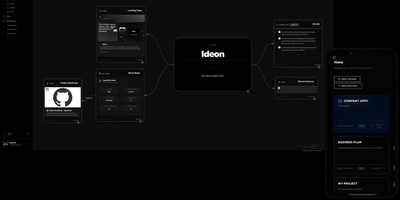
Scattered browser tabs, buried wiki folders, and disconnected issue trackers fragment engineering context across too many tools, which is why Ideon unifies your repositories, notes, and tasks on a shared infinite canvas. Rather than forcing projects into rigid folder hierarchies, you arrange interactive blocks spatially on a two-dimensional map where related documents, checklists, calendar schedules, and code references sit right beside one another. Teams can embed live repository cards and open issue streams directly from GitHub, GitLab, Gitea, and Forgejo onto the workspace, keeping code status visible alongside architecture documentation. Rich content blocks render Markdown notes with threaded comments, Mermaid flowcharts, uploaded files, images, and bookmarked links on the same board. Real-time multiplayer collaboration lets teammates edit blocks simultaneously, follow live cursors across the canvas, and map system designs together without edit conflicts. Built-in Time Travel snapshots capture historical states of the workspace so you can scrub backward to review how a project evolved or trace past design decisions. You can even synchronize an entire project canvas directly to a Git repository, storing notes and spatial block layouts as versioned files. Running on a dedicated VPS on RepoCloud with guaranteed CPU, RAM, and SSD, full root SSH access, and a browser serial console. AGPL-3.0 licensed.