LearnBuddy
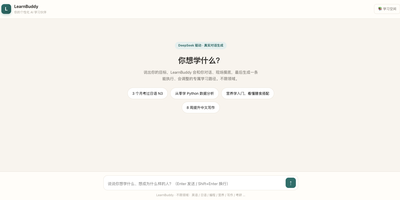
Tell LearnBuddy what you want to learn, in one conversation, and it works out where to start, what to do each day, and when yesterday's material needs another look. You describe the goal, whether that is a language, programming, nutrition, writing, or a career change, and three to five adaptive questions measure your actual baseline instead of making you pick a level from a dropdown. From there it builds a personalized path of four to twenty-four weeks and tells you daily what to study and what to review, so opening the app answers the question instead of raising it. Forgetting is treated as a scheduling problem: reviews resurface at spaced intervals, weekly self-checks test whether the plan still fits, and the roadmap replans dynamically when you race ahead or fall behind. Two editions run from the same codebase: try the hosted Cloud experience, or settle into Personal mode with your own model API key and your learning data stored on your own server. Optional OpenClaw and Feishu integration can bring the daily guidance into the chat tools you already live in. Running on a dedicated VPS on RepoCloud with guaranteed CPU, RAM, and SSD, full root SSH access, and a browser serial console. MIT licensed.
Mistgate
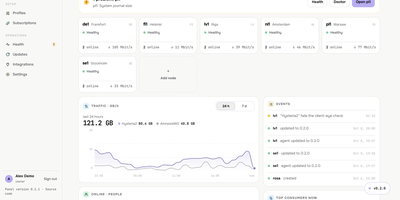
Running a VPN for family, friends, or a small team usually means babysitting servers one SSH session at a time, and Mistgate replaces that with one panel that keeps the whole fleet configured. Add a server from the browser by typing its address and root password: the panel pins the host key, checks the host, opens the ports, and installs the signed node agent for you. Each person gets one subscription link that their app turns into the server list, or a personal AmneziaVPN key per device, so a lost phone can be revoked without touching anyone else. Groups decide which protocol profiles a person receives, while per-user traffic quotas, expiry dates, device limits, and per-device speed limits keep sharing fair. Hysteria2 brings QUIC-based speed with port hopping, obfuscation, and certificate options; VLESS REALITY and AmneziaWG 2.0 and 3.1 cover networks where one protocol gets blocked, and Cloudflare WARP can serve as the exit for all three. Every five minutes the panel connects to each server the way a real client app would, a doctor on every node runs host checks with safe fixes, and alerts reach you on Telegram before your users notice. The public address shows strangers a decoy site while the admin hides behind a secret path, and encrypted backups go to your Cloudflare R2 bucket on a schedule. Running on a dedicated VPS on RepoCloud with guaranteed CPU, RAM, and SSD, full root SSH access, and a browser serial console. AGPL-3.0 licensed.
Nimbus
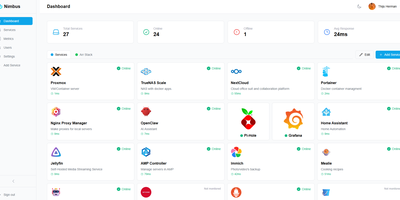
Nimbus is a self-hosted homelab dashboard that turns your scattered pile of services into a polished, organized command center with real-time health monitoring for every endpoint you care about. The dashboard displays live status cards for each registered service, tracking response times down to the millisecond and graphing uptime history so you can spot degradation before it becomes an outage. Health checks run on configurable intervals with smart self-signed certificate handling, meaning your internal services with self-issued TLS do not trigger false alarms. Multi-user support comes standard: local accounts authenticate via JWT, while OAuth2 integration with Google, GitHub, and Discord lets team members sign in with existing credentials. Role-based access control and a built-in admin panel give you granular authority over who sees what. Each user personalizes their view with custom backgrounds, light or dark mode, accent color themes, and drag-and-drop service tile arrangement. Services group into named categories and cards resize to fit your preferred layout, with both grid and list view modes available. Prometheus metrics export feeds your existing Grafana stack, and webhook notifications alert you instantly when a service goes offline. Custom service icons upload directly or auto-fetch from the Dashboard Icons collection. Zero-config Docker deployment gets you running in under 30 seconds with a single docker-compose command. Running on a dedicated VPS on RepoCloud with guaranteed CPU, RAM, and SSD, full root SSH access, and a browser serial console. AGPL-3.0 licensed.
Limelit Open
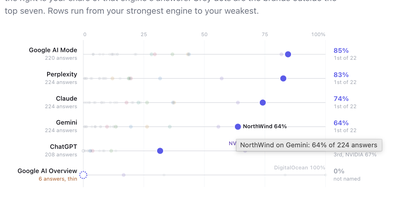
When a buyer asks ChatGPT, Claude, or Perplexity which product to choose, Limelit Open shows whether your brand appears in the answer, where it ranks, and which sources the engines trusted. You define the prompts your market actually asks, register your competitors, and the tracker runs every prompt against seven engines on a schedule you control: ChatGPT, Claude, Perplexity, and Gemini through vendor APIs with web search on, plus Google AI Overviews, Google AI Mode, and Bing Copilot through scraper providers, each result labeled by how it was collected. Every stored answer is searched for your brand and each competitor with the rank of the list item they appear in, so visibility, share of voice, average position, and citation share rest on readable evidence rather than a black-box score. Click any number and you land on the full answer text with matches highlighted, the searches the engine ran, the brands it named, and every cited URL classified as yours, a competitor's, social, informational, or other. A prompt by engine grid makes weak spots obvious, and the built-in MCP server lets Claude or another assistant query the same data in plain language. Runs are capped by a daily ceiling you set, prompts and answers live in one SQLite file, and a single export command dumps the whole instance as JSON or CSVs for your own reporting. Running on a dedicated VPS on RepoCloud with guaranteed CPU, RAM, and SSD, full root SSH access, and a browser serial console. Apache-2.0 licensed.
Drydock
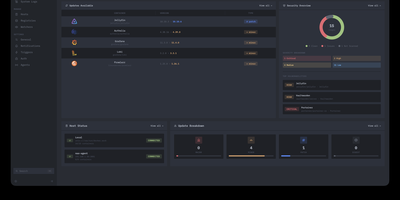
Deploying container updates without blind surprises is what Drydock delivers through a monitor-first inspection plane that evaluates image registries, scans CVE vulnerabilities, and automates rollbacks across distributed Docker infrastructure. Systems engineers track container fleets across twenty-three public and private registries including Docker Hub, GitHub Container Registry, Harbor, and Quay using cursor-based pagination and semver classification. The integrated Update Bouncer runs Trivy and Grype static scanners against incoming candidate layers, blocking deployments that fail configurable CVE severity policies while verifying cryptographic signatures through cosign. Operators configure declarative update schedules with stabilization countdown gates that hold back brand-new releases until defined burn-in periods elapse. When updates execute, Drydock creates pre-upgrade container snapshots and evaluates post-launch container health checks, instantly restoring previous image digests and network configs if failures occur. Distributed Portwing edge agents stream live container output and system logs over encrypted WebSockets, allowing central consoles to coordinate remote daemon updates without opening inbound host firewall ports. Automated event triggers dispatch granular notifications and update payloads across seventeen communication channels including Slack, Discord, Telegram, and Home Assistant MQTT brokers. Running on a dedicated VPS on RepoCloud with guaranteed CPU, RAM, and SSD, full root SSH access, and a browser serial console. AGPL-3.0 licensed.
Iso
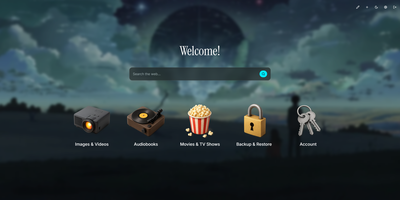
Drop a single container onto your host to launch Iso, a minimalist self-hosted startpage and service launcher that organizes every homelab web application behind a clean isometric icon grid and integrated search bar. No external database is required. Everything lives inside one human-readable JSON file or gets edited directly through the in-browser visual configuration modal. Add new service tiles in seconds, drag to reorder their display priority, and pick from a curated library of 3D isometric icons or upload custom graphics up to 25 megabytes. Switch instantly between built-in color palettes like Amethyst or upload a custom wallpaper with adjustable background blur and opacity sliders. A central search bar sits at the top of your startpage, routing queries directly to Google, DuckDuckGo, Startpage, Qwant, Searx, Bing, or any custom query URL template. Localize the interface into English, Spanish, French, or German with a single toggle. Custom greeting banners and optional page-load animations personalize the daily browsing experience for family members or lab users. Protect the dashboard and its visual editor behind shared password authentication configured via environment variables. Running on a dedicated VPS on RepoCloud with guaranteed CPU, RAM, and SSD, full root SSH access, and a browser serial console. MIT licensed.
Resolvr DNS Dashboard
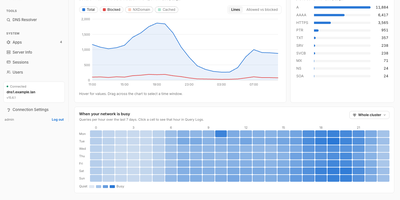
Resolvr gives your Technitium DNS server the clean, readable dashboard it deserves, turning raw query traffic into an overview you can understand at a glance. Four tabs divide the picture: Traffic charts queries over time with allowed and blocked stacked together and a seven-day heatmap of when your network is busy; Resolution shows where answers come from, cache, upstream, blocked, or authoritative, with response times and a flow diagram of each lookup; Top lists rank your chattiest clients and most-requested domains; and Infrastructure tracks DHCP scope usage, zones, and cache growth. Every chart is a doorway: click one and you land in Query Logs already filtered to what you clicked. Pick any device on the Clients page to see its queries, block rate, DHCP lease, and favourite domains. Query Logs themselves filter by client, name, protocol, response code, and time window, export to CSV, and can live-tail as new lookups arrive. Blocked Zones manages your feeds, your own blocked domains, and a checker that tells you whether a name is blocked and which feed caught it. Run a Technitium cluster and each panel gains a scope chip, comparing nodes side by side or merging their logs into one timeline. Running on a dedicated VPS on RepoCloud with guaranteed CPU, RAM, and SSD, full root SSH access, and a browser serial console. MIT licensed.
M3U Studio
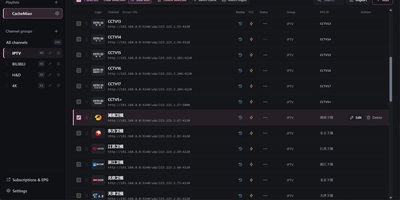
M3U Studio turns a tangled IPTV playlist into a tidy, published subscription you would actually hand to your player. Import channels from an M3U or TXT file, pasted text, or a remote link, then organize them properly: drag single channels or whole multi-selections into new groups, rename, reorder, and watch the list reshape itself as you work. Nothing goes live until you say so. Edits accumulate in a draft with undo and redo, and publishing keeps the last 30 configurations so a bad change rolls back in seconds. Channel logos stop being a scavenger hunt, because a unified logo library matches artwork automatically by name and alias, with search and batch upload when you bring your own. Select a pile of channels and fix them together: replace URL text, change groups, set EPG addresses, or move copies into another playlist, then run response checks to spot dead streams before your player does. Each playlist publishes as its own M3U or TXT subscription, or merged into a combined feed, under a custom short address that is easy to type into a TV box. Per-channel EPG, catch-up, and fast channel change settings travel with the export. Running on a dedicated VPS on RepoCloud with guaranteed CPU, RAM, and SSD, full root SSH access, and a browser serial console. GPL-2.0 licensed.
Gofer
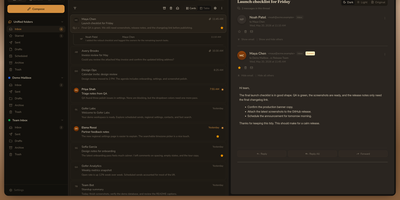
Five mailboxes, five tabs, five passwords: Gofer folds Gmail, Outlook, iCloud, and plain IMAP accounts into one browser tab where every inbox reads as a single, searchable whole. Threads, labels, and drag and drop keep triage fast, and search still finds the receipt from three years ago. Signatures and custom senders shape outgoing mail, scheduled sends wait for Monday morning, and a thread in another language translates in place. The calendar keeps pace with your mail: Google, Outlook, and CalDAV events sync both ways, invitations land in the inbox, and an RSVP or a Meet or Teams link attaches without leaving the message. Contacts follow the same rule through Google, Outlook, and CardDAV sync, so the address book you fix once is right everywhere. One install can serve a household or a small office, with separate users, encrypted credentials, blocked remote images, and passkey or authenticator sign-in for anyone who wants it. Classic, Minimal, and retro Express themes, flexible layouts, and push notifications make the daily inbox feel personal rather than administered. Leaving stays easy too: mailboxes export as mbox, mail moves between accounts, and a whole setup imports into another Gofer. Running on a dedicated VPS on RepoCloud with guaranteed CPU, RAM, and SSD, full root SSH access, and a browser serial console. MIT licensed.
Saki Panel
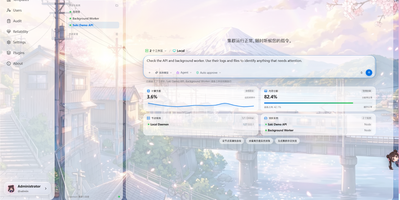
Saki Panel is a self-hosted operations console that manages your game servers, containers, and background processes across multiple Linux machines, with an AI assistant sitting inside the workspace when something breaks. Start, stop, restart, and monitor nine kinds of instances, from Minecraft and Steam game servers to Docker containers, Compose stacks, Node and Python apps, and plain shell commands. Remote nodes connect over SSH and report CPU, memory, and disk metrics to a cluster dashboard, so every machine is visible in one place. When an instance crashes, Saki Watch records the exit and its error fingerprint, then helps diagnose the cause from live logs, files, and metrics instead of making you copy text between a terminal and a chat window. Proposed fixes appear as diffs that need your approval, are graded by risk level, and can roll back automatically if verification fails after a patch. Day to day work happens in the same console: a web terminal, a file manager with an editor and archive support, database tools for SQLite, MySQL, PostgreSQL, and Redis, and cron-scheduled tasks with full run history. Role-based access with dozens of permission codes, audit logs, and incident notifications through webhooks or Telegram keep a small team in control. Running on a dedicated VPS on RepoCloud with guaranteed CPU, RAM, and SSD, full root SSH access, and a browser serial console. Apache-2.0 licensed.