
Gameyfin
Transform folders of DRM-free PC installers and retro game archives into a browsable, cover-art-rich digital storefront with Gameyfin, a self-hosted video game library server for LAN parties, homelabs, and family networks. Point the server at your mounted storage directories and its automated scanner indexes game archives, executables, and multi-part installers while showing real-time progress and estimated completion times. Bundled metadata plugins pull game synopses, release dates, developer credits, screenshots, and high-resolution box art from IGDB, Steam, and SteamGridDB according to your configured provider priority. Players can browse collections by genre or platform, inspect detailed game pages, and download installers directly through their web browser or via a built-in BitTorrent tracker and seeding client that distributes bandwidth across LAN participants. Administrators can manage multiple isolated libraries, trigger quick or full folder scans, customize UI themes including colorblind-accessible palettes, and enforce single sign-on via OAuth2 and OpenID Connect identity providers. Every cover image and metadata record is cached locally on disk so offline LAN events keep full browsing and download functionality without internet access. Built-in Prometheus actuator endpoints expose library and runtime metrics for infrastructure monitoring dashboards. Running on a dedicated VPS on RepoCloud with guaranteed CPU, RAM, and SSD, full root SSH access, and a browser serial console. AGPL-3.0 licensed.
Supertokens Core
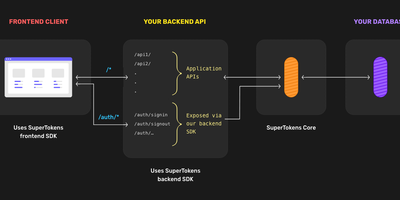
Authentication that lives inside your application rather than behind a redirect to an external identity provider - SuperTokens takes a fundamentally different architecture from Auth0 and AWS Cognito. Three tiers make that work - frontend SDKs (React, Angular, Vue, vanilla JS, React Native) render overridable login UI and manage tokens; backend SDKs (Node.js, Python, Go) expose auth endpoints on your own API domain; and SuperTokens Core, the piece you host here, is the stateless HTTP service handling core auth logic, password hashing, token signing, and database operations against PostgreSQL. The recipe system keeps features decoupled: use email/password, social login, passwordless (magic links, OTP), phone-password, multi-factor authentication (TOTP, WebAuthn), user roles, and microservice auth - individually or combined; you can even use SuperTokens purely for session management alongside another login provider. Sessions are where it shines: rotating refresh tokens with theft detection, automatic access-token refresh, CSRF protection, and secure cookie handling out of the box - the details that become vulnerabilities when hand-rolled. Verification happens locally in your backend via cached JWT signing keys, so the Core stays off the hot path. Self-hosted means no user limits, free forever, with all user data in your database. Apache-licensed.
AgentVerse OS
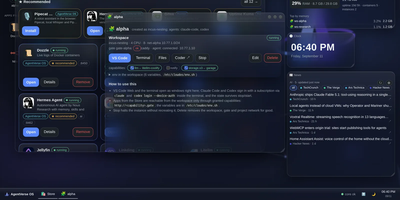
AgentVerse OS turns a single Ubuntu server into a personal cloud with a real desktop in the browser, built for a developer and their AI agents. You work in a windowed desktop with a taskbar, start menu, and widgets for system monitoring, clock, news, weather, and projects, and the same desktop opens from a laptop, tablet, or phone while everything stays on the server. Each project gets an isolated Incus container with Docker inside, its own network and gate, plus VS Code, a terminal, files, and git in the browser. The Agents app runs Claude Code, Codex, Gemini CLI, pi, and Antigravity inside the workspace, with permission prompts you approve from any device, scheduled routines, model menus, conversation search and export, and a ledger of what each session spent. When you close your laptop the agents keep working, and you pick the conversation up later exactly where it stopped. A built-in store merges the Runtipi, Coolify, and Umbrel catalogs into about 945 installable apps with guided setup, credentials shown in the app card, snapshots, and rollback. Projects request capabilities such as storage.s3, llm, or notify instead of hardcoding addresses, scheduled ZFS snapshots feed a restic backup repository, and access arrives only through your Tailscale network with real certificates. Running on a dedicated VPS on RepoCloud with guaranteed CPU, RAM, and SSD, full root SSH access, and a browser serial console. Apache-2.0 licensed.
FitTrackee
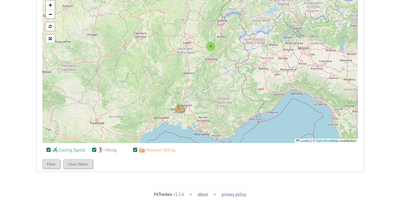
Cyclists, runners, hikers, and kayakers can log every GPS route in FitTrackee, a workout tracker where each workout stays private until shared. Upload a GPX, FIT, KML, KMZ, or TCX file and the workout appears with a map and charts. Zip archives and manual entry work too. Charts plot speed or pace, elevation, heart rate, cadence, and power on one graph or several. Each workout holds 20 photos at most, and photos with GPS coordinates appear on the map. Twenty-seven sports are available, including cycling, running, kayaking, and swimrun. Shoes, bikes, and boards each tally distance, duration, and workouts, and sports can have default equipment. The dashboard shows a monthly chart and a calendar of workouts and records, and statistics group totals by day, week, month, year, or sport. Filters narrow the workouts list by date, sport, equipment, location and radius, distance, or speed, and results can be mapped. A global map plots workouts, filtered by date and sport. Workout data, charts, map, and photos each get a visibility setting: private, followers only, or public. Follow requests need approval by default, and unwanted users can be blocked. Comments accept limited Markdown, and the five latest public workouts publish as an Atom or RSS feed. Data export bundles an account's workouts and uploaded files. Running on a dedicated VPS on RepoCloud with guaranteed CPU, RAM, and SSD, full root SSH access, and a browser serial console. AGPL-3.0 licensed.
TeXlyre
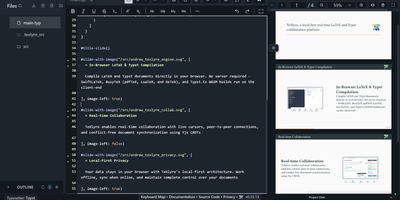
In TeXlyre, two coauthors edit the same LaTeX or Typst file at once, and the PDF compiles inside the browser tab instead of on someone else's server. Start from a template: arXiv preprint, IEEE paper, Tufte book, Beamer deck. pdfTeX, XeTeX, and LuaTeX compile with BibTeX and Biber. Errors turn into readable cards that jump to the failing line. Live cursors show who is typing where. A shared link brings coauthors in, no accounts needed. Chat sits beside the editor, and comments can be discussed and resolved. Tracked insertions and deletions land in a review panel to accept or reject. Draw.io and TikZ editors open inside the project for shared diagrams. MathLive edits a formula under the cursor with a virtual keyboard. A bibliography panel tidies BibTeX, matches DOIs, and imports from Zotero and OpenAlex. Large files travel straight from one collaborator's browser to another. Projects export as ZIP, sync to a local folder, or back up to GitHub, GitLab, Gitea, and Codeberg. Vim, Emacs, and Helix keybindings are one setting away. The app installs as a progressive web app and works offline. Language servers like LTeX LS Plus, Harper, and Tinymist plug in through recipes beside your own signaling and TeX Live package servers. Running on a dedicated VPS on RepoCloud with guaranteed CPU, RAM, and SSD, full root SSH access, and a browser serial console. AGPL-3.0 licensed.
HotHost
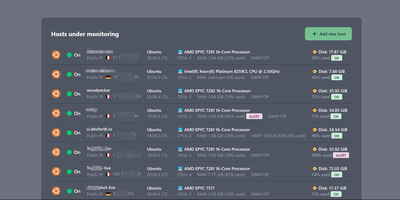
HotHost answers the only two questions that matter about every server you own, is it up and is the disk about to fill, before your users ask them instead. One web container collects metrics from a tiny agent you paste onto each host as a Docker or shell snippet, and the fleet lands in a single table: hostname, public IP, RAM and disk usage, CPU model and cores, swap state, and country. Disk and RAM get loud ALERT badges at a configurable threshold, ninety percent by default, and notifications fire on failure and again on recovery, so a resolved incident closes its own loop. The same console watches your websites directly, requesting each URL on your interval and checking the status code, a required keyword in the response, or basic auth behavior. SSL certificates get an expiration reminder fourteen days out by default, long before the browser warnings start. When memory climbs, the top ten RAM-consuming processes are charted over the last two days, turning "something is eating the box" into a named culprit. Alerts route through Email, Slack, Telegram, or Gmail plugins, and the plugin system accepts your own notifiers. Running on a dedicated VPS on RepoCloud with guaranteed CPU, RAM, and SSD, full root SSH access, and a browser serial console. MIT licensed.
PeerDB
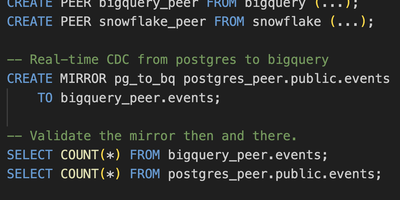
Replicate PostgreSQL to data warehouses 10x faster than conventional CDC tools, proven across 400+ companies including AutoNation and LC Waikiki collectively moving 200 TB monthly. The architecture pairs a Rust-based Nexus query layer implementing the PGWire protocol with Go-based Flow workers orchestrated by Temporal. Because Nexus speaks native Postgres wire protocol, any client tool (pgAdmin, psql, Grafana, Tableau, Flyway) can manage replication through standard SQL commands like CREATE MIRROR. Three streaming modes serve different needs: log-based CDC via logical replication slots, cursor-based streaming through timestamp or integer columns, and XMIN-based capture for tables lacking logical replication. Parallel initial load achieves consistent snapshots through transaction snapshotting and CTID range scans, reducing 100+ GB migrations from days to minutes. Native TOAST column handling processes large JSONB payloads and IoT data efficiently without row expansion penalties. Destinations include ClickHouse, Snowflake, BigQuery, Kafka, Azure Event Hubs, Google PubSub, S3, and PostgreSQL with in-flight SQL transformations. Schema change propagation, partitioned table support, and slot growth alerts ensure production reliability. Docker Compose bundles Temporal, catalog Postgres, Flow API, workers, and the Next.js monitoring UI. Deployable on RepoCloud with dedicated VPS resources under AGPL-3.0.

SQLPage
If you can write a SELECT statement, you can publish a working web app with SQLPage, where each query's results appear on the page as tables, charts, maps, or forms. A .sql file is a page. Name a component in the first row, and the rows after it become lists, cards, data grids, timelines, or step trackers. Tables offer searching, sorting, frozen headers, and per-row edit and delete buttons. Charts cover line, area, bar, pie, scatter, bubble, and heatmap views with a one-click CSV export. Forms feed INSERT and UPDATE statements directly, with validation and file uploads. A complete CRUD tool takes a handful of queries. The map component plots markers and GeoJSON shapes, and the JSON component lets the same data serve other systems as an API. Protect private pages with password logins or single sign-on through Google, Microsoft, or your own identity provider. Connect to SQLite, PostgreSQL, MySQL, SQL Server, or ODBC sources such as DuckDB, Oracle, Snowflake, and BigQuery. Tabs, modals, alerts, breadcrumbs, and carousels shape multi-page sites, and custom templates, CSS, and JavaScript fill any gap. Running on a dedicated VPS on RepoCloud with guaranteed CPU, RAM, and SSD, full root SSH access, and a browser serial console. MIT licensed.
BullFlow
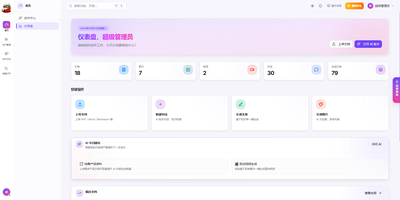
Generic AI writing sounds like nobody in particular; BullFlow writes from your own company knowledge instead. It first builds a private knowledge base from your documents, images, audio, and video plus structured records for your company, brand, products, customers, and cases. Ingestion runs entirely on local open models: OCR reads scans, semantic splitting and chunking prepare text, and hybrid vector plus full-text search retrieves passages with their sources and relevance scores shown under every answer. A creation agent then works in one conversation: it searches the knowledge base, drafts articles with images embedded in the text, generates image sets or short videos, and exports finished pieces as PDF or Word. Output adapts to where it is going, long-form articles for article platforms, multi-image posts with matching copy for image feeds. A separate distribution gateway sends one finished piece to many accounts across Chinese and international social platforms, checks account health on a schedule, and returns publish results and metrics by webhook. Around all of that sits a commercial shell: multiple tenants with isolated data, roles from super admin to finance, credit billing measured per token, image, and second, subscriptions, invoices, referral commissions, and a conversion funnel in the operations backend. Scheduled rules can generate and publish on a timetable with nobody watching, and notifications report each completion or failure. Running on a dedicated VPS on RepoCloud with guaranteed CPU, RAM, and SSD, full root SSH access, and a browser serial console. MIT licensed.
TencentDB Agent Memory
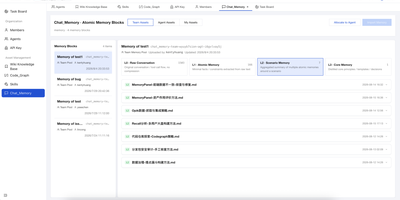
TencentDB Agent Memory provides a team-level memory hub that transforms AI agent conversations, documents, and codebases into four governed, shareable memory assets: Chat Memory for conversation history, Skills extracted from completed tasks, LLM-Wiki built from document ingestion, and Code-Graph generated from codebase analysis. The four-tier semantic pyramid structures long-term memory from L0 raw conversation capture through L1 episodic extraction and L2 scenario aggregation to L3 persona synthesis, enabling hierarchical drill-down via node and result references instead of flat vector recall. The Node.js Gateway sidecar handles capture, extraction, storage, recall, and pipeline scheduling through RESTful HTTP v2 endpoints on port 8420, while the Memory Proxy intercepts Anthropic-format API calls to inject team memory context into Claude Code, CodeBuddy, and other coding agents transparently. Local SQLite with the sqlite-vec extension provides the default storage backend with hybrid BM25 keyword plus vector embedding plus reciprocal rank fusion retrieval requiring zero external API dependencies. Teams manage ownership, versions, status, visibility, usage counts, and agent bindings through the Memory Hub dashboard with role-based access control separating System Admin and team-level Admin and Member permissions. Official TypeScript and Python SDKs provide programmatic access for custom framework integration beyond the built-in OpenClaw plugin and Hermes Agent adapter. Running on a dedicated VPS on RepoCloud with guaranteed CPU, RAM, and SSD, full root SSH access, and a browser serial console. MIT licensed.
TeamPass
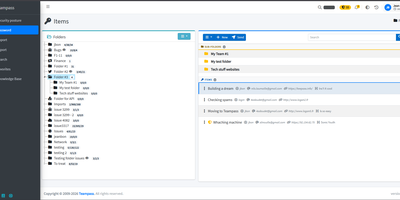
TeamPass is a dedicated on-premise password manager built specifically for teams that need collaborative credential sharing with fine-grained access controls. Role-based access control defines user permissions through hierarchical folder trees where each folder and item can be independently set to write, read, or no access against assigned roles, enabling organizations to segment credentials across departments without exposing sensitive data. Passwords are encrypted in the database using Defuse PHP Encryption with per-installation unique saltkeys, while two-factor authentication supports configurable RFC 6238 TOTP profiles with custom digits, period, and algorithm settings alongside Duo Security and Yubico hardware key integration. LDAP and Active Directory native integration enables enterprise SSO with automatic user provisioning. The Security Posture Dashboard surfaces weak, reused, breached, overdue, no-expiry, widely-shared, and unreadable credentials through indicator cards that filter and deep-link directly to items. Secure Send creates expiring, view-count-limited one-time links optionally protected by recipient passphrases for sharing credentials with external users. Import from Bitwarden, LastPass, 1Password, and KeePassXC through a unified source selector, with export to encrypted offline files. Email notifications, password expiration policies, custom fields, and attachment support round out item management. Running on a dedicated VPS on RepoCloud with guaranteed CPU, RAM, and SSD, full root SSH access, and a browser serial console. GPL-3.0 licensed.
LibreBooking
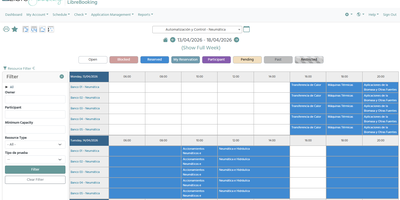
Conference rooms, equipment, boats, and even people can be reserved through LibreBooking, a self-hosted scheduler that keeps double bookings off the calendar. Schedules define bookable time slots with custom layouts and seasonal availability, while each resource carries its own minimum and maximum duration, buffer time, lead time, capacity, and optional approval step. Check-in and check-out can release unclaimed slots automatically, and blackout times close resources for maintenance. Quotas stack limits by hours or reservation count, credits meter peak and off-peak usage, and users can buy credits through Stripe or PayPal. Accessories such as projectors or chairs ride along with a booking under their own quantity limits. Groups carry application, group, resource, and schedule administrator roles, and custom attributes extend reservations, resources, and users with text, dropdown, date, or checkbox fields. Reports can be charted, exported to CSV, printed, or emailed, and public resources publish RSS and iCalendar feeds for Outlook and Thunderbird plus an embeddable calendar snippet. A tablet view beside a door shows live availability for on-the-spot booking, a monitor view fills lobby screens, and a Slack command starts a reservation. Sign-in options include LDAP, Active Directory, OAuth2, and SAML, and the REST JSON API automates bookings. Users can join waitlists, request reminder emails, and accept terms of service before booking, while six color themes restyle the interface. Running on a dedicated VPS on RepoCloud with guaranteed CPU, RAM, and SSD, full root SSH access, and a browser serial console. GPL-3.0 licensed.
T3 Code
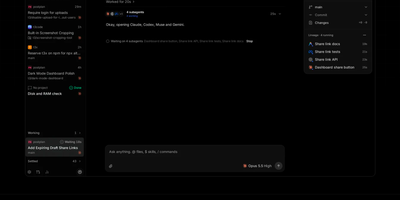
T3 Code puts every coding agent you already pay for behind one control surface, so Claude Code, Codex, Cursor, Grok Build, OpenCode, and Antigravity all run on your server while you direct them from your phone, browser, or desktop. Start a thread, choose the provider and model that fit the job, and watch the agent work in a shared conversation instead of a terminal you have to babysit. Permission modes decide when an agent must stop and ask, and its approvals, questions, and plan reviews arrive in the same thread wherever you happen to be connected from. When the work lands, review it file by file in the built-in diff view, then commit, push, and open pull requests through the Git and GitHub integrations without leaving the app. A real terminal sits beside the chat, and projects, settings, and scheduled tasks stay attached to the machine where the code actually runs. Install it as a background service and reach it from anywhere through T3 Connect, a Tailscale or LAN pairing, or the hosted web client, with a pairing code guarding local access. Outside agents can also drive threads over MCP, launching, messaging, and waiting on work across machines you have linked together. Running on a dedicated VPS on RepoCloud with guaranteed CPU, RAM, and SSD, full root SSH access, and a browser serial console. MIT licensed.
Doca
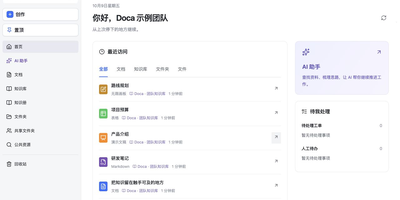
Doca puts rich text, Markdown, spreadsheets, slides, and an infinite canvas under one login and one permission model, giving individuals and small teams a self-hosted workspace for writing together. Every format supports real-time co-editing with presence, comments, saved history, and manual snapshots, and rich text and Markdown documents can be restored to an earlier version. Documents live in knowledge libraries with tree navigation, invitations, inherited permissions, share links, and trash, while personal files and shared folders sit on local disk or S3-compatible storage. Knowledge books go further: they subscribe to sources, run an editable workflow, keep source evidence, and route results through human review. A personal AI assistant, powered by whichever model you configure, searches authorized documents, reads PDF and Office attachments, edits images, and prepares browser drafts. MCP services let external AI clients such as Codex use those tools under your permissions. Sign in with a password, OIDC, Google, GitHub, WeChat, or QQ, review registrations before they go live, and send webhooks to other systems. A plugin SDK and marketplace add business modules, and a browser extension clips pages into documents. The interface ships in Chinese and English. Running on a dedicated VPS on RepoCloud with guaranteed CPU, RAM, and SSD, full root SSH access, and a browser serial console. MIT licensed.
Duckle
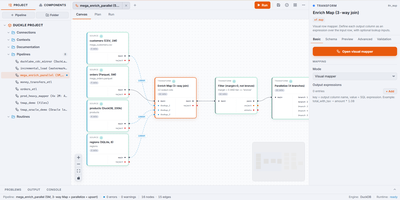
Duckle compiles visual data integration pipelines into vectorized analytical SQL executed on an embedded columnar engine, eliminating the overhead and cloud egress costs of traditional ETL infrastructure. Engineers can construct data pipelines on a drag-and-drop canvas, connecting hundreds of data sources spanning relational databases, cloud object storage, streaming event buses, vector databases, and SaaS application programming interfaces. An interactive mapping editor enables complex joins between primary data inputs and lookup streams with typed transform expressions and live sample inspections. Built-in transformation blocks execute change data capture, slowly changing dimensions, aggregation rollups, and integrated dbt models with zero row-based metering or cloud egress fees. Teams schedule headless production executions through a dedicated web console equipped with role-based access management, execution audit trails, and automated failure alerts dispatched to webhook endpoints. Embedded Model Context Protocol capabilities allow AI coding assistants to validate schema configurations, inspect execution logs, and trigger batch workflows directly through conversational commands. Workspaces store entire pipeline definitions as individual files in version control, ensuring reproducible deployments across staging and production environments. Running on a dedicated VPS on RepoCloud with guaranteed CPU, RAM, and SSD, full root SSH access, and a browser serial console. Apache-2.0 licensed.
Convoy
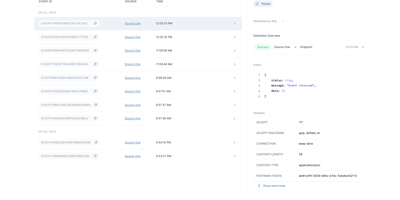
Convoy is an enterprise-grade webhooks gateway that manages both incoming and outgoing webhook traffic to guarantee reliable event delivery without exposing internal microservices to the public internet. Organizations deploy the platform at the edge to ingest events from message brokers such as Apache Kafka, RabbitMQ, and Google Cloud PubSub, or receive HTTP webhooks from third-party services directly. The gateway enforces delivery policies through configurable rate limiting per endpoint, circuit breaking during downstream outages, and automated retries using constant or exponential backoff with jitter. Developers can generate customer-facing webhook portals embedded via iframes, allowing end users to inspect delivery attempts, verify HMAC-SHA256 signatures, and manually replay failed events. Comprehensive security controls include static egress IP proxying to prevent server-side request forgery, automated rolling secret keys, and instant alerting via Slack or email when endpoints fail consecutively. Running on a dedicated VPS on RepoCloud with guaranteed CPU, RAM, and SSD, full root SSH access, and a browser serial console. Elastic License 2.0 licensed.
Kanzo
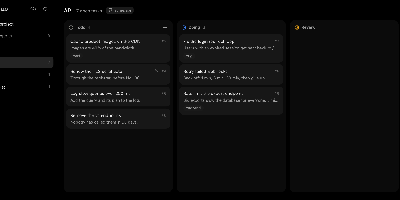
Give your coding agents a board they can work, not just read: Kanzo is a self-hosted kanban board where you and your agents move the same tasks through the same columns at the same time. Tell an agent to take the next task and it moves the card to doing, comments as it works, and leaves the result where you can read it in the browser. Projects follow the code automatically: the agent finds the right board from the Git remote of the repository it is working in, and you can link more repositories to a project from its menu. Press n to add a task, search every project with a slash or Command-K, paste an image straight into a card or comment, and park half-formed ideas in an optional Backlog column that agents leave alone until you promote them. The whole board is one folder, and a private Git repository you own keeps it in step across a laptop, a desktop, and a Raspberry Pi, with conflicts resolved by choosing which side to keep. Statuses are yours to rename in the config file, the board exports cleanly to Markdown or JSON, and one click in the sidebar installs updates and restarts the service. Running on a dedicated VPS on RepoCloud with guaranteed CPU, RAM, and SSD, full root SSH access, and a browser serial console. AGPL-3.0 licensed.
Orchard Core
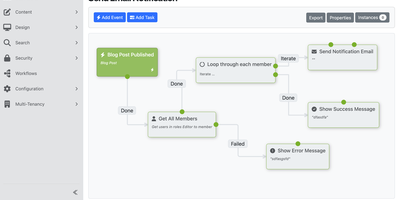
Content types, media libraries, workflows, roles, search, and a GraphQL API all ship in the box with Orchard Core, a free CMS and application framework that hosts many separate websites from one install. Editors build content types in the admin by combining parts and fields, with no migrations to write, and preview an item live before publishing it. Designers adjust page HTML safely with Liquid templates, and developers add their own modules. Multi-tenancy runs many isolated sites from one deployment, each with its own content, users, settings, and theme, and a setup screen lets you pick a recipe and database for each site. Media uploads can be resized on the fly and stored on remote providers, and a visual workflow editor automates content approvals, webhooks, and form submissions. A typed GraphQL API feeds headless sites and single-page applications, and custom SQL or Lucene queries can be exposed as endpoints. Roles and fine-grained permissions decide who can do what, OpenID Connect handles external sign-in, and two-factor authentication protects accounts. Content and the admin interface can be localized, and deployment plans move content and configuration from staging to production. SQLite works out of the box, SQL Server, MySQL, MariaDB, or PostgreSQL can be chosen at setup, and the official Docker image starts a site with one command. Running on a dedicated VPS on RepoCloud with guaranteed CPU, RAM, and SSD, full root SSH access, and a browser serial console. BSD-3-Clause licensed.