Open Source App Cloud Marketplace
Deploy, host, and scale with one click, at half the cost. Then customize with AI agents.
linkding
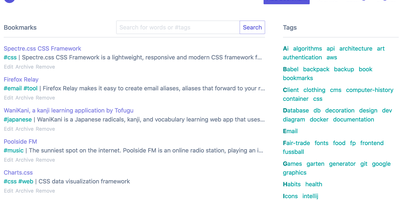
For people who found del.icio.us perfect and everything since bloated, linkding is the bookmark manager - a Django application whose entire design goal is saving and finding links with zero friction. Paste a URL and it fetches the title, description, favicon, and preview image automatically; organize with tags, search full-text across everything, mark bookmarks unread for read-it-later, attach Markdown notes, and bulk-edit whole selections at once. Its answer to link rot is archiving: bookmarked pages can be snapshotted automatically, either submitted to the Internet Archive or saved as local HTML files, and a documented SingleFile browser-extension integration uploads full self-contained page captures straight to your instance. Official Firefox and Chrome extensions (plus a bookmarklet) make saving a one-click habit, the UI installs as a Progressive Web App on mobile, and multi-user support with bookmark sharing - to users or logged-out guests - covers families and teams, with SSO via OIDC when needed. The REST API (create, search, filter by tag) has spawned a genuine ecosystem of community mobile apps and libraries. Operationally it is famously boring in the best way: one small container, SQLite by default, automated migrations, and a zero-breaking-changes policy. Import and export use standard Netscape HTML. MIT-licensed.
Plunk
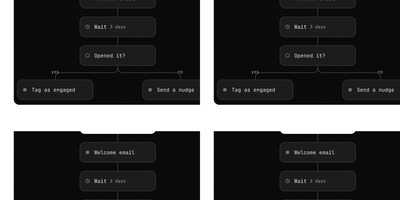
Plunk consolidates transactional emails, marketing campaigns, and drip automation into one platform riding AWS SES at roughly one-tenth of a cent per message, with zero per-contact charges regardless of list size. The Turborepo monorepo architecture separates the Express.js API server (handling REST requests with Prisma ORM against PostgreSQL) from a dedicated BullMQ worker process that consumes email, campaign, and workflow jobs independently for fault isolation and horizontal scaling. Transactional emails support HTML bodies, template variable substitution via React Email components, attachments, and custom headers with dedicated SMTP relay on ports 465 and 587 for integration with existing frameworks. The campaign system sends newsletters and product updates to full contact lists or dynamically segmented audiences based on contact properties and behavioral events, with scheduling, A/B testing, and performance tracking for opens, clicks, and bounces. The workflow automation builder creates event-triggered sequences with delays, conditional branches, and webhook steps for lifecycle campaigns like onboarding drip sequences and re-engagement flows. Contact management stores unlimited contacts with custom data fields, CSV import, full activity history, and dynamic segmentation. Custom domain verification with DKIM and SPF ensures deliverability, while inbound email processing handles incoming messages with custom routing rules. Docker Compose deployment runs five containers including PostgreSQL, Redis, MinIO for S3-compatible storage, and ntfy for notifications. Running on a dedicated VPS on RepoCloud with guaranteed CPU, RAM, and SSD, full root SSH access, and a browser serial console. AGPL-3.0 licensed.
Flowplan
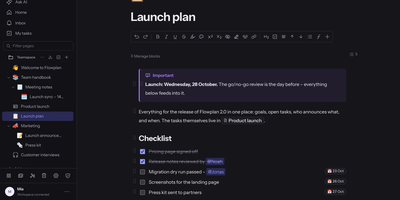
Flowplan puts your team's documents, databases, whiteboards, handwriting notebooks, and daily journal into one self-hosted page tree, so the work lives in a single place you control instead of five subscriptions. Write in a block editor that stays out of the way, and when a number appears mid-sentence, type the calculation and press Tab to drop in the result, or graph functions and vectors in 2D and 3D without leaving the page. The same records can be viewed as a table, board, calendar, timeline, gallery, list, feed, chart, form, or sprint board, with relations, rollups, and formulas tying them together, and projects get ticket numbers, sprints with burndown, and automations on top. Brainstorm on whiteboards with sticky notes, mind maps, and voting; keep a journal page per day with templates and an optional PIN lock; and write by hand in notebooks with lined, grid, or Cornell paper, annotate PDFs, and sketch inside documents with a pressure-sensitive pen. Teammates edit together with live cursors, comment in inline threads, and share single pages with guests through password-protected, expiring links, while permissions reach down to a single record. AI is off until an admin enables it, per feature and per person, and it can run entirely on your own hardware or answer questions about the workspace with links to its sources. Running on a dedicated VPS on RepoCloud with guaranteed CPU, RAM, and SSD, full root SSH access, and a browser serial console. AGPL-3.0 licensed.
Cordys CRM
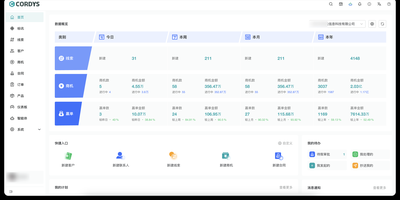
Follow every sale from first inquiry to final payment inside one self-hosted CRM. Cordys CRM splits the lead-to-cash cycle into connected modules: leads with custom forms and one-click conversion, customers with contact records and shared follow-up among team members, and opportunities that advance through configurable stages from needs confirmation to won or lost. Quotations and contracts come next, with contracts carrying payment plans, payment records, business titles, and invoice records so every collection stays traceable. Orders link to contracts and move through a customizable status flow covering shipment requests, partial and full shipment, inspection, and completion. Approval workflows route requests to reviewers and keep an approval history, and real-time notifications reach users while they work. Administrators draw the organization chart, assign role-based permissions, configure modules and form fields without code, and review system logs. An MCP server secured with per-user API keys lets MaxKB agents search records, create leads, customers, opportunities, and contacts, log follow-ups, and update accounts, while an Agents module embeds those assistants in the CRM and CRM Skills connect OpenClaw and WorkBuddy to the sales process. Sales data can feed DataEase dashboards, WeCom, DingTalk, and Lark integrations link departments and messages to the office platforms teams already use, and the interface ships in English and Chinese. Running on a dedicated VPS on RepoCloud with guaranteed CPU, RAM, and SSD, full root SSH access, and a browser serial console. GPL-3.0 licensed with FIT2CLOUD branding terms.
Warracker
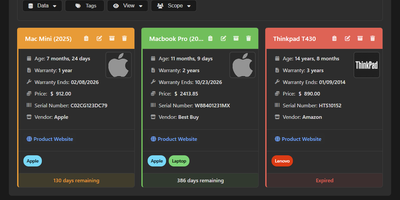
Stop losing money on out-of-pocket repairs for appliances and electronics that are still covered under manufacturer protection: Warracker gives households and organizations a centralized web platform to track product warranties, store purchase receipts, and manage active claims before coverage expires. You can log purchase dates, multi-part warranty durations in years, months, or days, lifetime coverage flags, vendor details, purchase prices, and multiple comma-separated serial numbers per item alongside product photos. When a coverage window approaches its end date, the platform dispatches automated reminders through email or more than 100 push notification services, including Discord, Slack, Telegram, Pushover, and ntfy. Receipts, invoices, and user manuals can be stored locally or routed directly into an existing Paperless-ngx archive with per-document storage selection and automatic tagging. A dedicated warranty claim tracker records claim submission dates, current statuses, and final resolutions across the entire repair lifecycle. Visual status dashboards chart active, expiring, and expired coverage alongside spending breakdowns across multiple currencies. Role-based multi-user accounts, OIDC single sign-on, persistent cross-device search filters, CSV bulk import and export, and localization across 20 languages make administration effortless. Running on a dedicated VPS on RepoCloud with guaranteed CPU, RAM, and SSD, full root SSH access, and a browser serial console. AGPL-3.0 licensed.
EmDash
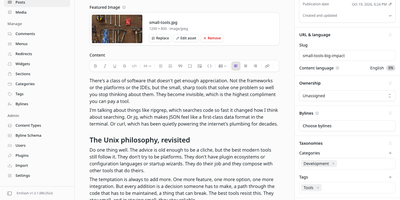
EmDash rebuilds the WordPress publishing experience as an open-source CMS, with drafts, revisions, scheduled posts, a media library, menus, widgets, and plugins that run in sandboxes and can only do what they declare. Writers get a rich-text editor with featured images, slugs, bylines, categories, and tags, plus signed preview links for unpublished work and a calendar of everything published or scheduled. Site builders define their own content types in a visual schema builder, choosing required and searchable fields, URL patterns, comments, SEO metadata, and edit locking so two people never overwrite each other. Uploads are drag and drop, with folders and filename search in the media library. Menus, sidebar widgets, reusable sections, and redirects with a 404 log shape the public site. Access is passkey-first, with OAuth and magic-link fallbacks, four roles from Contributor to Administrator, comment moderation, and personal API tokens. Coming from WordPress? Point the importer at a migration key, a site URL, or an exported XML file and it carries over posts, pages, media, and taxonomies. Plugins add hooks, settings, admin pages, dashboard widgets, custom blocks, and API routes after declaring capabilities such as content:read or email:send, while a built-in MCP server and CLI let AI assistants manage content directly. Blog, marketing, and portfolio templates give new sites a head start. Running on a dedicated VPS on RepoCloud with guaranteed CPU, RAM, and SSD, full root SSH access, and a browser serial console. MIT licensed.
ezBookkeeping
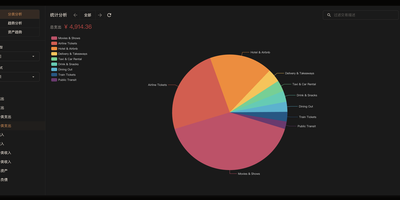
Managing household finances and personal investments becomes completely private with ezBookkeeping, a self-hosted accounting platform that combines multi-currency ledger tracking, automated bank imports, and AI-assisted receipt analysis into a responsive financial dashboard. Users can record daily income, expenses, and asset transfers using hierarchical two-level accounts and customizable tags, attaching photographic receipts and geographic location coordinates to individual entries. The automated data ingestion engine processes bank statements across standardized CSV, OFX, QIF, CAMT, and MT940 files, applying user-defined column mappings and custom conversion scripts to eliminate manual bookkeeping. Financial planners can schedule recurring bills, configure monthly category spending limits, and track asset distribution with interactive charts, trend graphs, and activity heatmaps in the Insight Explorer. Integrated artificial intelligence tools scan uploaded invoice photos to extract line items automatically while a native Model Context Protocol server lets external desktop assistants query balances and audit budgets safely. Security features include time-based two-factor authentication, single sign-on via standard identity providers, and biometric passkey screen locks that secure private monetary ledgers on shared computers. Account owners can export full audit histories to portable spreadsheets, manage multi-currency exchange rate tables, and access clean web interfaces on both desktop monitors and mobile devices. Running on a dedicated VPS on RepoCloud with guaranteed CPU, RAM, and SSD, full root SSH access, and a browser serial console. MIT licensed.

GEOFlow
Built for brands that want AI search engines to quote them, GEOFlow is an open-source admin system that turns approved knowledge into reviewed articles and publishes them across every site you run. Load documents or import trusted web pages into knowledge bases that are chunked into evidence units, with optional semantic planning and vector retrieval. Combine them with title libraries (AI can draft up to 100,000 titles), keywords, images, authors, and prompts, then set a task's generation limits, cadence, and publishing scope. Chat and embedding models connect through OpenAI-compatible endpoints or native Gemini, with automatic fallback to the next model when a call fails. Each draft passes an AI quality gate that checks evidence, citations, advertising rules, and publishing context, records scores with source locations and revision advice, and holds risky articles for a human reviewer. Approved articles appear on the built-in site with SEO metadata, Open Graph, Schema, sitemaps, and llms.txt, or travel to hosted subdomain sites, GEOFlow Agent packages, WordPress through its REST API, or any HTTP endpoint. A manual publishing workbench and Chrome assistant cover platforms that need a person, while analytics track traffic, AI crawlers, and brand visibility in generative engines. An API, command-line tool, and agent skill support automation. Running on a dedicated VPS on RepoCloud with guaranteed CPU, RAM, and SSD, full root SSH access, and a browser serial console. AGPL-3.0 licensed.
Customermates
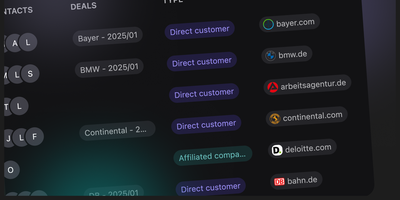
Customermates delivers a modern CRM purpose-built for teams who want practical customer management without enterprise-heavy complexity. The platform manages contacts, organizations, deals, services, and tasks through clean pipeline workflows while integrating AI agent capabilities, REST API access, webhook events, n8n automation connections, and Model Context Protocol tooling for AI-native operations. Team collaboration features include role-based permissions, comprehensive audit logging tracking every data change, and workspace organization for multi-team deployments. The deal pipeline provides customizable stages with drag-and-drop management, while task assignments and service tracking connect directly to contact and organization records for complete relationship context. API-first architecture exposes all CRM data through documented endpoints enabling custom integrations, reporting dashboards, and third-party tool connections. The n8n integration enables no-code workflow automation for lead routing, follow-up sequences, notification triggers, and cross-system data synchronization. Self-hosting requires only two files — a Docker Compose configuration and environment variables — with the published image at ghcr.io/customermates/customermates:latest running database migrations automatically on first boot. PostgreSQL provides the data layer with no additional infrastructure dependencies beyond a reverse proxy for TLS termination. The Community Edition includes unlimited users, unlimited records, full API access, n8n automation, and audit logging at zero cost. Running on a dedicated VPS on RepoCloud with guaranteed CPU, RAM, and SSD, full root SSH access, and a browser serial console. AGPL-3.0 licensed.

ENZO
ENZO is a self-hosted AI workspace where you bring your own provider API keys and chat with more than 300 models from nine providers in one streaming interface with normal, thinking, research, and coding modes. You describe an agent in plain English and a two-pass builder drafts its full operating manual, picks the tools the task needs, and keeps improving from your activity through a per-agent neural layer you can inspect. Seventy-four bundled skills give agents ready-made domain playbooks, and a skill editor lets you write your own. Agents can read Gmail, check Calendar, search the web, and run a deep-research loop that writes its own queries under hard budgets so it cannot burn your key. Coding mode writes a multi-file project, boots it, and previews it live while telling you when something is broken. A unified model marketplace compares providers with live health checks, download counts, and benchmarks, and a built-in music player streams songs with a five-band equalizer. Your keys stay sealed in a passphrase-encrypted browser vault and travel only to the provider you picked, so there is no ENZO account, usage meter, or subscription taking a cut. Running on a dedicated VPS on RepoCloud with guaranteed CPU, RAM, and SSD, full root SSH access, and a browser serial console. Apache-2.0 licensed.
GoAccess
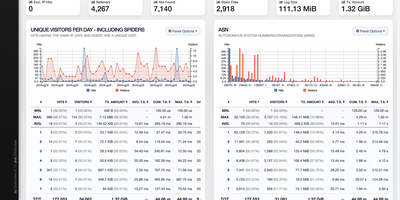
GoAccess processes millions of web log entries in seconds and renders the results as interactive dashboards that update every 200 milliseconds in the terminal or every second via WebSocket-connected HTML reports. Written entirely in C with only ncurses as a dependency, it achieves exceptional performance even on resource-constrained servers, reducing memory usage by approximately 20% and parsing time by 35% in recent releases through optimized in-memory hash tables with on-disk persistence support. The analyzer parses virtually every web log format out of the box (Apache Combined and Common, Nginx, Amazon CloudFront, Amazon S3, AWS Elastic Load Balancing, Google Cloud Storage, Squid, W3C IIS, Caddy JSON, and Traefik) while supporting fully custom log format strings for non-standard configurations. The self-contained HTML dashboard displays 15+ interactive panels covering unique visitors, requested files, static files, 404 errors, referring sites, search keyphrases, geographic location with city-level GeoIP resolution, operating systems, browsers, HTTP status codes, time distribution, and virtual host metrics. WebSocket authentication via JWT provides secure remote access, and incremental log processing ensures data continuity across daemon restarts. Docker deployment requires a single command with volume-mapped access logs. Over 20,800 stars with active development since 2010. Running on a dedicated VPS on RepoCloud with guaranteed CPU, RAM, and SSD, full root SSH access, and a browser serial console. MIT licensed.
CaddyUI
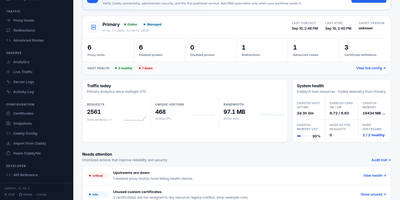
Providing an intuitive control plane for modern reverse proxy infrastructure, CaddyUI enables system administrators to manage proxy hosts, automated TLS certificates, and traffic routing without hand-editing configuration files. Operators can create and adjust reverse proxy destinations, URL path rewrites, custom headers, and redirection rules using structured forms that validate against the proxy engine before saving. The platform coordinates automatic ACME certificate requests and renewals, displaying live certificate expiration timelines, validation stages, and internal self-signed certificate authority options for local network services. Fleet management tools synchronize proxy rules across multiple distributed server instances, preventing configuration drift across staging and production clusters. Automated post-deployment health checks verify upstream endpoint availability, HTTP status codes, and latency thresholds, instantly rolling back to the previous configuration if an expectation fails. An integrated observability suite delivers real-time visitor traffic analytics, geographic maps, HTTP response code breakdowns, and single-click client IP blocking to counter malicious probing attempts. Administrators can schedule automated database backups, configure multi-user access with role permissions, and integrate CrowdSec threat intelligence to protect backends. Running on a dedicated VPS on RepoCloud with guaranteed CPU, RAM, and SSD, full root SSH access, and a browser serial console. Apache 2.0 licensed.
MCPHub
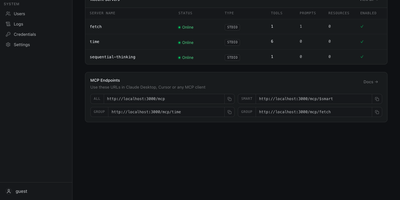
One endpoint for every MCP server you run: MCPHub gathers local and remote Model Context Protocol servers behind stable URLs, so AI clients connect once and see what you allow. Claude Code, Cursor, and Cherry Studio can use four routes: everything at /mcp, a named group at /mcp/{group}, one server at /mcp/{server}, or semantic tool search at /mcp/$smart. Smart routing runs vector search on PostgreSQL with pgvector and an OpenAI-compatible key, so the model gets a shorter tool list. Servers attach over stdio, SSE, or streamable HTTP, OpenAPI services can be wrapped as MCP tools, and changes apply without downtime. In the other direction, MCP tools can be exported as an OpenAPI 3.0.3 spec for OpenWebUI and other OpenAPI clients. Bearer keys, OAuth 2.0 (client and server modes), and GitHub or Google sign-in in database mode control access, with per-user visibility for servers and groups. Encrypted per-user credentials let one shared server use each person's own key. Logs show tool-call activity, request status, and latency, health checks track each connection, and the dashboard controls which tools, prompts, and resources each server exposes. Large text tool results can be compressed, interactive MCP Apps are proxied through MCPHub routes, and a built-in market lets you browse a server catalog. Typical uses include a team-wide gateway, per-project groups, and direct single-server routes for debugging. Running on a dedicated VPS on RepoCloud with guaranteed CPU, RAM, and SSD, full root SSH access, and a browser serial console. Apache-2.0 licensed.

Romarr
Name a game and Romarr goes and finds a copy you can prove is good. Search every indexer at once, through Prowlarr or directly, and each release comes back scored with the reasons written out: seeders, the right region, a plausible size, points off for hacks, betas, and repacks. The winner goes to whichever client speaks its protocol, from thirteen torrent daemons and eight debrid services to SABnzbd or a plain watched folder, and within a minute of finishing, the ROM itself is picked out of its archive, multi-track discs kept together as a set. Then comes the part no other library manager does: every import is checksummed against your No-Intro and Redump DATs and stamped verified, bad dump, or unknown. A verified dump is byte-for-byte the published one, a bad dump is refused unless you force it, and homebrew or translations import without ceremony as unknown. A verified copy automatically upgrades an unverified one, collections compare against a DAT to show exactly what you are missing, and duplicates are audited before anything moves. Finished games land in RomM, Gaseous, Retrom, or a simple folder, routed per platform, and your library server is told to rescan so the game appears with its art. Running on a dedicated VPS on RepoCloud with guaranteed CPU, RAM, and SSD, full root SSH access, and a browser serial console. MIT licensed.
Apache StreamPipes
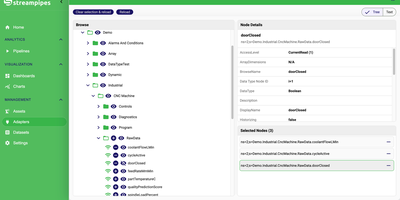
On the factory floor, the data already exists; it is just locked inside machines, PLCs, and protocols nobody on the analytics team speaks. StreamPipes unlocks it with guided adapters for OPC UA (including a web-based node browser), MQTT, Kafka, Pulsar, REST services, and industrial controllers, turning each source into a live stream in minutes. Domain experts then drag those streams into the pipeline editor, chain processors and sinks on a canvas, and watch connection validation check schema compatibility as they build, with live preview showing real values before anything is saved. Pipelines filter, enrich, aggregate, and route machine data, raise alerts, and write results to the built-in time-series data lake, where the data explorer charts history and spots trends. Finished pipelines run under an overview that starts, stops, and bulk-manages them, while detail views expose logs, metrics, status, and the pipeline as code. Live dashboards carry the same data to shop-floor screens and operations centers, organized around assets so a line, a cell, or a single machine becomes the navigation unit. Developers extend everything with custom adapters, processors, and sinks built on the Java SDK and deployed as microservices, or drive the platform from Python, Go, and Java clients. Running on a dedicated VPS on RepoCloud with guaranteed CPU, RAM, and SSD, full root SSH access, and a browser serial console. Apache-2.0 licensed.
Carbon ERP
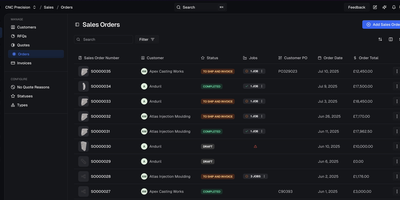
Carbon delivers a unified manufacturing operating system that eliminates the integration tax of running separate ERP, MES, and QMS platforms. The Remix and TypeScript frontend paired with Supabase PostgreSQL backend provides full-stack type safety from database schema to React components, with real-time subscriptions pushing production floor updates to every connected client. The built-in MCP server exposes 1,374 operations across 15 modules through three discovery tools, enabling AI agents to interact with manufacturing data while respecting attribute-based access control. Nested bill of materials with unlimited depth supports complex assemblies, while the MRP engine calculates material requirements across multi-level structures with configurable lead times and safety stock. The configurator handles configure-to-order scenarios with rule-based variant generation. Full lot and serial traceability from receiving through shipping satisfies AS9100, ISO 13485, CFR Part 11, and ITAR compliance requirements. Custom fields extend any entity without schema modification, and the app framework lets integrators build domain-specific modules that plug into the core navigation, permissions, and data layer. Typed API clients for TypeScript, Python, C#, and cURL enable programmatic access to every manufacturing operation. Docker-based local development boots Postgres, Redis, Inngest, and the application stack with a single CLI command. Running on a dedicated VPS on RepoCloud with guaranteed CPU, RAM, and SSD, full root SSH access, and a browser serial console. AGPL-3.0 licensed.
Odoo
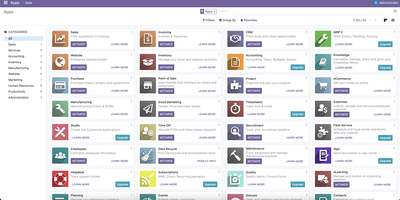
Roughly 40 integrated business apps forming a full ERP: Odoo's open-source suite runs companies end to end. The Community Edition, licensed LGPL-3.0, ships roughly 40 apps covering CRM, sales, invoicing, basic accounting (journals, chart of accounts, taxes, reconciliation), inventory and warehouse management with multi-step routes, manufacturing with BOMs and work orders, purchasing, project management, timesheets, HR, a website builder, and eCommerce. Each app works standalone, but they share one PostgreSQL database and one data model, so a confirmed sale updates stock, triggers procurement, and posts invoices without integration glue. The modular design means you enable only the apps you need and extend with 40,000+ community modules from the Odoo app store covering nearly any vertical requirement. Inventory supports multi-warehouse stock, reordering rules, and lot and serial tracking with barcode-ready operations; manufacturing ties BOMs, work orders, and work-center routing directly to sales demand and stock levels; and the website builder sells straight from your product catalog with payment provider integrations. You can start with just CRM and invoicing on day one and switch on inventory or eCommerce later - new apps integrate with existing data instantly because the schema is shared. The server is Python with an XML/JavaScript view layer, and because data lives in plain PostgreSQL there is no proprietary format: you can query, back up, migrate, and extend business data directly, with unlimited users and no per-seat licensing - where enterprise ERP pricing is per user per month, headcount here costs nothing.
OpenReplay
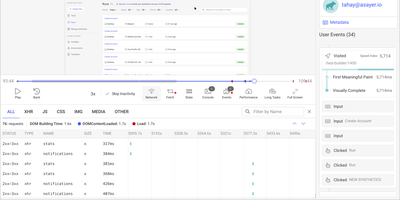
Backed by 12,400+ GitHub stars and positioned as the self-hosted alternative to FullStory and Hotjar, OpenReplay delivers the open-source session replay platform that keeps every byte of user behavior data on your own infrastructure. The JavaScript tracker captures pixel-perfect recordings of clicks, scrolls, form inputs, and navigation with automatic sensitive data masking, while simultaneously logging network requests, console errors, JavaScript exceptions, and Redux, VueX, MobX, NgRx, Pinia, and Zustand store state changes for complete technical context. DevTools mode reconstructs each session with full stack traces, GraphQL queries from Apollo and Relay, Fetch and Axios request payloads, CPU and memory metrics, and page speed waterfall charts — effectively giving developers a browser inspector tied to any user session. Product analytics surfaces conversion funnels, user journeys, click heatmaps, web vitals trends, and retention cohorts without requiring custom instrumentation. Co-browsing connects support agents to live user sessions with cursor control and WebRTC audio, enabling real-time assistance without third-party screen-sharing software. Integrations push session context into Sentry, Datadog, CloudWatch, Stackdriver, and Elastic for front-to-back debugging. Feature flags enable gradual rollouts with session-level targeting. The platform deploys to any cloud via Docker and Kubernetes with auto-scaling ingestion handling up to 50,000 sessions per month on the open-source edition. Running on a dedicated VPS on RepoCloud with guaranteed CPU, RAM, and SSD, full root SSH access, and a browser serial console. AGPLv3 licensed.