Open Source App Cloud Marketplace
Deploy, host, and scale with one click, at half the cost. Then customize with AI agents.

Claper
Passive slide decks put audiences to sleep, which is why Claper turns any presentation into a two-way live session where every attendee can vote in polls, submit questions, and react in real time from their phone. Speakers upload existing PDF or PowerPoint decks directly into the web studio and interleave interactive poll, quiz, form, and web embed slides between their static pages without rebuilding presentations from scratch. Conference organizers and educators share a short join code or QR link so hundreds of participants can enter the attendee room instantly from any mobile browser without installing an app or creating an account. During the talk, the presenter console displays incoming audience questions sorted by upvote popularity, alongside moderation controls to approve, pin, hide, or mark inquiries as answered on the main screen. Live polling supports multiple-choice, rating scale, and open-text prompts that animate into real-time bar charts and percentage breakdowns as votes arrive, while timed quizzes grade participant responses automatically. Integrated real-time speech transcription generates live captions and searchable session transcripts so international and hearing-impaired attendees can follow every spoken word. Universities and corporate training teams connect Claper directly to Moodle or OpenID Connect identity providers via LTI 1.3 to synchronize student rosters, push quiz scores to gradebooks, and export complete CSV engagement reports after every session. Running on a dedicated VPS on RepoCloud with guaranteed CPU, RAM, and SSD, full root SSH access, and a browser serial console. AGPL-3.0 licensed.
Hasty Paste
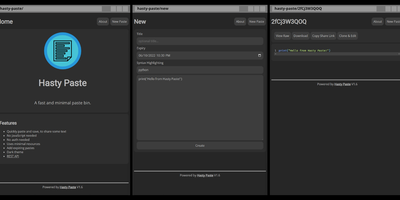
Paste some text, hit save, share the link - Hasty Paste is a fast, minimal pastebin written in Python on the async Quart framework, named, by its author's own admission, "because you use it so fast without a care in the world." No accounts, no authentication, no friction - built for the everyday case of handing a debug log, config snippet, or stack trace to someone in tech support or a chat channel. Pastes get randomly generated IDs, with an optional "long" ID mode that makes brute-force URL guessing impractical, and expiry times ensure throwaway content actually gets thrown away. Optional Pygments syntax highlighting makes code readable, a dark theme spares your eyes, and the whole interface works without JavaScript - it renders in terminal browsers and under the strictest script blockers. Storage is a custom flat-file system (no database), caching runs internally or through Redis for busier instances, and a REST API plus the companion "Hastily Paste It" CLI script enable piping command output straight into a paste from the terminal. The Alpine-based Docker image is tiny, resource usage is minimal, and the license is AGPL.
Yaade
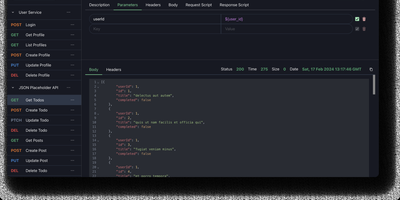
Yet Another API Development Environment delivers a self-hosted alternative to Postman designed from the ground up for teams that need secure, collaborative API development without sending sensitive credentials through third-party cloud services. The multi-user system manages team members with role-based permissions and supports external authentication through OAuth2 and OIDC providers, while all data persists in an H2 file-based database that survives container and server restarts. REST and WebSocket request testing includes environment variable substitution, request chaining, and Markdown documentation for each endpoint. The JavaScript scripting engine runs request and response scripts for automated testing and data extraction, with cron job scheduling and API-triggered execution for continuous integration workflows. Collections import directly from OpenAPI specifications and Postman exports, while outbound export generates request code in multiple languages and frameworks. The browser extension proxy for Chrome and Firefox routes requests through the user's browser to bypass CORS restrictions when testing localhost and internal APIs, with an alternative server-side proxy for headless environments. Single-file data import and export simplifies backup and migration between instances. The React and Vite frontend ships with dark mode enabled by default. Running on a dedicated VPS on RepoCloud with guaranteed CPU, RAM, and SSD, full root SSH access, and a browser serial console. MIT licensed.
Noisedash
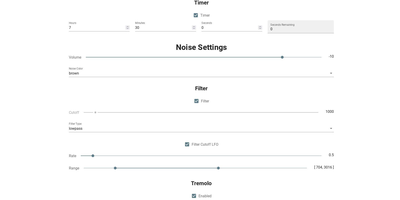
Noisedash is a self-hosted soundscape studio that generates the ambient noise you wish your surroundings made, from steady fan hums to layered rainstorms, and plays it in any browser. Start from white, pink, or brown noise and shape it with filters, LFOs, and effects until the hum in your head goes quiet. Upload your own recordings of rain, wind, thunder, or a café at noon, set loop points and fade-ins, and drop them into the mix as a continuous bed or an occasional sprinkle. Add reverb to a sample, let a thunderclap wander in every few minutes instead of looping, and balance every layer until the room feels right. Save the result as a noise profile, keep one for sleeping and another for deep work, and switch between them with a tap. Profiles travel: export one to share with a friend, import theirs, or record the generated audio to take the soundscape somewhere else entirely. An instance can host the whole household, with admin tools managing users, and the interface works as happily on a phone beside the bed as on a desktop. Running on a dedicated VPS on RepoCloud with guaranteed CPU, RAM, and SSD, full root SSH access, and a browser serial console. AGPL-3.0 licensed.

Hammond
When Clarkson, the once-popular fuel logger, stopped receiving updates, Hammond stepped in as its logical successor - a self-hosted vehicle expense tracker. Written in Go with a Vue.js interface and SQLite storage - a single lightweight container, no external database - it tracks every cost your vehicles generate: fuel fill-ups with cost, volume, and odometer readings; maintenance and repairs; and arbitrary other expenses, each attachable with photos and documents stored against the vehicle. The multi-user, multi-vehicle design is what sets it apart from phone apps: a household or small business adds all its vehicles and all its drivers, shares vehicles across users, and every fill-up lands in one ledger no matter who was driving. The Quick Entries feature respects how expenses actually happen - snap a photo of the receipt or pump screen at the gas station, then complete the structured entry later when you have a minute. Reporting works at both the vehicle level (cost per distance, fuel economy trends) and across the whole fleet. Migration matters here: importers for Clarkson, Fuelly, and Drivvo bring years of fill-up history along, so switching does not mean starting your data over.
Cortex Hub
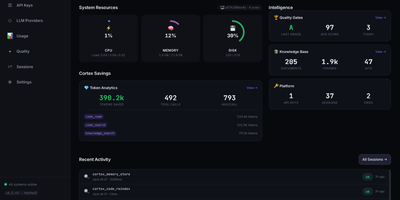
Cortex Hub gives every AI coding agent your team runs a shared brain, so what one agent learns in a repository is still there when the next agent, or the next person, opens it. Starting a session recalls the team knowledge and your own memory for that project, shows who else is editing, and picks up any task waiting for you. Agents search code by meaning and structure rather than text strings, tracing symbols, callers, and the blast radius of a change before touching it. Findings, file risks, and hard-won lessons are stored against the files they belong to, so they resurface exactly where they matter. Ending a session runs build, type, and lint checks, reports the result, and leaves a summary the next session starts from. A conductor can hand tasks to worker agents on other machines and track them centrally, while the dashboard shows sessions, keys, usage, and token savings across the team. Embeddings run locally by default, so your code memory never leaves the building just to be searchable. Running on a dedicated VPS on RepoCloud with guaranteed CPU, RAM, and SSD, full root SSH access, and a browser serial console. MIT licensed.
Atlas
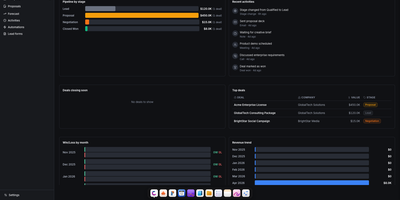
Atlas delivers a complete business operations platform in a single Docker Compose deployment, replacing the need for separate CRM, HRM, project management, invoicing, and file storage subscriptions. The CRM module provides pipeline management with Kanban views, contacts, companies, deals, leads, forecasting, saved views, and web-to-lead forms with Gmail integration for per-user email tracking inside deal timelines. HRM handles employees, departments, org charts, leave management, and attendance tracking. The invoicing system generates professional invoices with recurring billing, customizable templates, and payment tracking. Agreements provides PDF contract generation with legally-binding e-signatures, sequential signing workflows, counterparty linking, audit trails, and automated reminders. Projects integrates time tracking, billing, client management, budgets, and reporting in one view. Drive offers file storage with versioning, sharing, comments, activity logs, and password-protected links with Google Drive import and export. The calendar syncs bidirectionally with Google Calendar across month, week, day, year, and agenda views. Write provides rich text documents with cover images, comments, and templates, while Draw adds an Excalidraw-based whiteboard canvas with PDF export and presentation mode. The platform supports five languages, multi-tenant isolation, role-based permissions, and includes an Odoo importer that ingests res.partner, crm.lead, and CRM activity CSV exports for migration. Built on React, TypeScript, Vite, TanStack Query, and Zustand on the frontend with Express, Drizzle ORM, PostgreSQL, Redis, and BullMQ on the backend. Running on a dedicated VPS on RepoCloud with guaranteed CPU, RAM, and SSD, full root SSH access, and a browser serial console. AGPL-3.0 licensed.
Whiteboard
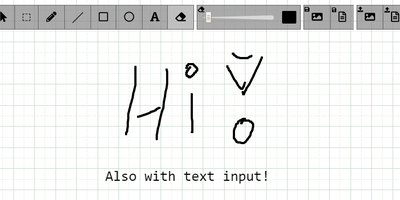
The drawing surface inside WebRTC conference tools like Meetzi and the LAMS online-learning platform is Whiteboard (by cracker0dks) - a lightweight Node.js collaborative sketchboard built to be embedded and customized, which also slots into Nextcloud via the External Sites app. Everyone opening the same whiteboardid URL parameter draws on the same board, with remote user cursors visible live, per-user undo/redo, and an indicator showing the smallest participating screen so nobody draws outside a colleague's view. Content handling goes beyond pen strokes: drag-and-drop or paste images and PDFs from any PC or browser, then resize, rotate, and draw over them on canvas or background; add text and sticky notes; hold Shift for angle-snapped lines and perfect squares. Every function has a keybinding - deliberately friendly to pen displays like Wacom and XP-Pen whose hardware buttons map to shortcuts. Boards save to image or JSON (with reload), export directly to Nextcloud via WebDAV, and persist across restarts with the file-database option. A REST API with bundled interactive docs allows full programmatic control, an optional access token locks down uploads, and YAML configuration tunes behavior and performance. MIT-licensed and reverse-proxy friendly.
Wally
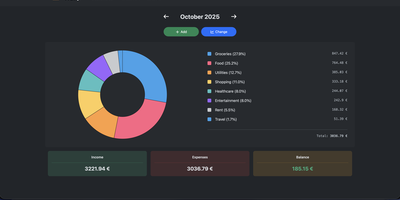
Started as an ExpenseOwl-inspired project, Wally grew into a lightweight, self-hosted expense tracker more capable in every direction its author touched. The backend is Python FastAPI over SQLite, which means every deployment ships a full REST API with interactive documentation at /api/docs - automating imports or wiring in external tools requires no reverse engineering, and when the optional login page is enabled you can mint scoped API keys from the Settings page for token-based integrations. The transactions view is built on AG Grid, bringing real search, column sorting, and per-column filtering to your ledger, with a footer totaling rows, income, and expenses for whatever slice you have filtered. Dashboards go beyond the usual monthly doughnut: a Change button swaps in year-scale line graphs so you can track a single category - restaurants, say - across time. Recurring transactions edit intelligently, letting you apply changes to all instances or only future ones. CSV import and export use a simple six-column format handled from Settings, the refined dark theme is genuinely easy on the eyes, and the interface is translated into more than ten languages. The whole thing runs from one small container with a single data volume.
EverShelf
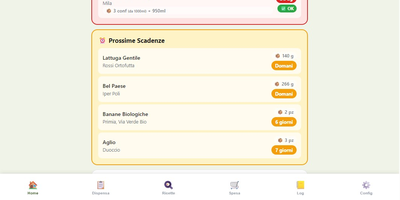
That yogurt hiding behind the ketchup expired three weeks ago, and the flour you bought "just in case" has been sitting in the pantry since last winter. EverShelf replaces mental guesswork with a structured inventory system that tracks every item across pantry, fridge, freezer, and custom locations with precise quantities, expiry dates, and consumption patterns. Scan barcodes with your phone camera to add products instantly, or let the Gemini AI identify items from a photo and estimate shelf life based on storage location. The dashboard surfaces expired items and upcoming expirations with color-coded urgency badges, while anomaly detection flags suspicious quantities and consumption predictions that deviate from your history. Opened products get reduced shelf-life calculations; vacuum-sealed items get extended dates automatically. The recipe engine generates context-aware meal suggestions from your current inventory, prioritizing ingredients approaching expiry so nothing goes to waste; each recipe includes step-by-step cooking mode with text-to-speech narration and timer integration. A smart shopping list auto-populates when stock hits zero and syncs bidirectionally with the Bring! app, with AI-estimated prices per item and consumption forecasts showing when you will need to restock. For Home Assistant users, a native HACS integration provides 22 sensors, expiry calendars, bidirectional todo-list sync, and voice assistant support for adding items hands-free. A dedicated Kiosk mode optimizes the interface for wall-mounted tablets with BLE scale integration. Running on a dedicated VPS on RepoCloud with guaranteed CPU, RAM, and SSD, full root SSH access, and a browser serial console. MIT licensed.
SmarterRouter
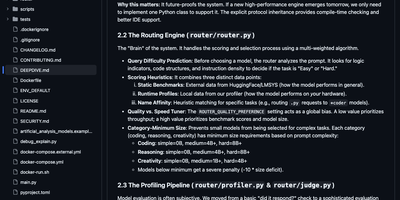
SmarterRouter stops you from playing model roulette with your local AI setup, choosing the right model for every prompt so you never have to. Point your applications at one familiar endpoint and send the request; the router studies the prompt, weighs category and complexity against benchmark results gathered on your actual hardware, and hands the job to the model most likely to answer well. It discovers the models your backend already serves, profiles each one with standard tests the first time it meets them, and keeps learning from the feedback your usage generates. When the first choice fails, a backup model takes over without your application noticing. Repeated questions come straight back from cache instead of burning another generation. Your graphics memory is watched continuously across one card or several, and models are unloaded before an ambitious request runs the machine dry. Cloud providers can join the same routing pool when a question deserves them, while everything local stays local and free. Running on a dedicated VPS on RepoCloud with guaranteed CPU, RAM, and SSD, full root SSH access, and a browser serial console. MIT licensed.

Media Journal
Every movie, series, anime, manga, book, game and album you finish deserves a line in one diary, not seven accounts on seven tracking sites. Media Journal keeps separate lists for each of the seven media types, and every entry carries your status, episode or page progress, rating and private notes. Rate on the scale that fits how you think: five stars, 1 to 10, 1 to 100, or simple faces. Group anything into collections, mark favorites, and watch your home page fill with stats, recent activity and your latest collections. The Discover page surfaces trending and popular titles, and built-in search pulls metadata and artwork from TMDB, IGDB and other providers once you add your free API keys. A community page lets everyone on your instance post thoughts and updates about what they watched, read or played, and a calendar plus history views keep your year in media organized. Saved songs play through the built-in YouTube music player while you browse, and automatic checks flag sequels and new seasons of things you already track. Running on a dedicated VPS on RepoCloud with guaranteed CPU, RAM, and SSD, full root SSH access, and a browser serial console. AGPL-3.0 licensed.
ShipShipShip
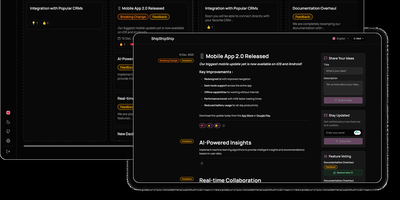
Keeping users informed about software releases while gathering community feedback on upcoming roadmap items becomes effortless with ShipShipShip, a self-hosted changelog, release notes, and feature voting platform. Product managers can draft rich release announcements using a formatting editor that supports Markdown, embedded media uploads, color-coded category tags, and exact publication timestamps. Instead of juggling disconnected feedback spreadsheets, teams organize backlog proposals, active development tasks, and shipped updates across a drag-and-drop Kanban board or a filterable list view. Visitors browsing the public roadmap can upvote proposed features to help prioritize the next sprint and react to announcements using eight expressive emoji reactions. When an item moves into a shipped status, the built-in newsletter engine automatically dispatches formatted release emails over SMTP to subscribers using customizable per-event templates and one-click unsubscribe links. Design-conscious organizations can install manifest-driven public themes, map internal workflow statuses to public roadmap columns, and tailor brand colors and logos. International audiences can navigate the interface in seven languages, including full right-to-left layout support, while engineering teams automate event creation through the REST API. Running on a dedicated VPS on RepoCloud with guaranteed CPU, RAM, and SSD, full root SSH access, and a browser serial console. Apache-2.0 licensed.

DumbPad
With a deliberately minimalist design philosophy and zero database dependencies, DumbPad delivers a self-hosted notepad that stores notes as plain text files with real-time auto-saving every 10 seconds and keyboard-shortcut manual saves. The Node.js Express backend serves a vanilla JavaScript frontend that supports multiple named notepads with direct URL linking and shareable links for instant access to specific notes. The split-view editor displays markdown source on the left and rendered preview on the right with a draggable resize handle, while the full preview mode renders complete markdown with GitHub-style alert blocks for Note, Tip, Important, Warning, and Caution callouts, extended table formatting, fenced code blocks with syntax highlighting via highlight.js covering approximately 180 programming languages, collapsible details sections, and checklist support. Fuzzy search matches across both filenames and file contents for fast navigation across large collections. Optional PIN protection secures access with configurable 4 to 10 digit codes, constant-time comparison to prevent timing attacks, brute force lockout after 5 failed attempts with 15-minute cooldown, and IP-based tracking. The Docker container runs as non-root UID 1000 by default with multi-architecture support, CORS origin restrictions for reverse proxy deployments, and persistent data volumes. Notes can be downloaded as text or markdown files, printed with auto-expanded collapsible sections, and imported by placing text files directly into the data directory. On RepoCloud, deploy DumbPad on a dedicated VPS with Docker, root SSH access, and complete control over your note-taking infrastructure, all under the GPL-3.0 license.
DumbBudget
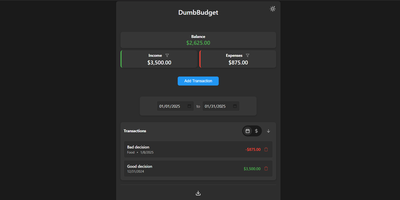
"Stupid simple software" is the entire philosophy at DumbWare.io, and DumbBudget delivers it: no over-engineering, no complexity, no accounts, no bank connections - just a clean, modern ledger for money in and money out. Log income and expenses, assign categories, and watch real-time balance calculations update as you type. Finding transactions is quick: filter by type, narrow by date range, sort by date or amount. When tax season or spreadsheet analysis calls, everything exports to CSV. Access control matches the philosophy - a single PIN (set via one environment variable) gates the app, backed by real security engineering: rate limiting on PIN attempts, temporary lockout after failures, secure session handling, and no sensitive data in browser storage. Multi-currency support covers the ISO codes, and a SITE_TITLE variable names each instance - deliberately useful, because running separate instances per account or family member is the intended pattern for multi-user needs. The responsive UI ships light and dark themes and installs as a PWA on phones, where expense logging actually happens. Configuration is five environment variables; data persists in one folder. If Actual Budget and Firefly III feel like accounting software, this is the notepad that gets used. GPL-licensed.
FeedMe
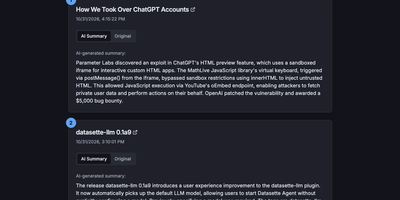
Most RSS readers hand you a pile of headlines and make you do the reading; FeedMe reads first and hands you the pile already digested. It aggregates every feed you configure into one clean, ranked stream, and for each article an LLM writes a short summary you can scan in seconds, with the full original text one tab away when a story earns a deeper look. Sources organize into categories like Tech News, Finance News, Personal Blogs, Company Blogs, Open Source, Research, and Podcasts, and a global search finds stories across all of them. The reader never sleeps on stale content: a built-in cron refreshes feeds and regenerates summaries on your schedule (every three hours by default in Docker), so the page you open in the morning already covers the night. Summaries answer to you, not a vendor: point FeedMe at any OpenAI-compatible endpoint and tune the prompt, input truncation, temperature, and token budget, with output in the languages you choose. There are no accounts, no forced logins, and no app to install; the responsive page works on phone and desktop in light or dark themes. Because the whole application is a static site, it stays fast and cheap to run, and the same build can live on GitHub Pages or Vercel if you ever want a public edition next to your private one. Running on a dedicated VPS on RepoCloud with guaranteed CPU, RAM, and SSD, full root SSH access, and a browser serial console. MIT licensed.
ComposeToolbox
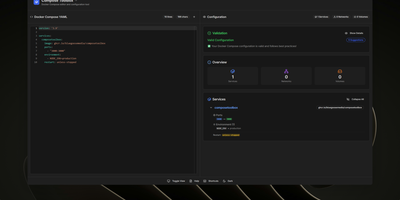
To eliminate YAML indentation errors and cryptic container misconfigurations before running docker compose up, ComposeToolbox pairs a full-featured code editor with a live configuration analyzer in a single self-hostable web workspace. Paste or write any docker-compose.yml file in the left pane to see immediate syntax validation alongside actionable best-practice warnings, such as unpinned latest image tags, missing healthchecks, or deprecated version declarations. On the right side, an interactive Configuration Overview breaks down every defined service, exposed port mapping, persistent volume mount, environment variable, and custom network into structured tabs. Built-in Quick Insert buttons let operators drop new service blocks, volume definitions, or network stanzas into the editor with one click. By mounting the persistent /app/data directory, administrators can define custom quick-insert YAML snippets with selectable hardware and networking icons in custom-templates.yml. Teams can also customize startup-template.yml so the editor opens with their organization's standard homelab or production boilerplate every time the page loads. Keyboard shortcuts, light and dark themes, and one-click YAML formatting or file export streamline daily container authoring. Running on a dedicated VPS on RepoCloud with guaranteed CPU, RAM, and SSD, full root SSH access, and a browser serial console. MIT licensed.
Jmal Cloud
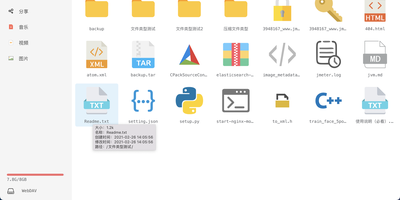
Jmal Cloud is a self-hosted private cloud drive that keeps your files on your own server, with online previews, resumable uploads, full-text search, and WebDAV access. The web manager previews photos, videos, Office documents, PDFs, EPUB books, and even CAD DWG drawings in the browser, then puts recently modified files, favorites, shared folders, and a trash bin a click away. Huge uploads resume from the exact chunk that stopped, while full-text search drills into text, PDFs, and Office documents when filenames fail you. Connect Alibaba Cloud OSS, Tencent Cloud COS, or MinIO as storage backends and browse every bucket through the same folders. Wire in a self-hosted OnlyOffice Document Server and draw.io to edit Word, Excel, and PowerPoint files and sketch flowcharts or mind maps without leaving the drive. Mount the library as a local network drive over WebDAV, share folders through links for upload and download, and push scheduled backups with the Rust jmalcloud CLI. Packages and Docker images cover Ubuntu, Debian, CentOS, Fedora, and Arch on x86_64 and ARM64, and the interface speaks English, Chinese, and Japanese. Running on a dedicated VPS on RepoCloud with guaranteed CPU, RAM, and SSD, full root SSH access, and a browser serial console. MIT licensed.