AppFlowy
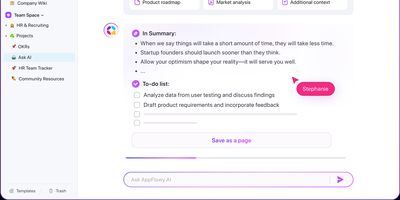
With over 75,000 GitHub stars and native apps across macOS, Windows, Linux, iOS, and Android, AppFlowy is the most widely adopted open-source alternative to Notion — delivering the same block-based workspace model with full data sovereignty. The Flutter frontend renders natively on every platform while a Rust backend powered by Actix-web and Tokio handles CRDT-based real-time collaboration, ensuring sub-second sync across devices with conflict-free concurrent editing. Relational databases support grid, board, kanban, calendar, and gallery views over the same dataset, with two-way relations, rollups, advanced filters, sorts, and formula calculations that cover the majority of Notion's database workflows. The block editor supports 40+ content types including nested pages, toggles, callouts, code blocks with syntax highlighting, embeds, and slash-command insertion. AI integration connects to OpenAI, Anthropic, or local models via Ollama for writing assistance, summarization, and translation — all without sending data off-premises when using on-prem LLMs. Team spaces with workspace-level and per-page permissions, OAuth and SSO authentication through GoTrue, and S3-compatible object storage via MinIO provide enterprise-grade access control and file management. The self-hosted stack deploys through Docker Compose with PostgreSQL for metadata, Redis for caching and pub/sub, and a dedicated background worker for imports and email notifications. Offline-first architecture ensures the desktop app functions without connectivity, syncing changes when the connection resumes. Running on a dedicated VPS on RepoCloud with guaranteed CPU, RAM, and SSD, full root SSH access, and a browser serial console. AGPL-3.0 licensed.
BigBlueButton
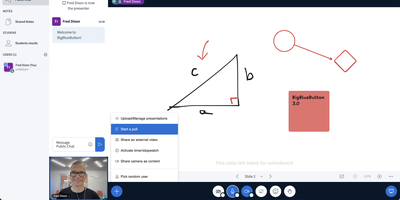
Used daily by millions of educators and learners in over 65 languages and embedded as the default virtual classroom in Moodle Cloud, Canvas, Sakai, D2L, Jenzabar, and Schoology — together comprising more than 75% of the worldwide learning management system market — BigBlueButton has been the leading open-source web conferencing platform for education since its creation at Carleton University in 2007. The platform delivers WebRTC-based real-time audio, video, and screen sharing with a tldraw v2-powered multi-user whiteboard featuring infinite canvas support, allowing multiple participants to annotate slides and draw simultaneously. Breakout rooms support up to eight concurrent groups with collaborative whiteboards enabled by default, and polling with customizable response types lets instructors assess understanding in real time. The built-in Learning Analytics Dashboard answers three questions at a glance: who is attending, who is participating, and who is learning based on poll responses, providing actionable engagement metrics without requiring webcam surveillance. Session recording captures audio, video, slides, chat, and whiteboard annotations for asynchronous playback on any device. The plugin architecture introduced in version 3.0 enables custom extensions, while IMS LTI 1.0 compliance allows integration with Blackboard, Desire2Learn, Pearson Learning Studio, and any conformant platform without custom code. The REST API enables programmatic session management, user authentication, and recording access for custom frontends like the included Greenlight application. Version 4.0 introduces LiveKit-based media and a redesigned interface. Running on a dedicated VPS on RepoCloud with guaranteed CPU, RAM, and SSD, full root SSH access, and a browser serial console. LGPL-3.0 licensed.
Affine Pro
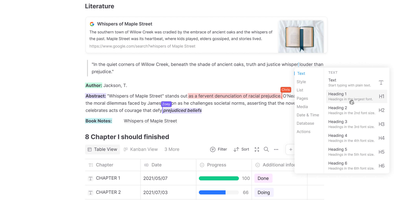
Gaining over 71,000 GitHub stars as one of the fastest-rising knowledge management platforms, AFFiNE merges the document editing capabilities of Notion, the infinite canvas of Miro, and the structured data of Airtable into a single cohesive workspace. The block-based editor built on the custom BlockSuite framework supports rich text, code blocks, embeds, tables, kanban boards, and database views with drag-and-drop composition. The whiteboard mode provides an infinite canvas where users can freely mix documents, sticky notes, shapes, connectors, and hand-drawn elements, enabling visual thinking alongside structured note-taking. Real-time collaboration allows multiple users to edit documents and whiteboards simultaneously with cursor presence, comment threads, and version history. The local-first architecture stores all data on your device by default using CRDT-based synchronization, ensuring offline access and data sovereignty, with optional cloud sync for cross-device availability. Workspaces organize content into hierarchical page trees with full-text search, favorites, tags, and trash management. The platform supports Markdown import and export, PDF export, and HTML export for interoperability. AI features powered by configurable LLM providers enable writing assistance, summarization, translation, and content generation directly within documents. The theming system supports light and dark modes with customizable accent colors. Running on a dedicated VPS on RepoCloud with guaranteed CPU, RAM, and SSD, full root SSH access, and a browser serial console. Licensed under MIT with an open-source self-hosted edition.
Huly
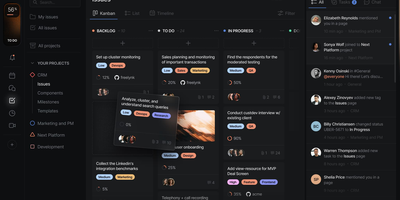
With 27,000 GitHub stars and 349 releases shipping multiple times per week, Huly replaces four separate SaaS subscriptions — Linear for issue tracking, Notion for documents, Slack for team chat, and Motion for time-blocking — with a single self-hosted platform that charges nothing per seat. The issue tracker provides projects, sprints, roadmaps, custom workflows, and Kanban views with bi-directional GitHub and GitLab synchronization that keeps issues and pull requests in lockstep across both systems. Collaborative documents use CRDT-based real-time editing for wikis, meeting notes, and technical specs with nested page hierarchies and rich embedding. Team messaging delivers channels, direct messages, threaded conversations, reactions, and pinned messages in a Slack-equivalent interface that lives alongside your project context. The time-blocking planner schedules tasks into calendar slots with drag-and-drop, integrating directly with your issue backlog so nothing falls through cracks. A virtual office module provides audio and video rooms for standups and pair programming with external guest access. HR features handle team management, office hours, and PTO tracking. The architecture runs 30+ microservices on CockroachDB for ACID-compliant storage, Elasticsearch for full-text search, MinIO for file attachments, and Redpanda for event streaming. Desktop apps ship for macOS, Windows, and Linux alongside mobile apps for iOS and Android. Running on a dedicated VPS on RepoCloud with guaranteed CPU, RAM, and SSD, full root SSH access, and a browser serial console. EPL-2.0 licensed.
TREK
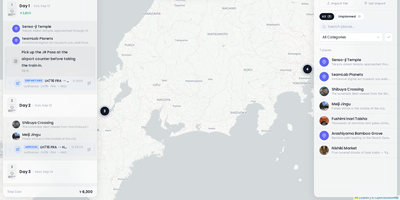
TREK coordinates group expeditions and vacations through a collaborative travel planning workspace that unifies daily itineraries, interactive route maps, shared expense budgets, and packing lists. Travel groups can build day-by-day timelines by dragging activities between dates, attaching transit bookings with flight numbers, and estimating driving intervals directly on OpenStreetMap and Mapbox canvases. Instant WebSocket synchronization mirrors itinerary edits, group chat messages, and decision poll votes across all traveling companions simultaneously without page refreshes. The integrated multi-currency expense manager tracks shared expenditures across lodging, dining, and transit categories, automatically calculating per-person debts and generating simplified debt settlement summaries. An interactive world atlas highlights visited nations and tracks lifetime travel statistics, enabling globe-trotters to manage personal bucket lists and review past journeys. Travelers can organize shared packing checklists from reusable equipment templates, monitor real-time weather forecasts powered by Open-Meteo, and export comprehensive travel schedules to printable PDF guides and calendar feeds. Role-based permission controls safeguard sensitive travel documents and boarding pass uploads while allowing guests to contribute notes and vote on activities. Running on a dedicated VPS on RepoCloud with guaranteed CPU, RAM, and SSD, full root SSH access, and a browser serial console. AGPL-3.0 licensed.
Zulip
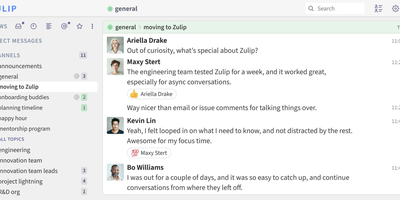
Used by the Rust language community, NASA, Dropbox, and thousands of organizations worldwide with over 25,600 GitHub stars and 1,500+ contributors, Zulip is the only modern team chat app designed from the ground up for both real-time and asynchronous communication through its unique topic-based threading model where every message belongs to a named topic within a channel. This eliminates the context collapse of linear chat by letting teams follow specific conversations without scrolling through unrelated messages, resume threads days later without losing context, and catch up on missed discussions at per-topic granularity. Server 12.0 introduced end-to-end encryption for mobile push notifications, AI-powered search ranking, channel folders for workspace organization, and expanded video conferencing with Jitsi, BigBlueButton, and Zoom integration. Over 100 native integrations connect GitHub, GitLab, Jira, Sentry, PagerDuty, Travis CI, Redmine, dbt, Nextcloud, and n8n with bidirectional notifications, while LLM-driven agents access web-public channels via a standard llms.txt interface. Full-text search covers unlimited message history across all plans, code blocks render with syntax highlighting for 250+ languages, and LaTeX math expressions display inline. The REST API with typed Python and JavaScript SDKs enables custom bots, webhook integrations, and programmatic administration. Import tools migrate entire workspaces from Slack, Microsoft Teams, Mattermost, and Rocket.Chat. Running on a dedicated VPS on RepoCloud with guaranteed CPU, RAM, and SSD, full root SSH access, and a browser serial console. Apache 2.0 licensed.
Gerrit Code Review
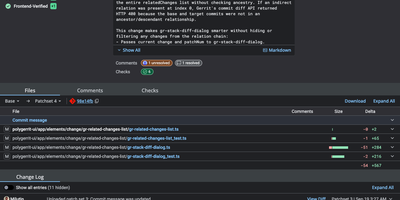
Unlike pull-request forges, Gerrit reviews every Git change as a series of patchsets, and nothing merges until the required approvals are in. Developers upload with a plain git push to a refs/for ref, adding push options for topics, hashtags, work-in-progress, or private changes. Each change gets a page listing reviewers, CCs, an attention set that flags who must act next, and submit requirements driven by labels such as Code-Review and Verified, with a quick approve button for the last missing vote. Side-by-side diffs with syntax highlighting take inline comments written in Markdown, saved as drafts and published together. A Checks tab shows CI runs reported by plugins, and integrations reach Jenkins, GitHub Actions, Zuul, and webhooks. Access rights attach to groups and branch patterns, including regular expressions, and inherit from parent projects and All-Projects. Sign-in works with LDAP, OAuth, OpenID, or HTTP single sign-on, and SAML through a plugin. A query language filters changes by status, owner, reviewer, label, file path, and reviewer count. Projects pick a submit strategy: merge if necessary, fast forward only, rebase if necessary, rebase always, merge always, or cherry pick. A REST API, SSH commands, and a plugin system extend the server, and an optional Review Agent chat panel can summarize a change once an AI provider plugin is installed. Running on a dedicated VPS on RepoCloud with guaranteed CPU, RAM, and SSD, full root SSH access, and a browser serial console. Apache-2.0 licensed.
Weblate
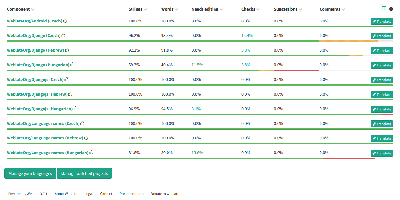
Over 2,500 open-source projects and companies in more than 165 countries localize with Weblate - the libre continuous localization platform and the standard self-hosted answer to Crowdin and Lokalise. Its defining trait is that translations live in the same version control as your code: Weblate talks directly to Git and Mercurial, pulls new source strings automatically via webhooks, and pushes finished translations back either as direct commits or as pull/merge requests on GitHub, GitLab, Gitea, Bitbucket, Azure DevOps, Gerrit, or Pagure. Every translator is properly credited in the commit history. For translators, it is a full computer-aided translation tool: translation memory, glossaries, customizable quality checks that catch placeholder and formatting mistakes, propagation of identical strings across components, and automatic suggestions from machine translation services - DeepL, Amazon Translate, LibreTranslate, and others, with per-service priorities and support for custom Python engines. It handles the format zoo (gettext PO, JSON, YAML, Android XML, iOS strings, and dozens more) and supports crowdsourced workflows with granular access control, workspaces, two-factor authentication, and reviewer approval steps. A REST API, CLI client, and add-on system automate everything else. Built on Python/Django, GPL-licensed, with no per-string or per-seat pricing when self-hosted.
Wiki.js
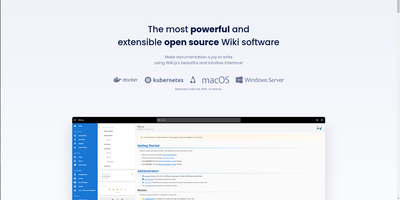
Team and product documentation on a fast Vue frontend with PostgreSQL storage: Wiki.js is a Node.js wiki engine. Its distinguishing trait is per-page editor choice: authors pick Markdown with live preview, a WYSIWYG visual builder for non-technical writers, or raw HTML, page by page. Native Git synchronization commits every page change to GitHub, GitLab, Bitbucket, Azure DevOps, or any Git remote - bi-directionally, so edits made in the repository flow back into the wiki - giving documentation version-controlled backup for free. Authentication coverage is among the broadest of any self-hosted wiki: local accounts with self-registration, social login via Google, GitHub, Discord, and Slack, and enterprise SSO through LDAP/Active Directory, SAML, CAS, Auth0, Okta, Azure AD, Keycloak, and generic OAuth2/OIDC, with optional MFA. Built-in full-text search runs on PostgreSQL with zero setup, and external engines like Algolia or Solr can substitute. Page history with visual version comparison, granular group-based permissions per path, nested navigation menus, 50+ integration modules, and full localization round it out. AGPLv3-licensed with a 28k-star community.
Litpage
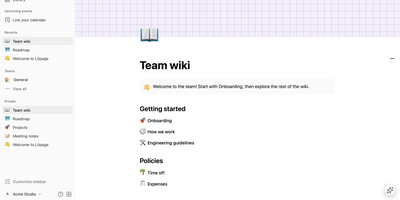
A project brief and the task board tracking it belong together, and Litpage keeps pages, databases, and team discussion in one self-hosted workspace instead of scattering them across subscriptions. Write in a block editor with 41 block types, a slash menu, markdown shortcuts, drag and drop, mentions, equations, and highlighted code blocks. The same data becomes a table, board, list, gallery, calendar, timeline, chart, dashboard, feed, form, or map, with typed fields, formulas, relations, and rollups underneath. Automations and buttons turn those databases into working tools, while templates keep repeated projects consistent. Teammates edit together live, comment, suggest edits, and revisit version history, with page-level and field-level permissions deciding who sees what. Pages can be shared publicly or published as sites, and Markdown, CSV, HTML, Word, and PDF files import into the tree. Optional AI runs on the provider and key you configure: chat that searches your workspace, custom agents on schedules or triggers, writing help, database autofill, and meeting-note summaries. Administrators get member and guest management, security policies, an audit log, analytics, passkeys, and two-step verification. A REST API with personal tokens, webhooks, and an MCP endpoint open everything to your other tools. Running on a dedicated VPS on RepoCloud with guaranteed CPU, RAM, and SSD, full root SSH access, and a browser serial console. MIT licensed.
Clawboo
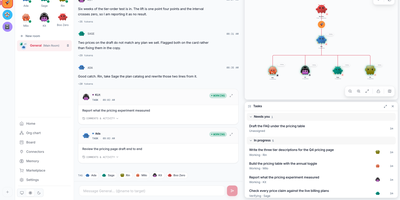
Describe the outcome once, in plain language, and a small crew of AI agents divides the work between them and reports back in the same chat. You type the request in the team chat; Boo Zero, the team lead, splits it into jobs on a shared board and hands each card to the teammate best placed to do it. Teammates run on Claude Code, Codex, Hermes, OpenClaw, or Clawboo's built-in runtime, and one team can mix them freely, so the researcher, the writer, and the coder can each work on their strongest tool. You follow every card live on the board and in the chat, watch the team graph to see who is doing what, and add a reviewer agent when a second pair of eyes matters. Finished work returns to Boo Zero, which pulls the pieces together and answers you in the chat. Ready-made teams from the marketplace cover marketing squads, dev teams, and research crews, and you can bring an API key from Anthropic, OpenAI, OpenRouter and more, a free local model through Ollama, or your ChatGPT subscription through the Codex CLI. Spend is tracked per team with budget warnings before costs surprise you. Running on a dedicated VPS on RepoCloud with guaranteed CPU, RAM, and SSD, full root SSH access, and a browser serial console. MIT licensed.
Worklenz
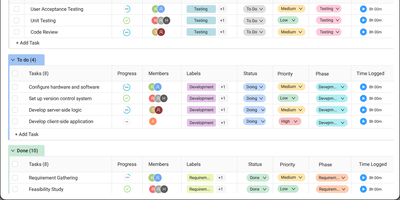
Worklenz delivers an all-in-one project management platform purpose-built for teams that bill clients for their time and expertise. The task management system supports list, Kanban board, and timeline Gantt views with priorities, due dates, assignees, labels, and subtasks. Built-in time tracking offers both start-stop timers and manual entry, logging billable hours directly against tasks and automatically aggregating time data into project-level cost reports. The resource management module provides a visual team utilization dashboard showing capacity allocation across all active projects, helping managers avoid overallocation and balance workloads. Client portals give external stakeholders direct visibility into project progress, task status, and deliverables without requiring internal account access. Financial insights track budgets versus actuals, showing project profitability, cost breakdowns, and burn rate in real time. The analytics engine generates reports on project health, team workload distribution, task completion trends, and time allocation patterns. Project templates enable one-click setup of common agency workflows with pre-configured task structures, milestones, and assignments. The React frontend uses Ant Design components with TypeScript, while the Express.js backend connects to PostgreSQL for data and Redis for caching. Docker Compose deployment includes Nginx reverse proxy with SSL/TLS support, automated database backups, health checks on all services, network isolation, and MinIO for object storage. On RepoCloud, deploy Worklenz on a dedicated VPS with root SSH access, persistent PostgreSQL storage for your project data, and complete control over client portal access and team configurations, all under the AGPL-3.0 license.
Papermark
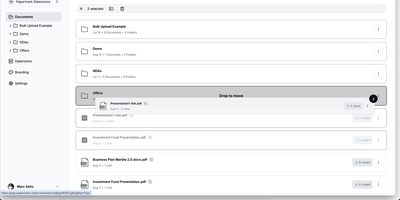
With nearly 9,000 GitHub stars and adoption by over 60,000 companies across 100 countries, Papermark is the open-source DocSend alternative that turns document sharing into a data-rich conversation between you and your viewers. Every shared document generates page-by-page analytics showing exactly which pages capture attention, how long viewers spend on each section, where they drop off, and whether they return for a second look, with real-time notifications the moment a document is opened. Virtual data rooms support unlimited folders with drag-and-drop organization, bulk uploads, granular per-viewer permissions, dynamic watermarking that stamps each page with the viewer's identity, and NDA gating that requires agreement before access. Custom branding applies your logo, colors, and custom domain to every shared link and download page, while email verification and password protection add authentication layers. The AI Data Room Copilot lets viewers chat with uploaded documents, ask questions, and receive contextual summaries directly within the data room interface. The developer platform exposes 43 REST API operations covering data rooms, documents, folders, links, visitors, and analytics, with an MCP server for AI agent integration and a CLI for automation. Built on Next.js with TypeScript, Prisma ORM, PostgreSQL, NextAuth.js authentication, and shadcn/ui components. Running on a dedicated VPS on RepoCloud with guaranteed CPU, RAM, and SSD, full root SSH access, and a browser serial console. AGPLv3 licensed.
LinkWarden
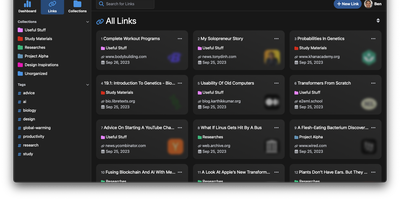
Links rot - the hard truth Linkwarden is built around, as a collaborative bookmark manager that preserves what it saves. Every page you save is fully preserved - a screenshot, a PDF, a self-contained single-file HTML archive (generated by the Monolith Rust binary), and a clean reader view - so the content survives even after the original site disappears. Think of it as a private Wayback Machine you own, with an optional one-click snapshot to archive.org on top. The reading experience matches the archival rigor: a distraction- free reader view supports text highlighting and annotation, and full-text search across everything you have saved is powered by Meilisearch. Optional AI tagging analyzes page content and auto-assigns tags - generate new ones, pick from your existing set, or constrain to predefined tags - with providers ranging from local Ollama models (fully private) to OpenAI, Anthropic, and OpenRouter. Organization is collections, sub-collections, and multiple tags per link; teams collaborate on shared collections with per-member permissions, and public collections share curated link sets (with preserved copies) to anyone. The stack is Next.js/React on TypeScript with PostgreSQL via Prisma, NextAuth supporting credentials, OAuth2, and SAML SSO, and a Playwright-driven headless Chromium worker doing the capture. Native iOS and Android apps and browser extensions feed it from anywhere.
Shoutrrr
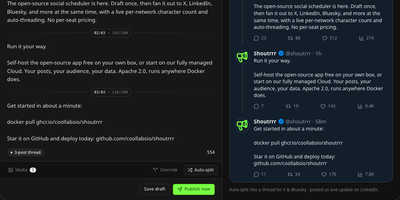
Write one post and Shoutrrr publishes it across X, Bluesky, LinkedIn, Facebook, Instagram, Threads, and Discord at the same moment, or holds it in a queue until the slot you picked. The composer counts characters against each network's limits as you type, attaches media with alt text, adjusts wording per platform when a message needs a local tweak, and splits long posts into threads where the network supports them. Recurring posting slots follow your workspace timezone, drafts drop into those slots from a month calendar, and anything can still go out instantly when news breaks. Every target publishes independently and retries on its own when a network hiccups, leaving a per-attempt trail you can inspect instead of a silent failure. Analytics chart follower and post-count trends for each account and report likes, reposts, replies, and impressions per post wherever the network's API allows. Teams share workspaces with role-based memberships and email invitations, keep clients in separate workspaces, and get in-app alerts the moment a post lands, fails, or needs an account reconnected. Account tokens sit encrypted at rest and refresh themselves, sign-in supports two-factor codes and passkeys, and the built-in MCP server hands AI assistants 22 tools to draft and schedule while publishing, retrying, and deleting refuse to run without your explicit confirmation. Running on a dedicated VPS on RepoCloud with guaranteed CPU, RAM, and SSD, full root SSH access, and a browser serial console. Apache-2.0 licensed.
Shelve
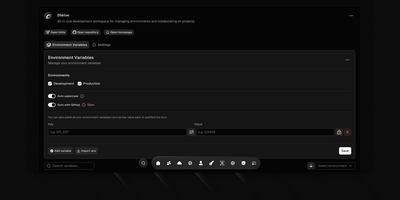
Eliminate scattered configuration files and leaked credentials across development teams with Shelve, an open-source secrets management platform that secures environment variables across development, staging, and production tiers. Engineering teams can organize sensitive database passwords and third-party API credentials within a centralized vault protected by AES-256 encryption and SHA-256 integrity verification. The platform synchronizes configurations directly to GitHub Actions and repository secret stores through an official GitHub App integration. Developers can inject encrypted variables directly into local processes using the dedicated CLI without saving plain-text secrets to disk. The built-in sharing vault creates self-destructing, password-protected links to exchange sensitive credentials securely with external contractors. Administrators can define custom workspace teams with granular role-based access controls, track change audit logs across configuration histories, and navigate management views using a keyboard-driven command palette. Automated schema validation engines detect missing parameters and enforce uniform uppercase naming standards across application tiers. Running on a dedicated VPS on RepoCloud with guaranteed CPU, RAM, and SSD, full root SSH access, and a browser serial console. Apache 2.0 licensed.
Excaliself
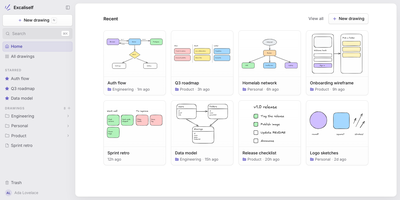
Excaliself turns the Excalidraw canvas into your team's own whiteboard server, where every sketch, diagram, and flowchart lives in your database instead of a vendor's cloud. The home screen works like a file cabinet for drawings: nest them in folders, star the keepers, drag files between spaces, and find anything again by title or by the text inside the drawing. Share a link and teammates edit together in real time with live cursors and follow mode; links can stay members-only or open to guests who have no account at all. A shared Team space sits next to everyone's private space, and one team library holds the shapes and icons the whole group reuses. AI clients can join with a personal access token: Claude Code or Claude Desktop can search your drawings, read what a diagram says, and create new ones from shapes or a Mermaid flowchart. Accounts are invite-only, single sign-on covers Google, Microsoft, and any OIDC provider, and admins manage members, roles, and password resets from Settings. Deleted drawings rest in a trash folder for thirty days before they are purged, and everything auto-saves as you draw. Running on a dedicated VPS on RepoCloud with guaranteed CPU, RAM, and SSD, full root SSH access, and a browser serial console. MIT licensed.
Pi Pocket
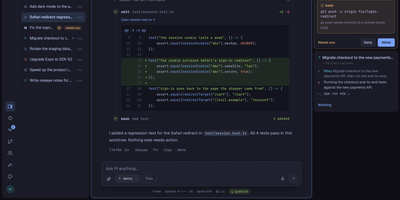
Pi Pocket puts the Pi coding agent in your phone browser, so you can start, steer, and review real coding sessions from anywhere while the work stays on your own server. Open a folder, a fresh Git worktree, or a GitHub repository, pick a model per session, and watch streamed replies with tool calls, queued follow ups, and a stop button when a run wanders. Sessions survive crashes and restarts because every model call, tool call, and subagent step is stored as it happens, and forks let you retry any reply with a different model on another branch. Invite teammates into a live session with presence, roles, and a side chat the agent never sees, or let PiP, the built in assistant, follow your other sessions and report back. GitHub watches and webhooks wake the agent when pull requests, issues, or workflows change, while scheduled messages and cron style goals keep routine work moving overnight. Spend views show cost per person and per session, and owner set limits pause new work instead of quietly burning budget. On a phone you get push notifications, dictation, share sheet intake, and a home screen app, and live reloadable extensions add routes, modules, and commands without a build step. Running on a dedicated VPS on RepoCloud with guaranteed CPU, RAM, and SSD, full root SSH access, and a browser serial console. MIT licensed.