Heimdall
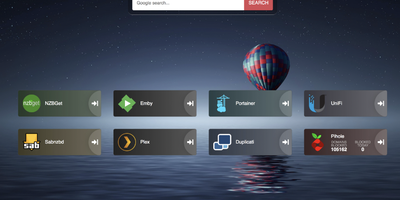
Links stop drowning in browser bookmarks once Heimdall - the application dashboard from the LinuxServer.io team - gives every web app and service you run a single, organized front door. Items come in three tiers. Generic items link to anything on the web with a name, color, and optional icon. Foundation apps are recognized as you type, auto-filling the application's icon and tile color so a full homelab dashboard assembles in minutes. Enhanced apps go further: supply API credentials and the tile shows live data - queue size and download speed for SABnzbd and NZBGet, plus integrations for Sonarr, Radarr, Plex, Jellyfin, Pi-hole, Portainer, Transmission, and many more. There are no iframes and no apps-within-apps; tiles are honest links with real-time stats layered on. Tiles arrange by drag and drop, backgrounds are customizable, an optional search bar (Google, Bing, or DuckDuckGo) makes it work as a browser start page, and optional multi-user authentication keeps dashboards personal. Built on Laravel with SQLite file-based storage - no external database - it stays light, responsive on mobile, and simple to back up. A natural first deployment: the page that ties every other self-hosted service together.
Homebox
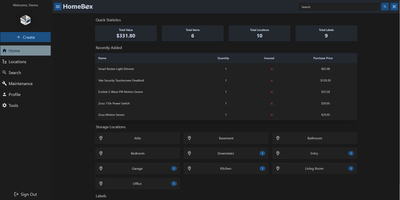
With over 7,000 GitHub stars and active community maintenance through version 0.26.0 released in June 2026, Homebox fills the gap between inadequate spreadsheets and overcomplicated enterprise asset management by providing a purpose-built inventory system designed specifically for home users, families, and small groups. The Go backend with SQLite storage deploys as a single Docker container consuming under 50MB of RAM at idle, running on hardware as modest as a Raspberry Pi while the responsive web interface adapts seamlessly across desktops, tablets, and smartphones. The entity-based architecture introduced in v0.26 unifies items and locations into a shared structure supporting custom fields, attachments, entity types, and reusable templates for consistent data entry across inventory categories. QR code generation creates printable labels that scan with any smartphone camera to instantly display item details, photos, serial numbers, and associated documents. Warranty tracking records purchase dates, prices, and expiration dates while maintenance scheduling sends reminders for recurring service tasks. Location hierarchies organize items spatially with nested sub-locations, and flexible label tagging enables cross-cutting categorization beyond physical placement. Multi-user support shares collections with family members or roommates with OIDC single sign-on integration for Active Directory, Okta, and other identity providers. CSV import and export handles bulk operations, while the full REST API enables automation and third-party integrations. Collection-level ZIP export packages complete inventories with attachments for backup or migration. Running on a dedicated VPS on RepoCloud with guaranteed CPU, RAM, and SSD, full root SSH access, and a browser serial console. AGPL-3.0 licensed.
Flame
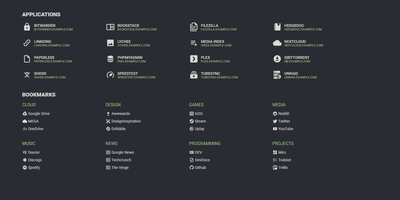
A server full of scattered services becomes one clean application hub under Flame - a self-hosted startpage where every bit of configuration happens in built-in GUI editors, never a config file. Applications and bookmarks are created, edited, and organized into categories directly in the browser, and favorites pin to the homescreen for one-click access. The integrated search bar filters your apps and bookmarks locally as you type, and prefix shortcuts (like /g for Google) route queries to any of 11 web search providers or custom ones you define, making Flame a genuine browser homepage rather than a static link wall. Docker integration is the standout for homelabs: mount the Docker socket, add flame.type, flame.name, and flame.url labels to containers, and new services appear on the dashboard automatically - Kubernetes Ingress annotations work the same way. A weather widget shows temperature, cloud coverage, and animated conditions for your coordinates, and password authentication protects settings and items. Appearance is deeply customizable with 15 built-in color themes, a custom theme builder, and full custom CSS support. The stack is Node.js with SQLite behind a React frontend - light, fast, and inspired by the minimalist SUI design.
Facet
Thousands of frames land on the card after a wedding shoot, and Facet finds the keepers among the bursts, blinks, and near-duplicates. Facet scores every photo across nine dimensions, aesthetic quality, composition, face quality, eye sharpness, technical sharpness, color, exposure, subject saliency, and dynamic range, with category-specific weights for portraits, landscapes, wildlife, and 30-plus other content types. The culling darkroom groups bursts and visually similar frames, protects exposure brackets and panorama sequences, and flags closed eyes per face, so you keep the sharpest open-eyed frame and reject the rest in one pass. Face detection clusters into people you can rename, merge, and search, while albums, star ratings, favorites, and AI content tags organize what survives. Browse survivors through a mosaic gallery with semantic search by plain description, a timeline, a geotag map, and slideshow capsules. Statistics dashboards track your gear usage and metric correlations, and the weight editor learns from A/B comparisons so scores drift toward your own taste. Shared album links support client proofing with hearts and comments, phones auto-upload over the built-in WebDAV inbox, and ratings round-trip to Lightroom, darktable, and Immich through XMP sidecars. Everything runs locally on your own hardware: no cloud accounts, no subscriptions, no photo ever leaves the server. Running on a dedicated VPS on RepoCloud with guaranteed CPU, RAM, and SSD, full root SSH access, and a browser serial console. MIT licensed.
Wardrowbe
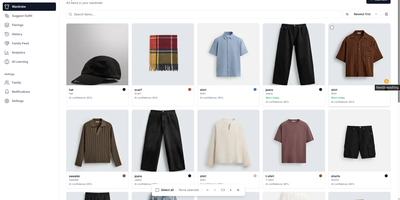
Your closet already knows what you own; Wardrowbe is the part that remembers it for you and decides what goes together tomorrow morning. Photograph garments one at a time or several in a single shot, and a vision model tags each piece with its type, color, pattern, fabric, style, and formality, with a confidence score you can correct. From that catalog the app builds complete outfits out of clothes you already have, weighing your local weather, the occasion, notes you attached to individual pieces, and the aesthetic you described. A daily suggestion can arrive on a schedule through ntfy, Mattermost, or email, so the outfit is waiting before you are. Accept, reject, and rate what you wear, and the history calendar keeps every past recommendation while the feedback sharpens the next ones. Pairings work the other way around too: pick one item and get outfits built around it, each with a plain-language explanation of why the combination works. Analytics show what you actually wear, what never leaves the rail, and how your colors distribute, and the wardrobe view flags pieces that need washing. Households manage several members' wardrobes with personalized suggestions for each person. Everything runs against any OpenAI-compatible endpoint, so Ollama with a local multimodal model keeps the whole pipeline offline and free. The interface speaks eight languages and follows your browser by default. Running on a dedicated VPS on RepoCloud with guaranteed CPU, RAM, and SSD, full root SSH access, and a browser serial console. MIT licensed.
Attic
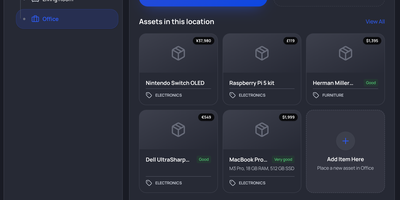
Somewhere in your home sits a box nobody has opened since the move, and Attic is the self-hosted home inventory that turns its contents from a mystery into a searchable record. You catalog appliances, tools, electronics, books, games, and furniture as assets, each with photos, receipts, manuals, purchase date and price, condition, and warranty dates attached. Nested locations mirror the house itself, rooms containing cupboards containing boxes, with photo galleries so you recognize a storage space on sight. Categories carry their own custom fields, inherited by subcategories, so electronics can demand a serial number while books ask for an ISBN. Items stored inside other items, like tools in a toolbox, are tracked as asset contents and move with their container. Collections group a game library or a moving box across locations, while tags label anything that needs repair or is out on loan. Adding stock is fast: import plugins pull metadata and cover images from Google Books, TMDB, BoardGameGeek, IGDB, and Rebrickable for LEGO sets. Search combines full-text with nested match-all and match-any filters, and saved searches pin to the sidebar as shortcuts. A history timeline records repairs and maintenance per asset, and the dashboard totals purchase value across currencies while flagging expiring warranties. OIDC single sign-on, scoped API keys, a REST API, and an MCP server connect Attic to scripts and agents. Running on a dedicated VPS on RepoCloud with guaranteed CPU, RAM, and SSD, full root SSH access, and a browser serial console. MIT licensed.
ByteStash
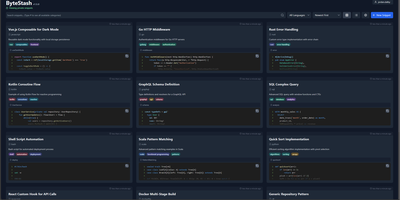
The functions, config files, and one-liners you keep re-deriving finally get a searchable home: ByteStash is a self-hosted code snippet manager - a private Gist. Each snippet holds multiple code fragments, so a Docker Compose file, its .env template, and a plaintext usage note live together under one titled, categorized entry. Monaco-based syntax highlighting covers dozens of languages, from Python, TypeScript, Go, and Rust to YAML, Dockerfiles, Terraform, and Markdown. Retrieval is the point: filter by language or category, search titles and descriptions, and optionally include snippet contents in full-text search. Snippets can be pinned for quick access and shared via public links that recipients open without an account. Multi-user support runs on JWT authentication with optional OIDC single sign-on for teams on centralized identity, and a full CRUD REST API with Swagger documentation wires snippet retrieval into editors, scripts, and CI pipelines. Storage is a single SQLite database with optional encryption, and collections export as JSON or Markdown. A React frontend on a Node.js backend, deployed as one lightweight container.
Kept
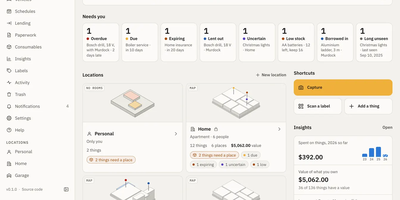
Kept is a self-hosted home inventory that answers where things are, what they are, and what is due. Locations, rooms, shelves, and boxes nest inside each other, so moving a box moves everything in it, and each location can be viewed as a list, a grid, or a 3D map with pins for low stock, loans, and due items. Every thing gets a short ID and a QR code for label sheets or roll printers, and scanning a label opens the box. Capture a thing, receipt, or whole room from the installable phone web app, offline too; an AI provider you choose, including Ollama, then suggests details for you to confirm. Receipts, manuals, and warranties attach to items, reminders arrive in the app, by email, by push, or in a calendar feed, and an insurance report exports photos, serials, and receipts. Lending tracking, vehicle readings and services, moving-house box lists, and stocktakes cover the rest of the household, with shared locations and roles for everyone you live with. An assistant answers questions like where the HDMI cable is, and an MCP endpoint lets Claude or other AI agents add and move things, with changes waiting for your approval. Nightly backups and imports from Homebox and CSV round it out. Running on a dedicated VPS on RepoCloud with guaranteed CPU, RAM, and SSD, full root SSH access, and a browser serial console. AGPL-3.0 licensed.
linkding
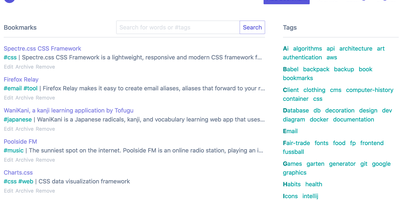
For people who found del.icio.us perfect and everything since bloated, linkding is the bookmark manager - a Django application whose entire design goal is saving and finding links with zero friction. Paste a URL and it fetches the title, description, favicon, and preview image automatically; organize with tags, search full-text across everything, mark bookmarks unread for read-it-later, attach Markdown notes, and bulk-edit whole selections at once. Its answer to link rot is archiving: bookmarked pages can be snapshotted automatically, either submitted to the Internet Archive or saved as local HTML files, and a documented SingleFile browser-extension integration uploads full self-contained page captures straight to your instance. Official Firefox and Chrome extensions (plus a bookmarklet) make saving a one-click habit, the UI installs as a Progressive Web App on mobile, and multi-user support with bookmark sharing - to users or logged-out guests - covers families and teams, with SSO via OIDC when needed. The REST API (create, search, filter by tag) has spawned a genuine ecosystem of community mobile apps and libraries. Operationally it is famously boring in the best way: one small container, SQLite by default, automated migrations, and a zero-breaking-changes policy. Import and export use standard Netscape HTML. MIT-licensed.
Vikunja
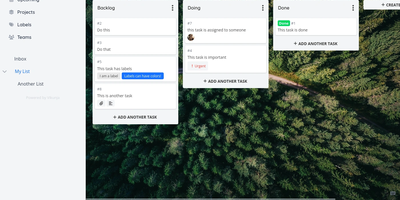
A personal to-do list that scales to team project management: Vikunja is an open-source task manager that grows with the work. Every project can be viewed four ways - classic list, drag-and-drop Kanban board, Gantt chart for timeline planning, and a spreadsheet-style table - so a project manager watches the Gantt while developers work the board, on the same data. Tasks carry the full attribute set: labels, priorities, due dates and reminders, recurring schedules, subtasks and task relations, file attachments, assignees, and comments, and Quick Add Magic parses natural-language input like dates and labels typed inline. Projects share with team members or via links, and saved filters slice tasks across projects. Built-in CalDAV support (VTODO) syncs tasks bidirectionally with clients like Thunderbird, DAVx5, and iOS Reminders, and one-click importers migrate from Todoist, Trello, and Microsoft To-Do. Nothing is metered - unlimited projects, tasks, filters, and attachments. A single Go binary with a Vue frontend runs against SQLite, MySQL, or PostgreSQL, exposes a full REST API, and works as an installable PWA on mobile. AGPLv3-licensed.
Papermerge
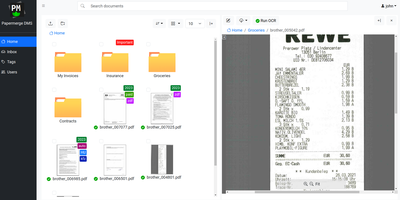
Receipts, contracts, and letters that arrive as pixels rather than text: Papermerge is a document management system built specifically for scanned documents. Upload a PDF, TIFF, JPEG, or PNG and OCR runs automatically, with a real-time status indicator beside the document title; under the hood it drives OCRmyPDF and Tesseract, supporting 130+ languages and producing a new document version with a selectable, searchable text layer you can download. Full-text search runs across everything, with multiple search-engine backends (Xapian by default). The interface deliberately mimics a modern desktop file browser: dual-panel commander, drag and drop, hierarchical folders, and colored tags on documents and folders. Page management fixes what scanners get wrong - delete blank pages, rotate, reorder, merge, extract, and move strayed pages between documents, powered by PikePDF. Document types act as categories, each with its own custom metadata fields, so invoices carry vendor and amount while contracts carry parties and dates. Versioning preserves every state of a document. Multi-user support includes groups, group ownership, permission management, and document/folder sharing between users and groups, and an OpenAPI-compliant REST API automates ingestion from scanners or scripts. Apache-licensed, ideal for long-term digital archives.
Trilium Notes
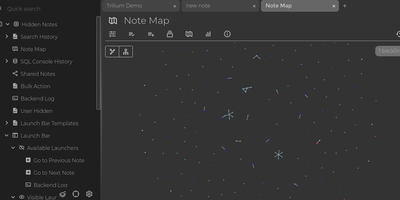
For people whose notes number in the tens of thousands, Trilium Notes is the hierarchical note-taking application built specifically for large personal knowledge bases - actively maintained as TriliumNext. Notes arrange into arbitrarily deep trees where every note is both content and container, and cloning lets a single note live in multiple places at once - bash notes belong under both Linux and Scripting, and Trilium refuses to make you choose. A WYSIWYG editor handles rich text, tables, math, and syntax-highlighted code blocks with Markdown-style shortcuts, while dedicated note types cover Excalidraw sketches, mind maps, geo maps with GPX tracks, relation maps that visualize connections between notes, and tables with typed columns. The attribute system is the power layer: labels attach queryable metadata (#year=1999, #author), relations create named links between notes, and both inherit down the tree - feeding full-text search, saved queries, and scripting. Scripting is Trilium's deepest differentiator: JavaScript code notes run on events like note changes or hourly schedules, build custom widgets, and add server-side logic, turning the knowledge base into a programmable platform. Protected notes encrypt sensitive content, note hoisting focuses on subtrees, and the self-hosted server syncs desktop clients across devices.
Faved
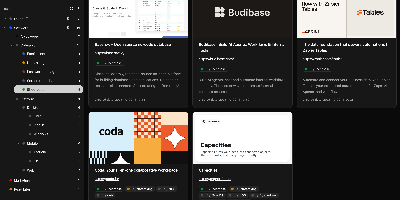
Large link collections stay fast and organized in Faved, a private, self-hosted bookmark manager built for exactly that job. Its core is a nested tagging system that outgrows flat folders: place Go and Python under Programming Languages, color-code tags, add descriptions, pin frequent ones to the top of the sidebar, and optionally roll up child-tag items into parent views. Saving is frictionless - a lightweight bookmarklet works in any desktop or mobile browser without extensions, and Apple devices can send links through the native Share menu. Faved fetches titles, descriptions, and preview images automatically, keeps that metadata fresh over time, and flags duplicates as you save. Instant as-you-type search, flexible sorting, and bulk actions (retag, delete, refetch) keep collections of any size manageable, while customizable layouts - card, list, or table - plus a system-synced dark mode adapt the interface to your workflow. Migration is first-class: import from Chrome, Safari, Firefox, or Edge with folder structure preserved, or move from Pocket and Raindrop.io keeping tags and collections. The stack is deliberately light - PHP 8 with SQLite behind a React/Tailwind frontend - deploying via Docker with no external dependencies. All data stays local: no ads, no tracking, and no risk of your library vanishing with a discontinued service.
HomeHub
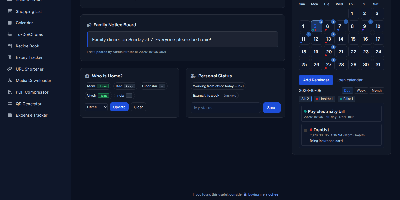
HomeHub gives a household one private page for the everyday coordination that usually scatters across chat threads, fridge notes, and five separate apps. Pin shared notes where everyone sees them, drop files into the shared cloud for the house, and keep one shopping list the whole family edits, with suggestions drawn from what you bought before. Chores become a shared checklist, the calendar holds the dates that matter, and a who's-home view answers the question every family group chat asks in the evening. The expense tracker follows family spending and handles recurring bills like the milk, the newspaper, and subscriptions, while the recipe book and expiry tracker keep the kitchen honest. Small utilities round it out: download media straight to the server, shorten URLs, compress PDFs, generate QR codes, and check the weather without leaving the hub. Every feature toggles on or off in one config file, themes recolor the interface, and there is no account system at all, because the hub trusts your home network instead of a password database. It runs happily on a Raspberry Pi, installs as a PWA on phones, and keeps uploads, media, and data in mounted folders you can back up with any file tool. Running on a dedicated VPS on RepoCloud with guaranteed CPU, RAM, and SSD, full root SSH access, and a browser serial console. MIT licensed.