Open Canvas
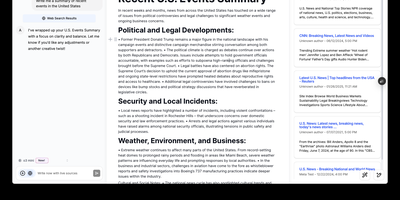
Open-source alternative to OpenAI's Canvas — a collaborative writing and coding environment where AI agents help you draft, edit, and refine documents through an agentic architecture built on LangGraph. The dual-mode editor combines a BlockNote rich text editor for live-rendered markdown with a CodeMirror-based code editor supporting syntax highlighting across multiple programming languages, letting you switch between prose and code artifacts within the same session. The built-in reflection agent automatically generates style rules and user insights from your chat history, storing them in a shared LangGraph memory store that persists across sessions for increasingly personalized assistance. Pre-built quick actions provide one-click access to common writing transformations including summarize, expand, simplify, and translate, while coding actions offer explain, refactor, add comments, and convert between languages. The monorepo architecture separates the Next.js 14 frontend from the LangGraph agent backend, connecting via HTTP and WebSocket protocols through the @langchain/langgraph-sdk client. Seven LLM providers are supported out of the box — OpenAI, Anthropic Claude, Google Gemini, Fireworks AI, Groq, Azure OpenAI, and local Ollama models — with Supabase handling authentication and data persistence. Deploy via Docker or build from source. Running on a dedicated VPS on RepoCloud with guaranteed CPU, RAM, and SSD, full root SSH access, and a browser serial console. MIT licensed.
Overleaf
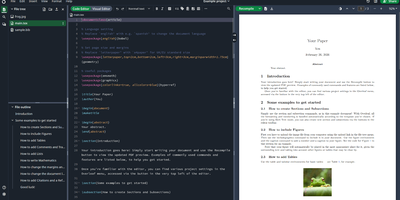
Multiple authors can edit the same LaTeX document simultaneously in the browser with live cursor tracking, conflict-free merging, and instant PDF compilation on every save. Overleaf Community Edition brings the collaborative editing experience that millions of researchers and academics rely on, with no compile time limits, storage quotas, or collaborator caps imposed by the hosted tiers. The web editor provides syntax highlighting, auto-completion, and bracket matching alongside an integrated PDF preview panel powered by a bundled TeX Live distribution supporting pdfLaTeX, XeLaTeX, and LuaLaTeX engines. The file tree panel organizes multi-file projects with separate files for chapters, figures, bibliography references, and style definitions. BibTeX and Biber handle bibliography management, and detailed compilation logs offer clickable error navigation to the exact source line causing each issue. Users upload images, PDFs, and data files directly through the browser, and a template gallery provides starting points for journal articles, conference papers, theses, presentations, and CVs. Over 17,800 GitHub stars and a decade of active development anchor the project. The application runs as containerized microservices including the Node.js web application, MongoDB for persistence, and Redis for session management. Running on a dedicated VPS on RepoCloud with guaranteed CPU, RAM, and SSD, full root SSH access, and a browser serial console. AGPL-3.0 licensed.
MediaWiki
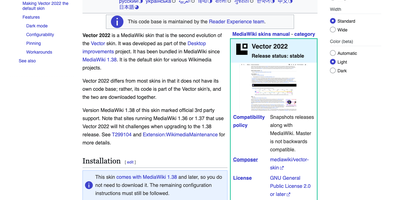
With MediaWiki, the wiki software behind Wikipedia, a team writes one shared knowledge base in plain wikitext or a visual editor while every revision stays saved for comparison and rollback. Page history names the author and edit summary of each change, and a side-by-side diff shows exactly what moved before anyone reverts. Talk pages hold threaded discussions with inline replies, notifications announce mentions and thanks, and watchlists flag the pages you follow. Namespaces, categories, redirects, and reusable templates give a large wiki its structure, and Lua modules written for Scribunto power infoboxes. Uploaded images get automatic thumbnails and a full-screen lightbox. Bundled extensions add PDF handling and math rendering for documentation that needs more than text. Group-based permissions decide who may read, edit, protect, or delete. A wiki can stay open to everyone or sit behind a login. AbuseFilter, CAPTCHAs, blocklists, and two-factor sign-in help fend off spam and account takeovers. Vector 2022 brings a sticky table of contents and an optional dark mode. The interface is localized in over 350 languages. Bots and scripts log in, read, search, and edit with the Action API. Use it for company handbooks, engineering runbooks, course notes, fandom encyclopedias, and public reference sites. Running on a dedicated VPS on RepoCloud with guaranteed CPU, RAM, and SSD, full root SSH access, and a browser serial console. GPL-2.0-or-later licensed.
Languagetool
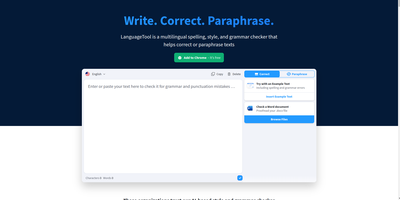
Grammar, punctuation, and style errors a dictionary lookup can't see: LanguageTool is open-source proofreading powered by a Java rule engine covering English, German, Spanish, French, Portuguese, Dutch, and 25+ other languages. Self-hosting the HTTP server is how you get Grammarly-class checking without sending every sentence you write to a third party - a real concern when the text being proofread is confidential email, legal drafts, or unreleased documentation. Your instance exposes the standard /v2/check API, so the official ecosystem plugs straight in: browser extensions for Chrome and Firefox accept a custom server URL, and integrations exist for VS Code, LibreOffice, Obsidian, Vim, Emacs, and many editors. Notably, self-hosting restores free browser-extension checking that the hosted service moved behind a premium subscription - your server, no character limits, no paywall. Detection quality is tunable: optional n-gram datasets (multi-gigabyte language models for en, de, es, fr, nl) teach the engine word-order and confusion-pair errors like there/their and brakes/breaks, and a fastText model improves automatic language identification. Everything runs offline once models are downloaded. The core is LGPL, the API is documented with Swagger, and rules are community- maintained and constantly expanding.
Aldine
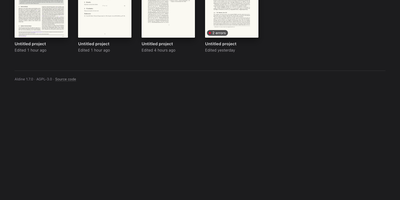
Paper co-authors usually trade .tex files by email or pay for a hosted editor seat by seat; Aldine replaces both with a self-hosted LaTeX workspace where the whole team types in one document at once and sees a typeset PDF seconds later. Live cursors and presence show who is editing which paragraph, and the underlying sync is conflict-free, so two authors can rewrite the same section without overwriting each other. Every project is a real git repository: branch a draft, edit it independently, and merge it back from the interface when the argument holds together. Connect GitHub, GitLab, Gitea, or Forgejo to push and pull without leaving the editor, watch ahead and behind indicators, resolve conflicts, and open a pull or merge request on the merged result. Moving in is painless, since an exported Overleaf project ZIP dropped on the home screen imports with its root file detected and its first typeset automatic. Citations come from your own Zotero library or a single collection, kept in sync as a .bib file and inserted from a search panel or \cite autocomplete. Reviewers select text and leave anchored, threaded comments, optionally with a suggested replacement the author accepts in one click. Compiles run in a sandboxed container with no network access, warm recompiles land in about two seconds, and errors jump to the offending line. Running on a dedicated VPS on RepoCloud with guaranteed CPU, RAM, and SSD, full root SSH access, and a browser serial console. AGPL-3.0 licensed.
Etherpad
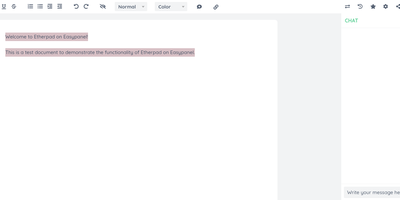
In continuous open-source development since 2009, Etherpad is the original really-real-time collaborative editor - used by Wikimedia, governments, EU public-sector institutions, and tens of thousands of self-hosters. Its core idea is visible authorship: every keystroke is attributed with author colors, every revision preserved, and the timeslider lets you scrub through a document's entire history character by character. Multiple people type into the same pad and see each other's changes instantly - it scales to thousands of simultaneous editors per pad. The base install is deliberately lightweight; capability comes from roughly 290 plugins installable from the admin web UI: comments, images, tables, drawing, video chat via WebRTC, math rendering, code highlighting, and authentication via OAuth, LDAP, or OpenID. AI is pointedly a plugin, not a default - you choose the model and infrastructure, or never turn it on. There is no telemetry. For integrators, an HTTP API (with OpenAPI definitions at /api/openapi.json) manages pads, users, and groups for embedding in your own applications, and the ueberDB abstraction layer supports PostgreSQL, MySQL, Redis, MongoDB, and SQLite backends. Full data export is built in, the format is open, it is translated into 105 languages, and it runs on anything from a Raspberry Pi to a server farm. Apache 2.0 licensed, Node.js based.
Flatnotes
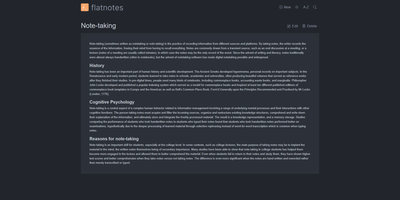
A web interface for a folder of Markdown files - Flatnotes is exactly that, and the discipline of that design is why people love it. Every note is a plain .md file in a single flat directory: no database, no proprietary format, no hierarchy to maintain, no export step if you ever leave. Edit notes in the browser or open the same files in VS Code or Obsidian, sync them with Syncthing or rsync while the app is running - the Whoosh-powered search index synchronizes incrementally, so external edits just show up. The interface is a clean Vue.js app with both WYSIWYG and raw Markdown editing modes (TOAST UI Editor), instant full-text search behind the "/" shortcut with partial-match support, wikilinks for cross-note references, and automatic tag extraction from #hashtags in note bodies. Light and dark themes and a mobile-responsive layout make it pleasant everywhere. Authentication is flexible for a personal tool: none, read-only, username/password, or TOTP two-factor. A documented REST API covers create/read/update/delete for automation. The operational story is the quiet selling point - the only state is the notes folder and a rebuildable index, so backup is copying a directory. For a personal notepad that respects your data, Flatnotes nails minimal.
Nowen Note
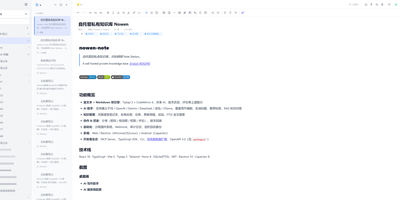
Nowen Note is a self-hosted knowledge base where your notes, tasks, daily journals, and mind maps live in one private workspace you control. One tree holds folders, rich-text documents, and Markdown notes side by side, with drag-and-drop ordering, unlimited nesting, colored tags, pinning, and full-text search across everything. Each note can switch between a rich-text editor and Markdown with live preview, split view, outlines, tables, code blocks, math formulas, diagrams, comments, and version history. Connect the AI provider you prefer, such as an OpenAI-compatible API, Gemini, DeepSeek, or local Ollama, to continue drafts, rewrite passages, translate, summarize, and ask questions answered from your own notes. Tasks get list, board, calendar, and timeline views with dependencies, recurring rules, reminders, and templates, while daily journals capture short entries, moods, and photos and roll them into AI weekly and monthly reviews. Teammates edit together in real time, and folder-level permissions, passwords, allow and deny rules, share links with expiry dates, and guest comments decide exactly who sees what. Imports arrive from Obsidian, SiYuan, Word documents, web pages, and plain Markdown, attachments can live on local disk or S3-compatible storage, and scheduled backups travel to email or WebDAV. Keep working offline with a cached workspace that syncs when you reconnect, clip pages from the browser extension, and connect other tools through the OpenAPI, SDK, webhooks, and MCP server. Running on a dedicated VPS on RepoCloud with guaranteed CPU, RAM, and SSD, full root SSH access, and a browser serial console. GPL-3.0 licensed.
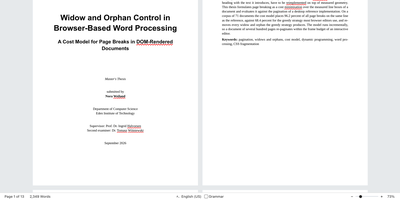
EdenText
EdenText is a full word processor, from quick notes to full-length books, that opens the docx and odt files you already have and keeps them looking the way Word or LibreOffice made them. Pages are real pages: A4 or Letter sizes, margins, headers and footers, footnotes, columns, and watermarks, with mirrored margins and chapters opening on the right-hand page when you are laying out a book. Paragraph, character, table, and list styles cascade with inheritance and chapter numbering, and tables sort rows and compute spreadsheet-style formulas. The academic toolbox is complete: table of contents, captions, cross-references, citations with bibliography, an alphabetical index, and LaTeX formulas. Reviewing works the way editors expect, with tracked changes, threaded comments in margin balloons, printable markup, spell checking in eight languages, and grammar checking for English. An optional AI assistant answers questions about the document and proposes edits as tracked changes through your own model provider. Nothing waits on a server: documents autosave in the browser, the app installs and works offline, and your words never leave the machine. Running on a dedicated VPS on RepoCloud with guaranteed CPU, RAM, and SSD, full root SSH access, and a browser serial console. AGPL-3.0 licensed.
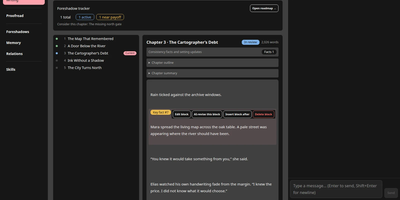
Show Me The Story
Somewhere between the brilliant novel idea you had in the shower and the finished manuscript sits a hundred hours of outlining, drafting, and continuity wrangling; Show Me The Story compresses that distance. Start with a synopsis and get a full chapter outline you can review, edit inline, or send back for revision before a single paragraph of prose exists. Once the outline is confirmed, the writing page drafts one chapter at a time with streaming output, then waits for your verdict: accept it, or highlight a passage and request a surgical revision that leaves the rest untouched. Characters, organizations, world rules, and relationships live in structured settings, complete with a relationship graph, and are woven into prompts automatically. A dedicated foreshadow system plans setups and payoffs chapters apart, tracks each thread from planted to resolved, and nudges you when one is overdue. After every chapter, extracted facts and a consistency check guard the story against contradictions, and an optional automatic mode keeps the chapters flowing while you supervise. Finished books can be diagnosed and polished in one pass, then exported as a single text file. Running on a dedicated VPS on RepoCloud with guaranteed CPU, RAM, and SSD, full root SSH access, and a browser serial console. MIT licensed.
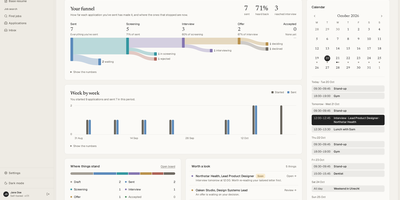
Dossier
Paste in a job posting and Dossier, a self-hosted job search app, shows how your profile matches it, then drafts a tailored resume and cover letter that use only facts you have given it. Requirements your profile cannot back up appear as gaps instead of invented experience, and a chat lets you refine any part, undo AI changes, or return to an earlier version. Twelve resume themes and a theme builder print to PDF on the server. Find jobs through JSearch, Adzuna, or Germany's Bundesagentur für Arbeit, score a posting against your profile, and start an application in one click. An optional job agent runs one search a day and can prepare drafts that wait for your approval; it never sends or applies. A board and a table track each application from draft to offer, and the dashboard charts your funnel week by week. Connect Gmail and Google Calendar to send applications from your own address, have the AI read employers' replies and draft answers, and keep interviews in step both ways, with nothing sent until you confirm. Choose a local model through Ollama or LM Studio, or a hosted OpenAI-compatible, Anthropic, or Mistral provider. Everything exports as one file, with nightly backups. Running on a dedicated VPS on RepoCloud with guaranteed CPU, RAM, and SSD, full root SSH access, and a browser serial console. AGPL-3.0 licensed.
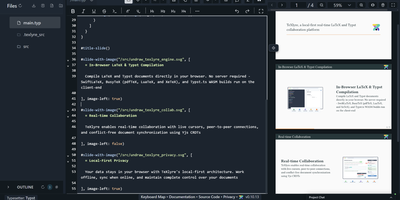
TeXlyre
In TeXlyre, two coauthors edit the same LaTeX or Typst file at once, and the PDF compiles inside the browser tab instead of on someone else's server. Start from a template: arXiv preprint, IEEE paper, Tufte book, Beamer deck. pdfTeX, XeTeX, and LuaTeX compile with BibTeX and Biber. Errors turn into readable cards that jump to the failing line. Live cursors show who is typing where. A shared link brings coauthors in, no accounts needed. Chat sits beside the editor, and comments can be discussed and resolved. Tracked insertions and deletions land in a review panel to accept or reject. Draw.io and TikZ editors open inside the project for shared diagrams. MathLive edits a formula under the cursor with a virtual keyboard. A bibliography panel tidies BibTeX, matches DOIs, and imports from Zotero and OpenAlex. Large files travel straight from one collaborator's browser to another. Projects export as ZIP, sync to a local folder, or back up to GitHub, GitLab, Gitea, and Codeberg. Vim, Emacs, and Helix keybindings are one setting away. The app installs as a progressive web app and works offline. Language servers like LTeX LS Plus, Harper, and Tinymist plug in through recipes beside your own signaling and TeX Live package servers. Running on a dedicated VPS on RepoCloud with guaranteed CPU, RAM, and SSD, full root SSH access, and a browser serial console. AGPL-3.0 licensed.

TavernAI
Character-based chat and storywriting with large language models: TavernAI is the open-source frontend that leaves model choice to you. It generates no text itself; it connects to the backend of your choice - OpenAI (including GPT-4), Anthropic Claude, KoboldAI and KoboldCpp, Oobabooga's Text Generation Web UI, NovelAI, Ollama, and the crowdsourced Horde - so cost, model quality, and content policy are decided by your backend, not the interface. Characters are defined by portable card files in PNG or JSON format with personality, scenario, and example dialogue, and tens of thousands of community-made cards from sites like Chub.ai import directly. Conversations support group chats with multiple characters, a story mode for long-form writing, message swiping to branch between alternative responses, and full editing of any message. World Info injects lore into context when keywords trigger, keeping long roleplays consistent. Themes, custom backgrounds, and configurable generation settings round out the interface. It runs on Node.js, and the SillyTavern project began as a fork of it.
CodeX Docs
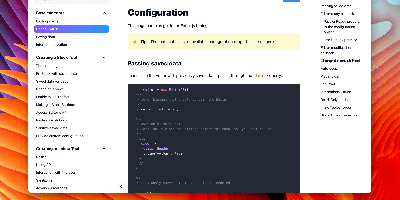
Writing docs should feel like editing a modern document, not wrangling Markdown files - CodeX Docs delivers that on Editor.js, the block-styled editor its CodeX team builds and thousands of products use. Content is composed from clean blocks (headings, lists, code, images, embeds) with a UI that reads well on both desktop and mobile, and pages render statically with human-readable, SEO-friendly URLs. Structure is free-form: pages nest to any depth, so a flat FAQ and a deep product manual coexist in one instance, and the UI tunes to fit - collapse sections, hide the sidebar. The operational footprint is deliberately tiny. No database is required: the default driver persists to a local folder, with MongoDB available when you want it, and the whole app configures through one YAML file (overridable with APP_CONFIG_ environment variables) covering title, start page, auth password, and JWT secret. Editing mode sits behind password authentication. Thoughtful extras are wired in: readers can report misprints straight to your Telegram or Slack, Hawk error tracking catches frontend and backend exceptions, and Yandex Metrica analytics is a one-line config. A ready-made Helm chart covers Kubernetes. Written in TypeScript.