Nebula
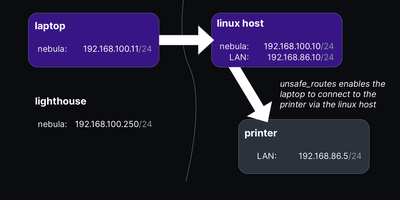
Give every laptop, server, and cloud VM you own one private address that works from anywhere, and that is exactly the overlay network Nebula builds. Each machine runs a single small binary, presents a certificate signed by your own certificate authority, and joins a peer-to-peer layer-3 mesh where tunnels form on demand between hosts that need to talk. Lighthouse nodes, the piece you park on a VPS, keep track of where every peer can be reached and introduce hosts to each other, so machines find each other without any central VPN concentrator carrying their traffic. UDP hole punching and keepalive packets open direct tunnels through home routers and office NAT, and when two hard NATs refuse to cooperate, a relay host forwards the encrypted traffic until a better path appears. Every host enforces its own firewall, default deny on all overlay traffic, with rules keyed to certificate groups, so laptops in the user-endpoint group can reach a server's web port while other groups cannot. Ordinary hosts need no inbound ports at all, and the same binary runs on Linux, macOS, Windows, phones, and FreeBSD, making the mesh feel identical at home, in a datacenter, or across three clouds. Unsafe routes can even pull an existing office subnet into the overlay, giving legacy hardware that will never run Nebula an address on the private network. Running on a dedicated VPS on RepoCloud with guaranteed CPU, RAM, and SSD, full root SSH access, and a browser serial console. MIT licensed.
DefGuard
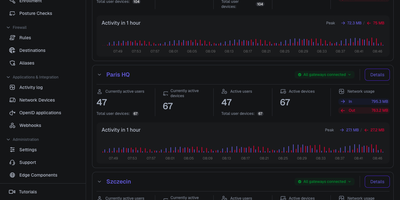
Behind one admin panel, DefGuard runs a WireGuard VPN, an identity provider, and multi-factor authentication, so every person and device proves who they are before reaching your private network. Administrators define VPN locations, assign which users and groups may enter each one, and enforce firewall rules that allow or deny traffic per location, with changes applied to gateways in real time. People enroll remotely through a guided self-service flow, register their own laptops and phones, and connect with desktop and mobile clients that show live connection statistics. Sign-in goes well beyond passwords, because the built-in OpenID Connect provider gives internal tools single sign-on, while TOTP codes, WebAuthn and FIDO2 keys, email tokens, and mobile biometrics gate each connection. Directory teams sync accounts from LDAP and Active Directory, or federate sign-in through Google, Microsoft, and custom OpenID providers, instead of maintaining a separate user list. Every authentication, enrollment, and policy change lands in a searchable activity log, and webhooks plus a REST API let surrounding systems react to access events automatically. Gateways keep enforcing access from a local cache when the control plane is unreachable, and several gateways can front the same location for failover. Running on a dedicated VPS on RepoCloud with guaranteed CPU, RAM, and SSD, full root SSH access, and a browser serial console. AGPL-3.0 licensed.
zrok
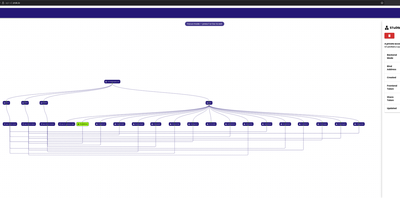
zrok puts services that live behind NAT and firewalls onto the public internet with a shareable URL, without opening a single inbound port. The machine being shared dials out to an OpenZiti overlay network, so a web app on your desk, a Raspberry Pi at home, or a staging box inside a corporate network becomes reachable through your instance while its firewall stays closed. One command shares an HTTP service publicly; add a name from one of your namespaces and the URL stays stable even when you move the backend to a different machine, and an ephemeral name can be promoted to a reserved one when a quick demo turns into a keeper. Private shares skip the public internet entirely and reach only the users you grant, including raw TCP and UDP services, while web and drive backend modes publish static sites or whole folders, with OAuth, password auth, and an interstitial warning page available on public shares. The long-running agent keeps every share and access under one process, restarts the named ones after a reboot, and offers a localhost console for point-and-click sharing; the account-wide web console maps your environments, shares, and accesses as a navigable graph or a sortable table with live activity. Operators get invite-based accounts, InfluxDB-backed usage metrics, and configurable limits that warn or cut off accounts that exceed their quotas. Running on a dedicated VPS on RepoCloud with guaranteed CPU, RAM, and SSD, full root SSH access, and a browser serial console. Apache-2.0 licensed.
ZTNET
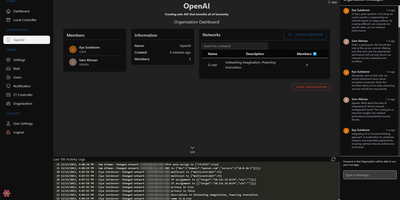
ZTNET provides a polished web dashboard for running your own ZeroTier network controller, covering network creation, member authorization, IP assignment, flow rule editing, and real-time node monitoring entirely from the browser. The organization system supports multi-tenant deployments where teams manage separate network pools with role-based permissions and customizable email notification templates for events like member joins, departures, IP changes, and authorization updates. Each network view displays connected members with their ZeroTier addresses, assigned IPs, last-seen timestamps, physical endpoints, and protocol versions in a clean tabular layout. The admin panel provides platform-wide user management, SMTP configuration for transactional emails, and system-level settings. Built on the T3 stack with Next.js, Prisma ORM, tRPC, TypeScript, and Tailwind CSS with DaisyUI components, the application supports both PostgreSQL and SQLite for persistence and communicates directly with the ZeroTier controller daemon through its native API. Dark and light themes adapt to user preference, and responsive layouts make network management practical from any device. Docker Compose bundles the web application alongside the ZeroTier controller service. Over 100,000 Docker pulls confirm steady community adoption. GPL-3.0 licensed.
Wag
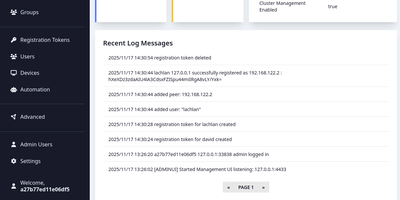
Wag is an authentication gateway for WireGuard that lets each device reach only the routes it should, and asks for a second factor before the sensitive ones open. Admins write access policies for everyone, groups, or single users, marking subnets, hosts, ports, and protocols as MFA-required, always allowed, or denied, and the most specific prefix wins, so one allowed address can sit inside a protected range. Devices join with a registration token, and the public endpoint answers with a finished WireGuard profile. Users then confirm a TOTP code, a WebAuthn security key, an OIDC single sign-on login that maps identity provider groups into Wag groups, or a PAM prompt, and repeated failures lock the account. Session lifetime and idle timeouts decide when they must prove themselves again. The browser portal lists users, devices, rules, registration tokens, and webhooks with real-time notifications, while a command line locks devices, resets MFA, and manages administrators. Webhooks turn JSON from an HR or identity system into new tokens or removed users and devices, and clients can fetch the list of guarded routes from a small API. Remote staff, contractors limited to one host, and homelabs are typical uses. When a server fails, the VPN remains reachable through clustering with witness nodes or an external etcd, and certificates arrive through ACME with HTTP-01 or Cloudflare DNS-01. Running on a dedicated VPS on RepoCloud with guaranteed CPU, RAM, and SSD, full root SSH access, and a browser serial console. BSD-3-Clause licensed.
Meshlan
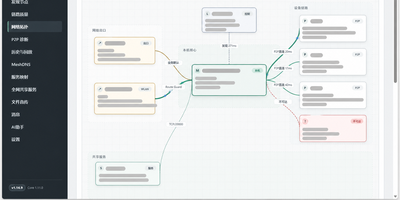
Meshlan turns your own Linux server into the control plane for a private virtual LAN that connects remote Windows devices as if they sat on the same router. Devices pair through your server, receive their certificates, and then talk directly to each other over encrypted tunnels whenever NAT allows, using dual-stack hole punching, UPnP, and STUN diagnostics to find a path. When a direct connection is impossible, traffic falls back to relays, and multiple relay nodes are chosen automatically by latency, jitter, packet loss, and health. You can publish a service that only listens on localhost, a local API, a web panel, a database, a game server, to the mesh on a custom port, with direct access or manual approval by its creator. Names stay stable while addresses change: devices answer to names like alice.mesh and services to api.alice.mesh, and an HTTPS gateway serves mesh websites without port numbers. Files move directly between devices over the encrypted link while the server only distributes metadata. The console shows the live topology with P2P and relay paths, latency, and service health, and local history keeps traffic and events for replay with a time slider. Optional AI automation keeps model keys on the server, encrypts context end to end, and asks for your confirmation before changing anything. Signed updates verify and roll back automatically when a health check fails. Running on a dedicated VPS on RepoCloud with guaranteed CPU, RAM, and SSD, full root SSH access, and a browser serial console. MIT licensed.
Headplane
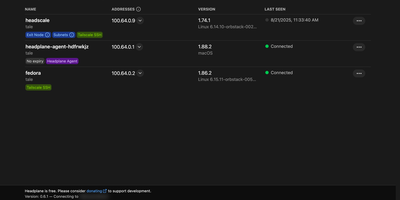
Instead of wrestling with raw command-line flags and YAML configuration files for every device on your self-hosted Headscale mesh VPN, Headplane gives you a Tailscale-style web administration console to manage machines, users, DNS records, and access policies from any browser. From the machines overview, network administrators can inspect connected nodes, view Tailnet IPv4 and IPv6 addresses, rename devices, reassign ownership across users, toggle key expiration, and approve advertised subnet routes or exit nodes in a couple of clicks. Built-in Access Control List (ACL) management lets you edit security policies, define user groups, assign node tags, and configure auto-approvers without manually SSHing into your control server. When someone needs immediate shell access to a remote Linux host on the mesh, the integrated WebSSH console opens an interactive terminal session right inside the browser tab over Tailscale SSH. You can also manage MagicDNS settings, configure split DNS nameservers, and add custom DNS records that automatically reload your Headscale instance. Multi-user administration supports OpenID Connect (OIDC) single sign-on with identity providers like Okta, Authentik, Authelia, and Google Workspace, alongside granular role assignments and pre-authentication key generation for unattended server enrollment. Running on a dedicated VPS on RepoCloud with guaranteed CPU, RAM, and SSD, full root SSH access, and a browser serial console. MIT licensed.
NetsGo
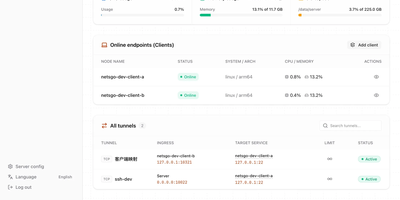
Created to eliminate the configuration fragmentation plaguing multi-device Homelab setups and small-team infrastructures, NetsGo merges what typically requires three separate tools — a tunnel daemon, a management panel, and a monitoring stack — into a single Go binary that starts with one command and listens on one port. The server exposes HTTP, TCP, and UDP tunnels, a built-in Web console for node management, a REST API for automation, and real-time traffic statistics with per-client bandwidth limiting, all sharing default port 9527 so firewalls and reverse proxies need only a single rule. Version 0.1.11 introduced Client-to-Client P2P tunnels via WebRTC DataChannel with three selectable transport strategies — Server relay, Prefer P2P with automatic fallback, and P2P only — reducing latency for direct connections while maintaining the centralized control plane. The management console displays every connected client's online status, authentication tokens, tunnel configuration, active transport mode, P2P candidate gathering progress, and cumulative byte-level traffic counters updated every second. Unlike frp or rathole which delegate management to external plugins or configuration files, NetsGo provides built-in client key generation, tunnel target migration between nodes, SOCKS5 proxying, IP-whitelist console access, and one-command server upgrades. Running on a dedicated VPS on RepoCloud with guaranteed CPU, RAM, and SSD, full root SSH access, and a browser serial console. Apache 2.0 licensed.
ShellHub
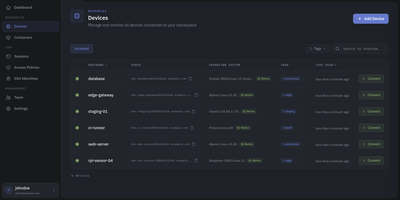
Every server, embedded board, and edge gateway you manage becomes reachable through one SSH address in ShellHub, even when it sits behind NAT with no public IP and no open inbound port. A small agent on each device dials out to your server, so a box on a customer LAN or a cellular link needs nothing beyond outbound web access. Connect with the stock ssh client by typing [email protected]@server, or open a terminal in the browser, and scp, sftp, rsync, and port forwarding work unchanged. SSH identities tie every key to a named team member, so removing someone ends their access on every device at once. Default-deny access policies grant or block members, roles, users, or API keys by device tag, Linux login, and source address, and can require a fresh browser confirmation before a session opens. Provisioning keys enroll whole fleets through automatic, manual, webhook, or allowlist acceptance, with usage limits, expiry dates, and tags. The Sessions page records who connected to which device, as which login, and from where, and browser terminals can be recorded and replayed. A Docker connector turns containers into devices that policies can grant one by one. Four member roles shape what each person can change, and the HTTP API, API keys, and an MCP server let scripts and AI assistants list devices and review sessions. Running on a dedicated VPS on RepoCloud with guaranteed CPU, RAM, and SSD, full root SSH access, and a browser serial console. Apache-2.0 licensed.
DockFlare
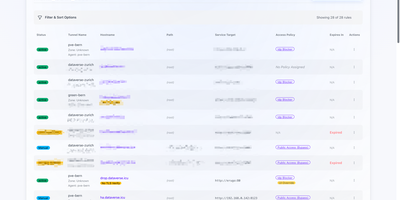
Combining Docker container labels with a live web control plane, DockFlare automates Cloudflare Tunnel ingress routing, multi-zone DNS records, and Zero Trust Access policies across self-hosted infrastructure. DevOps engineers and homelab operators can attach simple container labels to expose HTTP, HTTPS, TCP, SSH, and RDP services publicly in seconds without clicking through external cloud dashboards. For non-containerized workloads such as bare-metal hypervisors or network appliances, administrators can define manual ingress rules, path-based routes, custom TLS SNI headers, and origin certificate bypass flags directly in the web interface. Security teams use reusable Access Groups and wildcard zone policies to enforce Google, GitHub, Azure AD, or custom OIDC authentication across every subdomain from a single policy definition. Distributed deployments connect lightweight remote agents back to the primary controller using Zero Trust service tokens so multi-host clusters share one unified routing view. When containers stop or restart, configurable grace-period timers prevent accidental route churn before cleaning up stale DNS entries, while encrypted state backups protect your entire ingress configuration. Running on a dedicated VPS on RepoCloud with guaranteed CPU, RAM, and SSD, full root SSH access, and a browser serial console. GPL-3.0 licensed.
Wiredoor
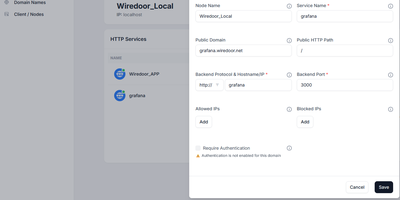
A self-hosted front door for apps that live on home labs, office LANs, and private clusters, Wiredoor publishes them to the internet without opening a single inbound port on the private side. The Wiredoor CLI on each remote machine dials out to the server over an encrypted WireGuard tunnel. Web apps and APIs are routed by domain and path, WebSocket traffic included, while TCP and UDP services such as SSH or Redis get a public port of their own. Public domains receive Let's Encrypt certificates, internal names fall back to self-signed ones, and Cloudflare or GoDaddy credentials let the server create DNS records itself. Any web route can demand OAuth2 sign-in with an email allow list and a few open paths, and every protocol accepts IP allow lists. Gateway nodes stretch one tunnel across a Docker network, Kubernetes cluster, or private subnet, so a single link serves many backends. Services can be switched off or given an expiry such as 30 minutes, 2 hours, or 1 day. The dashboard shows which nodes are connected and whether their services are enabled, while the CLI creates, enables, and disables services from a terminal. Optional Prometheus and Grafana views chart traffic and tunnel peers, and CrowdSec can block abusive addresses. Running on a dedicated VPS on RepoCloud with guaranteed CPU, RAM, and SSD, full root SSH access, and a browser serial console. Apache-2.0 licensed.