ContainerFlow
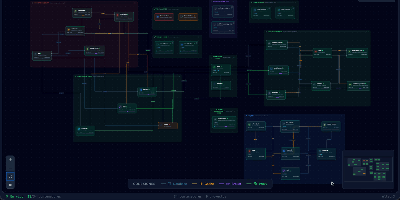
Your database container is probably not at 98 percent memory, whatever docker stats claims, because most of that figure is reclaimable page cache; ContainerFlow subtracts the full cache and shows the memory your containers actually hold. Point it at a Docker socket and it draws the whole estate as a living map: every Compose project discovered automatically, services grouped and colour coded, and the connections between them inferred, app to database, proxy to app, worker to broker. CPU and memory refresh every three seconds, the graph flashes when a container starts, stops, or restarts, and seven days of metric history wait in a local store when you need to know what happened overnight. Click any node and a detail panel opens with live logs you can filter by stream, an inline terminal that runs commands inside the container, and buttons to start, stop, restart, rebuild, recreate, or remove it. The same panel teaches as it works, flagging containers that run with no memory limit, no CPU limit, or no restart policy, while Discord webhooks fire when a container you care about crosses a threshold you set. Running on a dedicated VPS on RepoCloud with guaranteed CPU, RAM, and SSD, full root SSH access, and a browser serial console. AGPL-3.0 licensed.
plMail
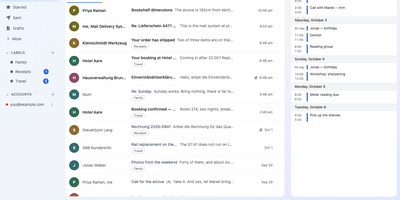
Gmail, Outlook, and every IMAP mailbox you own share one inbox, one search box, and one calendar in plMail, a mail client you host yourself. Accounts sit side by side with sending aliases, and new mail arrives on its own through IMAP IDLE, Gmail and Outlook push, and browser notifications. Credentials are encrypted before storage. Search understands from:, subject:, label:, has:, and before:, completes as you type, and highlights matched words. Filters are nested any, all, or none trees, and each shows how many real messages match before you save it. Drag several conversations at once onto folders, labels, or inbox tabs; a label adds itself without removing the mail from your inbox. A calendar sits beside the mail, with two-way sync for Google, Microsoft, and CalDAV. Move events on the week grid, answer invitations in place, and send share and booking links. An optional language model, pointed at your own Ollama server or any OpenAI-compatible endpoint, searches by meaning, drafts replies, summarizes threads, and sorts mail into tabs once you switch it on. Attach files from and save them to Drive, OneDrive, Dropbox, Nextcloud, Immich, and Paperless-ngx. Sign in through Authentik, Keycloak, or any OpenID Connect provider, and pick from 41 themes. Android and iOS apps connect to your own server. Running on a dedicated VPS on RepoCloud with guaranteed CPU, RAM, and SSD, full root SSH access, and a browser serial console. AGPL-3.0 licensed.
Marmot
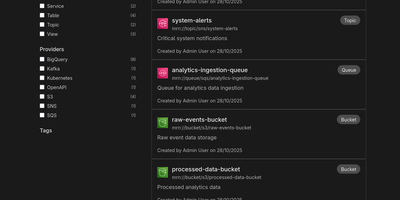
Cataloging tables, topics, queues, and APIs across fragmented data stacks usually demands heavyweight enterprise governance suites, yet Marmot delivers fast full-text asset discovery and AI-ready metadata context in a single self-hosted service. Data engineering and platform teams use its 71 official plugins to automatically ingest schemas, run histories, and dependencies from Apache Kafka, Airflow, Iceberg, Superset, PostgreSQL, BigQuery, and AsyncAPI specifications without moving raw table rows or message payloads. From the web interface, analysts can run structured boolean queries, filter assets by custom tags or PII classifications, and inspect column-level schemas in seconds. Interactive upstream and downstream lineage graphs let engineers trace how events flow from message brokers into warehouse tables and BI dashboards so they can assess what breaks before renaming a column or deprecating an endpoint. Shared business glossaries, bidirectional ownership assignments, and curated data product bundles ensure every department speaks the same language and knows exactly which team maintains each pipeline. Through the built-in Model Context Protocol server, AI assistants in Cursor, Claude Desktop, and LibreChat can invoke tools like discover_data, find_ownership, and lookup_term to answer natural-language questions against live catalog metadata instead of guessing. Platform administrators can also manage catalog resources declaratively using the REST API, CLI, Terraform provider, or Pulumi integration. Running on a dedicated VPS on RepoCloud with guaranteed CPU, RAM, and SSD, full root SSH access, and a browser serial console. MIT licensed.
Medama
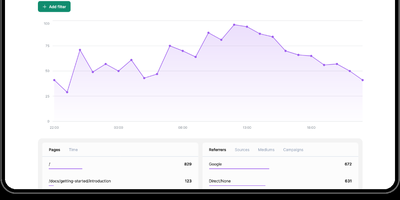
Track website traffic and conversion funnels with sub-second precision while guaranteeing visitors total anonymity with Medama, a privacy-first web analytics platform operating without cookies, IP storage, or consent banners. Site owners embed a sub-kilobyte tracking script into web headers to record page views, session duration, referrers, screen resolutions, browser user agents, and geographic countries anonymously. Built-in caching header mechanisms determine unique daily visitors without generating persistent hashes or storing cross-site identifiers that violate privacy regulations. The web dashboard visualizes hourly traffic trends with interactive area charts and provides multi-dimensional data tables breaking down top-performing pages, search engine referrers, operating systems, and campaign UTM parameters. Developers can instrument custom click events and page attributes using simple HTML data attributes to measure conversions, document downloads, button interactions, and user subscription states. Administrators manage multiple websites from a single interface, configure curated anti-spam blocklists using Firehol and Tor exit node feeds, and monitor server CPU, memory, and disk usage in real time. Full OpenAPI specification endpoints allow teams to export analytics data directly into internal business intelligence pipelines and custom executive dashboards. Running on a dedicated VPS on RepoCloud with guaranteed CPU, RAM, and SSD, full root SSH access, and a browser serial console. Apache-2.0 licensed.
Minimax Music UI
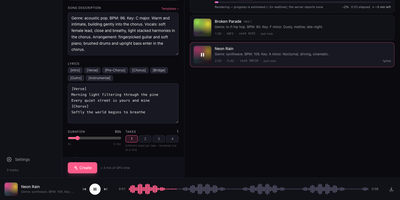
Minimax Music UI turns a self-hosted MiniMax-Music3 model into a private song factory, giving you a Suno-style studio where you describe a track, add lyrics, and watch finished songs appear in your own library. The Create panel works in Simple or Custom mode: write a style description covering genre, BPM, key, vocals, and arrangement, then shape words in a lyrics editor with one-tap [Verse], [Chorus], [Bridge], and [Instrumental] section chips. One submit can queue up to four takes at 5 to 360 seconds each, and the render queue shows queued, rendering, and done states with elapsed time, cancel, and retry, surviving a server restart without losing your place. When you run the bundled inference server, you can even press play on a track that is still rendering and hear the waveform grow in real time. A magic wand rewrites rough ideas into structured music captions, and a second wand drafts original lyrics sized to your chosen duration, both through any OpenAI-compatible model you point it at. Finished renders land in a searchable library with cover art, seeds, and render times, ready to download as WAV, reuse as a template, or open in a detail panel with the prompt and lyrics. A sticky waveform player with seek and keyboard shortcuts keeps music going while you work, and an optional access token locks the whole studio down. Running on a dedicated VPS on RepoCloud with guaranteed CPU, RAM, and SSD, full root SSH access, and a browser serial console. MIT licensed.
Pipedash
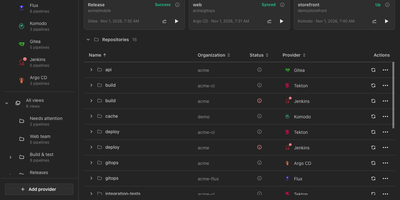
Pipedash unifies pipelines from twelve CI/CD providers into one self-hosted dashboard for watching statuses, reading job logs, and triggering, rerunning, or cancelling runs without opening each provider's site. Connect GitHub Actions, Gitea Actions, GitLab CI, Azure DevOps, Bitbucket, Buildkite, Jenkins, Tekton, ArgoCD, FluxCD, Komodo, or Prow, and every workflow lands in one list grouped by repository. Filters narrow by status, provider, organization, or time range, and saved views with rules, sub views, and pins give each team its own shortlist. Run history records each attempt with its commit, branch, actor, and duration, and opening a run reveals its jobs and a searchable log viewer that streams live output. Trigger forms load the workflow's own inputs, pipeline variables, or job parameters from the provider, so parameterized runs start with real values. Reruns reuse the original inputs, GitHub runs can restart only failed jobs, and stuck builds can be cancelled singly, in bulk, or by repository. Metrics charts track duration, success rate, and run counts per pipeline by hour, day, week, or month with P95 and P99 values. A notifications inbox gathers failures, degraded workloads, long running builds, and provider outages, while health panels place status pages beside the pipelines they describe. Every dashboard action is a REST API route under /api/v1 with bearer authentication, provider tokens stay encrypted at rest, and the server sends no telemetry. Running on a dedicated VPS on RepoCloud with guaranteed CPU, RAM, and SSD, full root SSH access, and a browser serial console. GPL-3.0 licensed.
Chaptarr
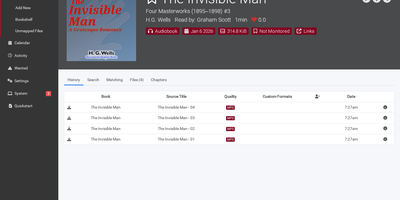
One library for the books you read and the books you listen to: Chaptarr manages audiobooks and eBooks side by side, so the same title can live on your server as a chaptered M4B and an EPUB without two separate apps fighting over it. It knows the difference between editions and narrators, which means a dramatized production, an unabridged reading, and the print text can coexist as first-class versions of one work. Multi-part releases and multi-file recordings are handled as single books, and MP3 audiobooks can be converted into one chaptered M4B with chapters preserved or inserted where they are missing. Separate root folders keep audiobooks and eBooks apart, or place eBooks alongside their audio twins; either way, matching uses file tags, folder names, and release metadata to attach files to the right book automatically. Series are organized for you, metadata profiles control which languages belong in your library, and flexible renaming tokens produce filenames that read the same way a human would shelve them. Custom quality profiles per library drive automatic upgrades when a better release appears, and the standard download clients and indexer integrations from the *arr family plug straight in. Running on a dedicated VPS on RepoCloud with guaranteed CPU, RAM, and SSD, full root SSH access, and a browser serial console. GPL-3.0 licensed.
Doca
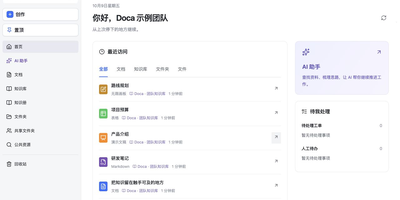
Doca puts rich text, Markdown, spreadsheets, slides, and an infinite canvas under one login and one permission model, giving individuals and small teams a self-hosted workspace for writing together. Every format supports real-time co-editing with presence, comments, saved history, and manual snapshots, and rich text and Markdown documents can be restored to an earlier version. Documents live in knowledge libraries with tree navigation, invitations, inherited permissions, share links, and trash, while personal files and shared folders sit on local disk or S3-compatible storage. Knowledge books go further: they subscribe to sources, run an editable workflow, keep source evidence, and route results through human review. A personal AI assistant, powered by whichever model you configure, searches authorized documents, reads PDF and Office attachments, edits images, and prepares browser drafts. MCP services let external AI clients such as Codex use those tools under your permissions. Sign in with a password, OIDC, Google, GitHub, WeChat, or QQ, review registrations before they go live, and send webhooks to other systems. A plugin SDK and marketplace add business modules, and a browser extension clips pages into documents. The interface ships in Chinese and English. Running on a dedicated VPS on RepoCloud with guaranteed CPU, RAM, and SSD, full root SSH access, and a browser serial console. MIT licensed.
EveryOS
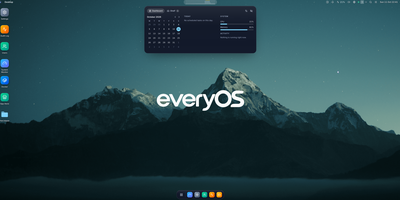
EveryOS gives the Linux server you already own a desktop it never had: open a browser and your machine greets you with windows you can move, snap, and stack, a dock, virtual desktops, widgets, and a launcher, all remembering exactly how you left them. Your files live in a private home with the usual folders, previews, a text editor, and a trash you can restore from, and plugging in a USB disk makes it appear on the desktop ready to mount. An app store installs self-hosted applications from catalogs and follows each deployment, later offering updates that keep your settings, rollbacks when one goes wrong, and backups of app data. The same workspace watches the machine itself: CPU, memory, disk, and network at a glance, systemd services and logs, available package updates, and a Docker view for containers and Compose projects. A real terminal opens in the browser under your own Linux account, Home Assistant arrives as a panel and desktop widgets with its tokens kept on the server, and an AI assistants app can find or install a local model server such as Ollama and chat with it privately. Running on a dedicated VPS on RepoCloud with guaranteed CPU, RAM, and SSD, full root SSH access, and a browser serial console. MIT licensed.
salt.md
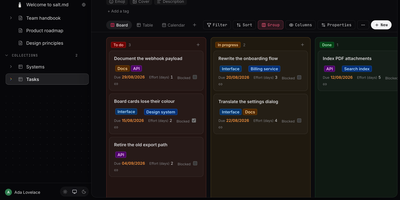
salt.md is an open-source, self-hosted workspace where your team and its AI agents work on the same documents and databases, under the same permissions and with the same history. A slash-menu block editor handles checklists, tables, callouts, columns, code, diagrams, and embeds. Page links, backlinks, and a graph view show how pages connect. Any page can become a collection with typed properties like select, date, person, relation, rollup, and formula, shown as a table, board, list, gallery, calendar, timeline, or form. Ctrl+K searches titles, body text, row values, and the text inside uploaded PDFs. Two people can type in the same paragraph at once with live cursors. Comments, page history, and an activity log record who changed what. Publish a page as a read-only link with an optional password and expiry, or hand people without accounts a form that adds rows to a collection. Agents connect over MCP with 33 tools for searching, writing, building databases, and commenting, using tokens scoped to one workspace or read-only. Signed webhooks, iCalendar feeds, and Google or Microsoft sign-in link it to the rest of your stack. Import Markdown, ZIP archives, or a Notion export, and export pages as Markdown, HTML, or PDF. Use it for handbooks, meeting notes, project boards, and a knowledge base your assistants can read. Running on a dedicated VPS on RepoCloud with guaranteed CPU, RAM, and SSD, full root SSH access, and a browser serial console. AGPL-3.0 licensed.
Berth
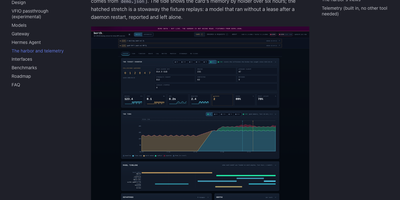
A single GPU can only hold so many models at once, and when a chat server, an image pipeline, and a voice engine all grab VRAM together, somebody runs out of memory and crashes. Berth fixes the scramble by making every engine lease the card: wrap a launch in berth run and the daemon grants memory in turn, queues the rest with an honest place in line and a start estimate, and drains a holder cleanly before the next load begins. The broker learns each engine's real footprint from its runs, so grants are sized by measured peaks instead of guesses, and processes that grab memory without a lease are reported as stowaways, never killed, with contested grants flagged in plain sight. A collisions board counts what the scheduling prevented: avoided collisions, VRAM handed off, drains, stuck releases, and refusals, and every count links back to a gap free event log you can follow live. The Harbor web UI turns that into a departures board of leases, a six hour tide of memory by holder, engine cards with decode throughput and a token ledger, plus a per model leaderboard and thirty days of stored history. Alerts reach your desktop or a webhook, Prometheus scrapes the metrics endpoint, and multi GPU machines can even pass one card through to a VM while the others keep serving. Running on a dedicated VPS on RepoCloud with guaranteed CPU, RAM, and SSD, full root SSH access, and a browser serial console. Apache-2.0 licensed.
ComposeToolbox
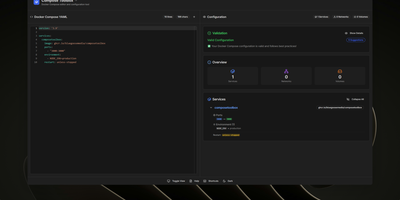
To eliminate YAML indentation errors and cryptic container misconfigurations before running docker compose up, ComposeToolbox pairs a full-featured code editor with a live configuration analyzer in a single self-hostable web workspace. Paste or write any docker-compose.yml file in the left pane to see immediate syntax validation alongside actionable best-practice warnings, such as unpinned latest image tags, missing healthchecks, or deprecated version declarations. On the right side, an interactive Configuration Overview breaks down every defined service, exposed port mapping, persistent volume mount, environment variable, and custom network into structured tabs. Built-in Quick Insert buttons let operators drop new service blocks, volume definitions, or network stanzas into the editor with one click. By mounting the persistent /app/data directory, administrators can define custom quick-insert YAML snippets with selectable hardware and networking icons in custom-templates.yml. Teams can also customize startup-template.yml so the editor opens with their organization's standard homelab or production boilerplate every time the page loads. Keyboard shortcuts, light and dark themes, and one-click YAML formatting or file export streamline daily container authoring. Running on a dedicated VPS on RepoCloud with guaranteed CPU, RAM, and SSD, full root SSH access, and a browser serial console. MIT licensed.
Jirafeau
Upload a file, get a unique download link and a separate delete link - Jirafeau has done exactly this one thing since 2008. It is plain PHP with no database, no mail server, no JavaScript framework, and no external dependencies - files and metadata live on the filesystem, which is why it runs on nearly anything and why it has outlasted most of its imitators. Uploads use the HTML5 file API, so PHP's post_max_size ceiling does not constrain file size, with live progress showing speed, percentage, and time remaining. Every upload takes options: expiration from one minute to a year to unlimited, self-destruct after first download, and password protection with configurable policy - passwords can be optional, required, or server-generated with complexity rules. Server-side encryption (modern builds use XChaCha20-Poly1305) stores files encrypted at rest with the decrypt key embedded only in the download URL, never on the server, so a compromised host cannot read the contents. Unencrypted deployments get file-level deduplication - identical files stored once with multiple links. Upload access can be gated by password lists or IP allowlists, a small admin panel manages stored files, and a CLI cleanup script handles expired files via cron. Recipients can preview supported files in-browser.
GeoLens
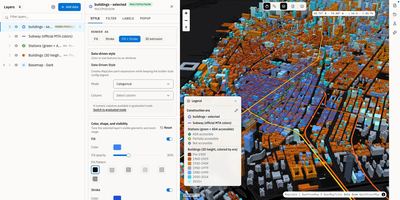
Transforming scattered spatial files into an interactive data catalog, GeoLens empowers engineering and GIS teams to organize geospatial assets, execute semantic searches, and build interactive 3D maps on self-hosted infrastructure. Users can ingest shapefiles, GeoJSON boundaries, database tables, and Cloud-Optimized GeoTIFF rasters into a centralized inventory with automatic source freshness auditing. Natural language queries evaluate dataset relevance across spatial boundaries and thematic tags, allowing analysts to uncover hydrology networks or zoning footprints without knowing exact layer names. The browser-based composition canvas lets cartographers extrude three-dimensional building footprints, overlay elevation terrain contours, color features by attribute values, and reorder layer hierarchies with drag-and-drop ease. Finished map projects publish immediately as secure shareable web links or responsive embeds for external dashboards. Desktop GIS operators can connect directly from QGIS or ArcGIS through native OGC API Features and STAC endpoints to query live vector tiles and run spatial filters. Teams can export filtered geometries into GeoPackage, FlatGeobuf, GeoParquet, or PMTiles archives to support downstream analysis workflows. Running on a dedicated VPS on RepoCloud with guaranteed CPU, RAM, and SSD, full root SSH access, and a browser serial console. Apache 2.0 licensed.
ScribeWizard
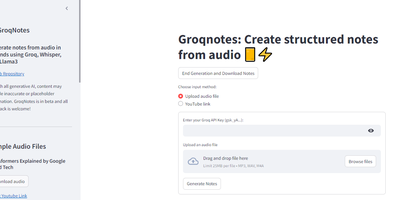
Audio lectures become structured, Markdown-formatted notes in about a minute with ScribeWizard (also known as GroqNotes). Upload an MP3, WAV, or M4A file - or paste a YouTube link - and the app runs a three-stage pipeline on Groq's LPU inference hardware: Whisper Large v3 transcribes the audio, a larger Llama model drafts a comprehensive outline of the material, and a faster Llama model fills each section with detailed content. This scaffolded prompting strategy is the core idea: the strong model handles structure where quality matters most, the fast model handles volume, and Groq's 1200+ tokens-per-second inference keeps the whole process near real time. Output renders as clean Markdown with support for tables and code blocks, and finished notes download as text or PDF. Model selection is configurable - swap in other Groq-hosted open models like Mixtral or Gemma to trade speed against quality or work around rate limits. Built as a single Streamlit app by Benjamin Klieger at Groq, it needs only a Groq API key to run, making it one of the simplest self-hosted AI tools to operate.
Marketing Dashboard
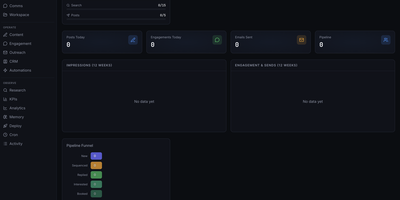
This is a marketing operations control center that replaces fragmented CRM, outreach, content, and analytics tools with a unified self-hosted interface designed for AI agent-assisted go-to-market teams. The CRM module manages leads through a configurable pipeline funnel with stages from New through Sequenced, Replied, Interested, and Booked, tracking source attribution, industry segments, company size, lead quality scores, and LinkedIn URLs per contact. Outreach sequencing supports email campaigns with pause controls, audit endpoints, suppression workflows, and engagement tracking. The content operations surface provides calendar views, content item management, performance metrics, and approval queues for editorial control. Analytics and KPI dashboards show impressions, engagement, and send volumes over configurable time periods, with optional connectors to Plausible, Google Analytics 4, X, and LinkedIn for cross-platform reporting. The OpenClaw-native agent runtime enables dynamic agent and squad discovery, workspace management, session monitoring, and communications surfaces. Automation scheduling uses cron job templates with OpenClaw-compatible schedule variants including cron expressions, every intervals, and at timestamps. The tech stack combines Next.js 16 App Router with React 19, Tailwind CSS 4, Recharts, and Zustand for state management. Authentication supports session cookies, API keys, and optional Google OAuth with role-based access controls. All state persists locally in SQLite via better-sqlite3 with no required external infrastructure. On RepoCloud, deploy Marketing Dashboard on a dedicated VPS with persistent SQLite storage, root SSH access, and complete control over your marketing operations data, all under the MIT license.
OpenGrokBot
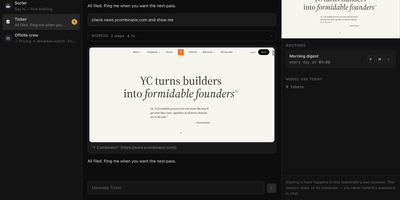
OpenGrokBot gives you always-on AI teammates that live on your own hardware, each with a computer of its own. Every teammate is a folder with a persona and hard boundaries, a thread in your sidebar, and a contained machine with its own browser profile, workspace, and persistent memory that survives between asks. You manage the crew from a workbench-style web client: message one teammate or the whole group, watch its browser screen live, set routines like a morning digest, and check what each one used today. The safety model is the point: credentials live inside the teammate's own browser profile, so at a login wall it asks you to take over its screen instead of asking for a password; standing instructions change only through a diff you approve; and a teammate cannot approve its own holds. Teammates hand work to each other under an allowlist with a hop limit, optional daily token ceilings stop spending for the rest of the day, and a stop button kills even a shell command mid-flight. Computers can be a Docker container per teammate, or Docker-free local browsers with sandboxed commands. Running on a dedicated VPS on RepoCloud with guaranteed CPU, RAM, and SSD, full root SSH access, and a browser serial console. MIT licensed.
Ovis
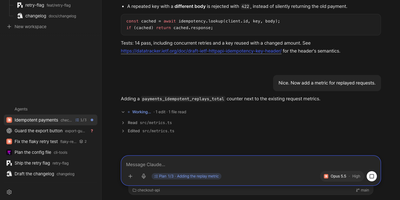
Ovis puts every coding agent running on your machine into your pocket, turning Claude Code, Codex, and a dozen other agent panes into clean phone-friendly chats you can read, answer, and steer from anywhere. Each pane shows the agent's own transcript as a conversation instead of terminal scrollback, with the live terminal one tap away when you need raw output. Permission requests, questions, and plan menus arrive as cards you answer with a tap or a number, and Ovis checks the prompt is still current before sending your answer. Live status for every pane shows which agents are working, which finished, and which are waiting on you. Web push alerts reach you even with the app closed, so a blocked agent never sits idle while you are away from the desk. Install it on your phone as a PWA with a rearrangeable key bar for Esc, Tab, Ctrl, and arrow keys, paired by QR code to your Tailscale address. Dictate replies into chat or terminal with mixed Korean and English speech, review the transcript, then send it to the agent. Open working-tree, staged, or commit comparisons from the file browser and read each file's diff without touching the repository. Reach remote PCs over SSH, queue a message for the agent's next turn, or send it immediately. Running on a dedicated VPS on RepoCloud with guaranteed CPU, RAM, and SSD, full root SSH access, and a browser serial console. MIT licensed.