Ovis
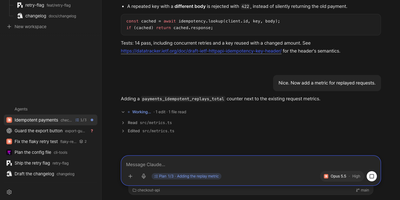
Ovis puts every coding agent running on your machine into your pocket, turning Claude Code, Codex, and a dozen other agent panes into clean phone-friendly chats you can read, answer, and steer from anywhere. Each pane shows the agent's own transcript as a conversation instead of terminal scrollback, with the live terminal one tap away when you need raw output. Permission requests, questions, and plan menus arrive as cards you answer with a tap or a number, and Ovis checks the prompt is still current before sending your answer. Live status for every pane shows which agents are working, which finished, and which are waiting on you. Web push alerts reach you even with the app closed, so a blocked agent never sits idle while you are away from the desk. Install it on your phone as a PWA with a rearrangeable key bar for Esc, Tab, Ctrl, and arrow keys, paired by QR code to your Tailscale address. Dictate replies into chat or terminal with mixed Korean and English speech, review the transcript, then send it to the agent. Open working-tree, staged, or commit comparisons from the file browser and read each file's diff without touching the repository. Reach remote PCs over SSH, queue a message for the agent's next turn, or send it immediately. Running on a dedicated VPS on RepoCloud with guaranteed CPU, RAM, and SSD, full root SSH access, and a browser serial console. MIT licensed.
Codync
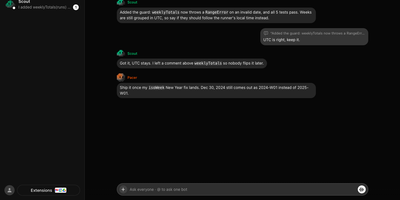
Codync turns the coding agents already installed on your computer into named bots you can message from your phone, so the Claude Code or Codex session on your desk keeps working while you are away. Each bot wraps one agent in one project folder, with its own standing instructions, memory, and approval rules, and several bots run side by side on one machine. Message any bot from the iPhone app, the desktop app, or a terminal; group rooms put bots in one thread, and an @name mention routes a question to exactly one of them. Bots ask each other for reviews inside the room and quote-reply to specific messages. File changes arrive as approval cards naming the file and computer, with Allow once, Always allow, or Deny; finished and blocked work both ping you as push notifications. The connection between phone and computer is end-to-end encrypted through a free relay, your own relay, or directly over the same Wi-Fi or Tailscale. Watch the computer's screen from your phone, hand a bot a computer-use tool, or talk to it in a voice call, and approve every new device per computer with a six-digit code. Your existing agent subscription does the work; Codync never calls a provider API with your login, and there is no paid tier. Running on a dedicated VPS on RepoCloud with guaranteed CPU, RAM, and SSD, full root SSH access, and a browser serial console. Apache-2.0 licensed.
Mikochi
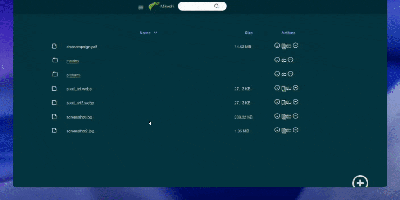
Point a browser at your server's folders and skip the FTP clients, the SSH tunnels, and the heavyweight cloud clones: Mikochi turns any directory on your machine into a clean web file browser you can open from anywhere. You browse nested folders in a fast list view, jump to files with fuzzy search, upload new material, create folders, rename items, and delete what is no longer needed. Whole directories come down as a single tar.gz archive, which makes backups and bulk transfers painless. Media files get a smarter treatment: Mikochi generates streaming links that open directly in VLC or mpv, so a film or album stored on the server plays on your screen without downloading gigabytes first. Access stays protected behind a username and password login with JWT sessions, and you can serve everything over TLS with your own certificates or disable authentication entirely on a trusted private network. Deployment takes one Docker command with a mounted data directory, and Kubernetes users get an official Helm chart. Homelab owners point it at a NAS share, developers drop it on a build box, and anyone tired of scp commands gets a permanent window into their files. Running on a dedicated VPS on RepoCloud with guaranteed CPU, RAM, and SSD, full root SSH access, and a browser serial console. MIT licensed.
Nexterm
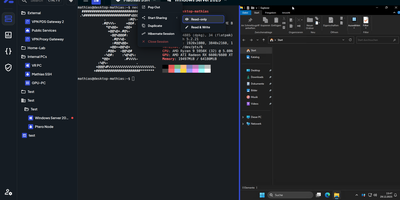
Terminals, remote desktops, and file browsers for every server you run: Nexterm opens them over SSH, VNC, RDP, Telnet, or SFTP from a self-hosted web page. Servers live in folders with tags and custom icons. Connections open as tabs or split views, keep running across browsers and devices, and can hibernate and resume later. The file manager handles SFTP and FTP: drag files in, upload whole folders, search, and edit in place with syntax highlighting. Live metrics track CPU, memory, disk, network, and processes for each host. Snippets store the commands you retype most. Scripts run whole maintenance jobs. Git repositories added as sources bring ready-made ones filtered by operating system. Organizations share servers through role-based permissions, and every action is logged. Record full terminal sessions for audits and training, or send a shared-session link so a colleague can join, read-only or writable. Authentication covers local accounts with TOTP and passkeys, OIDC providers such as Keycloak, Authentik, and Microsoft Entra ID, and LDAP or Active Directory. Saved passwords, SSH keys, and passphrases stay encrypted at rest. A Proxmox integration lists LXC containers and QEMU virtual machines and can start or stop them. An opt-in AI assistant drafts shell commands from plain-language requests. Running on a dedicated VPS on RepoCloud with guaranteed CPU, RAM, and SSD, full root SSH access, and a browser serial console. MIT licensed.
Yep Anywhere
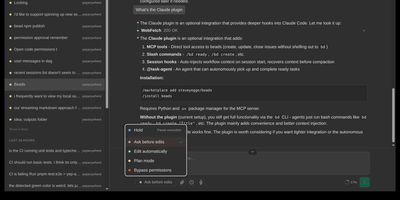
Designed for developers on the go, Yep Anywhere turns any smartphone browser into a full-featured control center for supervising, steering, and reviewing autonomous AI coding agents. Operators can monitor live execution across multiple active projects simultaneously without sitting at a desktop terminal. Real-time reasoning feeds. Instant push alerts for permission prompts. One-tap tool approvals. Developers can unblock pending tasks mid-turn, redirect active workflows, or queue sequential follow-up prompts for automatic delivery at the next safe milestone. An integrated source control viewer displays syntax-highlighted working-tree and commit diffs, allowing reviewers to attach line-level comment bundles directly back into the agent context. Mobile voice transcription lets users dictate instructions straight into running sessions, while photo library integration makes uploading bug screenshots effortless. All agent credentials, CLI configurations, and repository data remain private on the host server without requiring third-party cloud database accounts or proprietary device pairing. Running on a dedicated VPS on RepoCloud with guaranteed CPU, RAM, and SSD, full root SSH access, and a browser serial console. MIT licensed.
Breeze
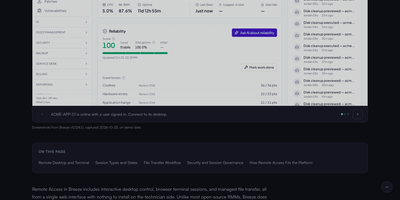
Breeze is an open-source RMM and PSA platform for MSPs that watches every managed device, and its built-in AI operator investigates alerts and drafts fixes for your approval. See live CPU, memory, disk, and network health for the whole fleet, with hardware and software inventory on every Windows, macOS, and Linux endpoint. Approve and deploy operating system and application patches in rings and maintenance windows, or push scripts and software to hundreds of devices at once. Open a remote terminal, browse files, or take over the desktop with multi-display support when a user needs hands-on help. Network discovery scans each site for unmanaged devices, while configuration policies and drift checks keep machines aligned with your baseline. Tickets, time entries, quotes, and invoices live beside the device work, so a resolved issue becomes a billable record without a second system. Clients get their own portal to raise requests and follow progress, and the multi-tenant structure keeps every customer separate from day one. When the AI operator acts, tiered approvals and a full audit log show exactly what it did and who allowed it. Running on a dedicated VPS on RepoCloud with guaranteed CPU, RAM, and SSD, full root SSH access, and a browser serial console. AGPL-3.0 licensed.
Wag
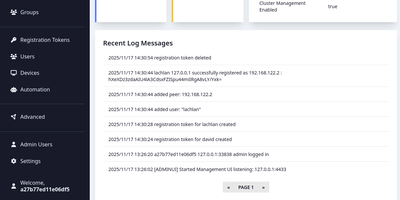
Wag is an authentication gateway for WireGuard that lets each device reach only the routes it should, and asks for a second factor before the sensitive ones open. Admins write access policies for everyone, groups, or single users, marking subnets, hosts, ports, and protocols as MFA-required, always allowed, or denied, and the most specific prefix wins, so one allowed address can sit inside a protected range. Devices join with a registration token, and the public endpoint answers with a finished WireGuard profile. Users then confirm a TOTP code, a WebAuthn security key, an OIDC single sign-on login that maps identity provider groups into Wag groups, or a PAM prompt, and repeated failures lock the account. Session lifetime and idle timeouts decide when they must prove themselves again. The browser portal lists users, devices, rules, registration tokens, and webhooks with real-time notifications, while a command line locks devices, resets MFA, and manages administrators. Webhooks turn JSON from an HR or identity system into new tokens or removed users and devices, and clients can fetch the list of guarded routes from a small API. Remote staff, contractors limited to one host, and homelabs are typical uses. When a server fails, the VPN remains reachable through clustering with witness nodes or an external etcd, and certificates arrive through ACME with HTTP-01 or Cloudflare DNS-01. Running on a dedicated VPS on RepoCloud with guaranteed CPU, RAM, and SSD, full root SSH access, and a browser serial console. BSD-3-Clause licensed.
Meshlan
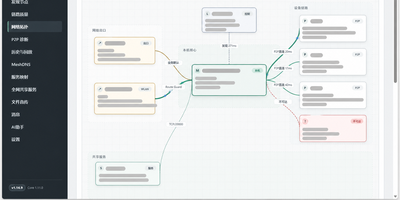
Meshlan turns your own Linux server into the control plane for a private virtual LAN that connects remote Windows devices as if they sat on the same router. Devices pair through your server, receive their certificates, and then talk directly to each other over encrypted tunnels whenever NAT allows, using dual-stack hole punching, UPnP, and STUN diagnostics to find a path. When a direct connection is impossible, traffic falls back to relays, and multiple relay nodes are chosen automatically by latency, jitter, packet loss, and health. You can publish a service that only listens on localhost, a local API, a web panel, a database, a game server, to the mesh on a custom port, with direct access or manual approval by its creator. Names stay stable while addresses change: devices answer to names like alice.mesh and services to api.alice.mesh, and an HTTPS gateway serves mesh websites without port numbers. Files move directly between devices over the encrypted link while the server only distributes metadata. The console shows the live topology with P2P and relay paths, latency, and service health, and local history keeps traffic and events for replay with a time slider. Optional AI automation keeps model keys on the server, encrypts context end to end, and asks for your confirmation before changing anything. Signed updates verify and roll back automatically when a health check fails. Running on a dedicated VPS on RepoCloud with guaranteed CPU, RAM, and SSD, full root SSH access, and a browser serial console. MIT licensed.
NetsGo
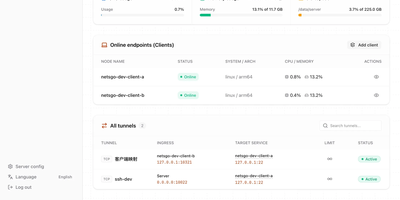
Created to eliminate the configuration fragmentation plaguing multi-device Homelab setups and small-team infrastructures, NetsGo merges what typically requires three separate tools — a tunnel daemon, a management panel, and a monitoring stack — into a single Go binary that starts with one command and listens on one port. The server exposes HTTP, TCP, and UDP tunnels, a built-in Web console for node management, a REST API for automation, and real-time traffic statistics with per-client bandwidth limiting, all sharing default port 9527 so firewalls and reverse proxies need only a single rule. Version 0.1.11 introduced Client-to-Client P2P tunnels via WebRTC DataChannel with three selectable transport strategies — Server relay, Prefer P2P with automatic fallback, and P2P only — reducing latency for direct connections while maintaining the centralized control plane. The management console displays every connected client's online status, authentication tokens, tunnel configuration, active transport mode, P2P candidate gathering progress, and cumulative byte-level traffic counters updated every second. Unlike frp or rathole which delegate management to external plugins or configuration files, NetsGo provides built-in client key generation, tunnel target migration between nodes, SOCKS5 proxying, IP-whitelist console access, and one-command server upgrades. Running on a dedicated VPS on RepoCloud with guaranteed CPU, RAM, and SSD, full root SSH access, and a browser serial console. Apache 2.0 licensed.
ShellHub
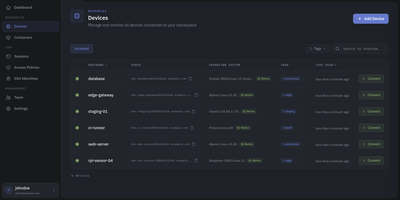
Every server, embedded board, and edge gateway you manage becomes reachable through one SSH address in ShellHub, even when it sits behind NAT with no public IP and no open inbound port. A small agent on each device dials out to your server, so a box on a customer LAN or a cellular link needs nothing beyond outbound web access. Connect with the stock ssh client by typing [email protected]@server, or open a terminal in the browser, and scp, sftp, rsync, and port forwarding work unchanged. SSH identities tie every key to a named team member, so removing someone ends their access on every device at once. Default-deny access policies grant or block members, roles, users, or API keys by device tag, Linux login, and source address, and can require a fresh browser confirmation before a session opens. Provisioning keys enroll whole fleets through automatic, manual, webhook, or allowlist acceptance, with usage limits, expiry dates, and tags. The Sessions page records who connected to which device, as which login, and from where, and browser terminals can be recorded and replayed. A Docker connector turns containers into devices that policies can grant one by one. Four member roles shape what each person can change, and the HTTP API, API keys, and an MCP server let scripts and AI assistants list devices and review sessions. Running on a dedicated VPS on RepoCloud with guaranteed CPU, RAM, and SSD, full root SSH access, and a browser serial console. Apache-2.0 licensed.
Wiredoor
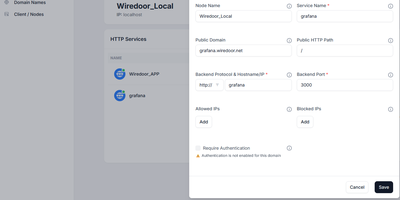
A self-hosted front door for apps that live on home labs, office LANs, and private clusters, Wiredoor publishes them to the internet without opening a single inbound port on the private side. The Wiredoor CLI on each remote machine dials out to the server over an encrypted WireGuard tunnel. Web apps and APIs are routed by domain and path, WebSocket traffic included, while TCP and UDP services such as SSH or Redis get a public port of their own. Public domains receive Let's Encrypt certificates, internal names fall back to self-signed ones, and Cloudflare or GoDaddy credentials let the server create DNS records itself. Any web route can demand OAuth2 sign-in with an email allow list and a few open paths, and every protocol accepts IP allow lists. Gateway nodes stretch one tunnel across a Docker network, Kubernetes cluster, or private subnet, so a single link serves many backends. Services can be switched off or given an expiry such as 30 minutes, 2 hours, or 1 day. The dashboard shows which nodes are connected and whether their services are enabled, while the CLI creates, enables, and disables services from a terminal. Optional Prometheus and Grafana views chart traffic and tunnel peers, and CrowdSec can block abusive addresses. Running on a dedicated VPS on RepoCloud with guaranteed CPU, RAM, and SSD, full root SSH access, and a browser serial console. Apache-2.0 licensed.
Rustunnel
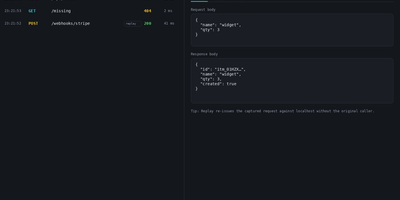
Rustunnel turns a service running on your laptop or private network into a public HTTPS, TCP, or UDP endpoint without opening inbound ports on the machine where it lives. Point the client at a local port and share the public address for webhook testing, a quick demo, an AI agent tool, SSH access, a game server, or an IoT device that cannot accept inbound connections. Give tunnels custom subdomains on your own wildcard domain, terminate HTTPS with automatic Let's Encrypt certificates, and keep client traffic encrypted from edge to local service. Put several backends behind one subdomain or TCP port and let TCP or HTTP health probes remove sick members before visitors hit them. When two peers can reach each other directly, start a P2P tunnel with NAT hole punching and QUIC, with relay fallback when the direct path fails. Watch sessions, tunnel health, traffic, and request logs from the live dashboard, inspect headers and bodies in the local request inspector, and replay a captured call while debugging a webhook. Manage tunnels, tokens, groups, captured requests, and history through the REST API, scrape Prometheus metrics, review audit logs, or let an MCP-compatible coding assistant create and close tunnels in plain language. Running on a dedicated VPS on RepoCloud with guaranteed CPU, RAM, and SSD, full root SSH access, and a browser serial console. AGPL-3.0 licensed.