Dobase
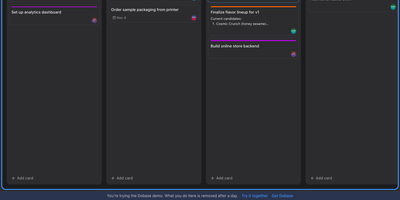
Dobase replaces the scattered pile of team subscriptions with one self-hosted workspace where mail, kanban boards, documents, chat, to-do lists, files, a calendar, and video rooms live side by side. Install only the tools your team needs, and share each one with exactly the collaborators you choose; a board for the whole company and a private todo list can sit in the same window. Several people can type in the same document at once, watching each other's colored cursors while the text merges cleanly, and presence faces in the sidebar show who is inside every tool right now. Open tools arrange themselves as tiles in a wide window, so chat can sit next to the board it discusses and the calendar under the mail you are answering. Pressing Cmd+K searches cards, todos, documents, files, chat, events, and mail in one motion, and nearly everything also works from the keyboard alone. Mail threads conversations and lets you accept calendar invites from the message, files get public links guarded by a password and an expiry, and the calendar syncs with CalDAV services or runs on its own. Video rooms with screen sharing join the same workspace, mentions and notifications follow you, and an email digest catches up anyone who was away. Running on a dedicated VPS on RepoCloud with guaranteed CPU, RAM, and SSD, full root SSH access, and a browser serial console. MIT licensed.
TypeType
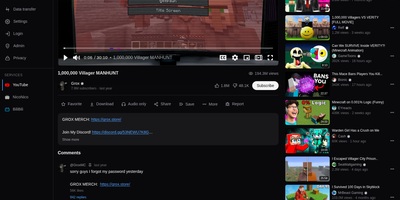
On your own server, TypeType runs a private video platform for YouTube, NicoNico, and BiliBili, keeping subscriptions, history, and playlists out of someone else's recommendation engine. Pick a service and search it. Browse channels, Shorts, podcasts, and a home feed. Speed and quality control. Cinema mode. Native picture-in-picture. Subtitles, alternate audio tracks, and frame-by-frame stepping. SponsorBlock segments get skipped, or just marked, by category. Subscriptions, playlists, watch later, favorites, and resume positions fill the library. Import a Google Takeout export or a PipePipe backup and a new instance never starts empty. Download video or audio to local or S3-compatible storage and collect it in the browser when it is ready. Sign in locally or through OIDC. An admin console runs the instance. Block a channel and it disappears from feeds, search, and related videos. Hide Shorts. Hide personalized recommendations. Hide the suggestions column. A native Android client for phones and tablets syncs with the same instance. An optional experimental recommender can build a personalized home feed, and each user chooses whether to turn it on. Running on a dedicated VPS on RepoCloud with guaranteed CPU, RAM, and SSD, full root SSH access, and a browser serial console. MIT licensed.
ZoneMinder
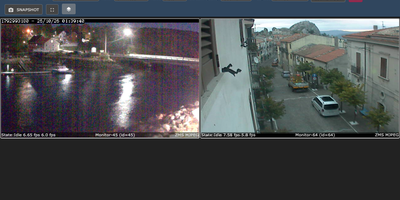
Turn ordinary IP cameras, USB webcams, and video files into a self-hosted surveillance system that watches, records, and replays everything from a browser. Every camera becomes a monitor that can capture, analyze, and record around the clock or only when motion appears. Draw detection zones in six types (active, inclusive, exclusive, preclusive, inactive, and privacy) so a visitor on the driveway raises an alarm and swaying trees do not. The Montage view tiles live feeds in selectable layouts, Cycle rotates through them, and the Watch view adds scale, stream quality, and player controls for a single camera. Events arrive in a sortable list with thumbnails, durations, and alarm scores, play back against a timeline, and can be reviewed across every camera in Montage Review. Filters automate housekeeping by archiving, emailing, messaging, uploading, copying, moving, or deleting matching events on a schedule. PTZ controls steer supported cameras. User roles limit who can view or change each monitor, a REST API and MQTT support connect other tools, and the optional event server adds push notifications and object detection through machine-learning hooks. Multi-server installs spread cameras and storage across machines, and the zmNinjaNg app brings the same views to phones and desktops. Running on a dedicated VPS on RepoCloud with guaranteed CPU, RAM, and SSD, full root SSH access, and a browser serial console. GPL-2.0 licensed.
BigBlueButton
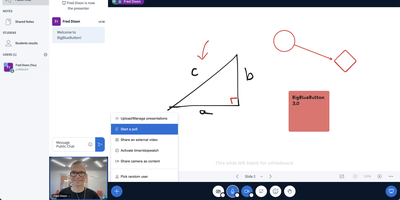
Used daily by millions of educators and learners in over 65 languages and embedded as the default virtual classroom in Moodle Cloud, Canvas, Sakai, D2L, Jenzabar, and Schoology — together comprising more than 75% of the worldwide learning management system market — BigBlueButton has been the leading open-source web conferencing platform for education since its creation at Carleton University in 2007. The platform delivers WebRTC-based real-time audio, video, and screen sharing with a tldraw v2-powered multi-user whiteboard featuring infinite canvas support, allowing multiple participants to annotate slides and draw simultaneously. Breakout rooms support up to eight concurrent groups with collaborative whiteboards enabled by default, and polling with customizable response types lets instructors assess understanding in real time. The built-in Learning Analytics Dashboard answers three questions at a glance: who is attending, who is participating, and who is learning based on poll responses, providing actionable engagement metrics without requiring webcam surveillance. Session recording captures audio, video, slides, chat, and whiteboard annotations for asynchronous playback on any device. The plugin architecture introduced in version 3.0 enables custom extensions, while IMS LTI 1.0 compliance allows integration with Blackboard, Desire2Learn, Pearson Learning Studio, and any conformant platform without custom code. The REST API enables programmatic session management, user authentication, and recording access for custom frontends like the included Greenlight application. Version 4.0 introduces LiveKit-based media and a redesigned interface. Running on a dedicated VPS on RepoCloud with guaranteed CPU, RAM, and SSD, full root SSH access, and a browser serial console. LGPL-3.0 licensed.

Yarrtube
Follow the channels you actually chose, and let their newest uploads land on your own disk instead of in an algorithmic feed. Yarrtube tracks public YouTube playlists and whole channels, checks them on a schedule, and downloads fresh videos automatically the moment they appear. The built-in web player lets you watch the collected library from a desktop or a phone browser without ads interrupting. Downloads are organized into media-server friendly folders, so the same collection shows up inside Plex, Jellyfin, or Kodi next to your films and shows. For Plex homes, an optional scan trigger refreshes the library right after a download finishes, so new episodes surface without manual rescans. You control download quality per source and can cap how many videos each channel keeps, which protects limited disk space from runaway back catalogs. Grouping sources into categories and smart playlists keeps a growing archive browsable instead of turning into one long dump. Everything runs from one Docker container with two persistent mounts, one for its small database and one for the video files. A free YouTube Data API v3 key powers the new-upload checks, so setup takes minutes. Running on a dedicated VPS on RepoCloud with guaranteed CPU, RAM, and SSD, full root SSH access, and a browser serial console. MIT licensed.
TubeHaus
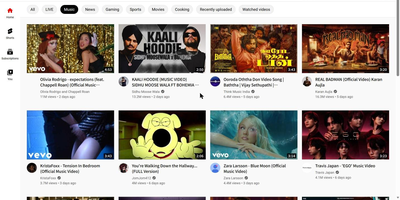
Watch YouTube without the ads, accounts, or tracking, from a server you own: TubeHaus is a private YouTube client that keeps the familiar layout, URLs, and keyboard shortcuts. Your subscriptions, watch history, resume positions, Watch Later, and playlists live as files on the server, so every device in the house shares one library and picks up a video where another screen left it. Live streams play with segments fetched ahead of the player, and captions are transcribed on the fly when a stream has none. Chapters, storyboard previews, a mini player, and theater mode make long videos easy to navigate, while sponsors are skipped automatically and dislike counts come back to the page. Save videos offline in 1080p or 4K for trips, send playback to a TV from your phone without a separate casting dongle, and drive the television interface entirely from a remote. Imports arrive from a Google Takeout export, Invidious, NewPipe, or FreeTube, so years of subscriptions move over in minutes instead of being rebuilt by hand. A calm mode hides recommendations and Shorts when you only want to search and watch deliberately. Running on a dedicated VPS on RepoCloud with guaranteed CPU, RAM, and SSD, full root SSH access, and a browser serial console. AGPL-3.0 licensed.
Universal Media Server
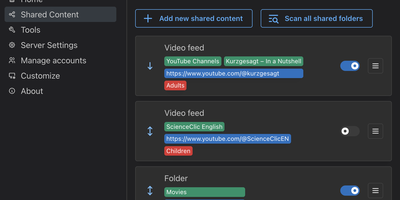
Every screen in the house (browser, TV, game console, or phone) can open the same library of videos, music, and photos once Universal Media Server shares it, with transcoding handled automatically for whichever device asks. A file the device can already play passes through untouched. Anything else is converted on the fly to suit the network, the device, and the preferred language. Folders open at once, with no wait for library scans, and disc drives and disc images play directly. In the web interface, every title gets a page with cover art, cast, and genre details from TMDB, Discogs, and MusicBrainz, and filters narrow the library by actor, director, genre, year, or artist. YouTube channels, online radio, podcasts, and RSS feeds appear beside local files on every connected device. Users and groups, with optional avatars and four-digit PINs, decide which shared folders each person sees; content for children stays apart from the library for adults. A list of detected renderers shows every connected device, and the configuration file of each device can be edited to fix browsing, playback, or transcoding on an unsupported TV. Builds exist for Windows, Linux, and macOS, with AppImage and Docker options for servers. Running on a dedicated VPS on RepoCloud with guaranteed CPU, RAM, and SSD, full root SSH access, and a browser serial console. GPL-2.0 licensed.
Peach
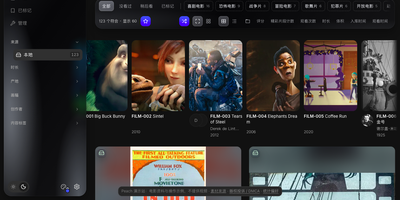
Peach is a self-hosted video library manager that scrapes rich metadata for your own collection and serves it through a polished web player you can open on any device. Point it at local drives, SMB shares, mounted cloud storage, or a PikPak library and it scans everything into one browsable catalog without moving or modifying your files. The scraper recognizes video codes, reads existing NFO files, and fills in titles, performers, studios, and cover art from multiple sources while always preserving corrections you make by hand. Playback happens right in the browser with subtitle support, variable speed, rotation, resume points, and timeline previews you can scrub through before committing to a scene. A follow system tracks performers and creators so new releases surface automatically, and the discovery views plus a want list help you decide what to add next. When something is missing, search by video code or drop in a magnet link and completed downloads are filed into the library on their own. Tagging, duplicate detection, and multi-version grouping keep large collections tidy, while the task center lets you pause, resume, or cancel scans and downloads and watch their resource use as they run. Running on a dedicated VPS on RepoCloud with guaranteed CPU, RAM, and SSD, full root SSH access, and a browser serial console. AGPL-3.0-or-later licensed.
Tailchat
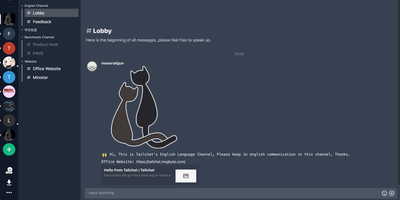
Think of it as a team messaging platform where every feature beyond core chat is a plugin you can install or remove, inspired by VS Code's extension model but applied to real-time communication. The Moleculer microservice backend scales horizontally across nodes while Socket.io delivers instant message synchronization with text, images, files, mentions, reactions, and rich Markdown formatting. Available plugins provide LiveKit video conferencing, collaborative drawing boards, task management panels, end-to-end encryption, custom themes, and third-party push notification reception without touching core code. Groups use a two-level space system with customizable panel layouts arranged through drag-and-drop, while role-based access control enforces fine-grained permissions across the organization. The Open Platform exposes OAuth for single sign-on across connected applications and a Bot API enabling bidirectional message processing between Tailchat and external services via HTTP requests. Multi-platform clients cover web, Electron desktop with screenshot capabilities, and mobile apps with native push. Docker Compose deployment bundles MongoDB for persistence, Redis for caching and transport, and MinIO for S3-compatible file storage. Deploy on RepoCloud with a dedicated VPS for persistent team infrastructure under the Apache 2.0 license.
MeetDo
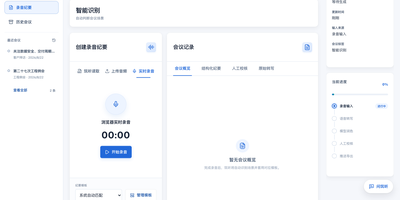
The meeting ends and, instead of a raw transcript, you get minutes you can file: MeetDo is an open-source meeting-to-action system that hosts the meeting, captions it locally, and finishes the record for you. Start a browser meeting with video, screen sharing, and chat, and watch captions stream from a speech model running on the same infrastructure, so no audio is sent to a cloud note-taker. When the call ends, the transcript becomes structured minutes: summary, agenda flow, conclusions, and action items with owners, instead of a wall of raw text. Five meeting types, from management reviews and project weeklies to interviews and customer calls, shape the record, and custom templates export to DOCX or PDF with your original layout preserved. Domain vocabulary is corrected after recognition, so names, units, and industry terms survive transcription instead of turning into near-miss words. Past meetings stay searchable in a local history, and questions can be asked across them without anything leaving the machine. Editable transcripts let a human fix the record before it is filed, and the whole pipeline works offline after the first model download. Running on a dedicated VPS on RepoCloud with guaranteed CPU, RAM, and SSD, full root SSH access, and a browser serial console. MIT licensed.
PeerTube
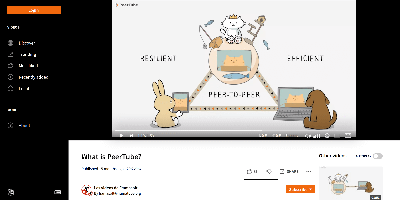
The fediverse's answer to YouTube comes from French non-profit Framasoft: PeerTube is a TypeScript/Angular video platform where hundreds of independently operated instances federate over ActivityPub into one network. Videos you publish are discoverable across the whole video fediverse, and viewers can follow your channels from Mastodon or any ActivityPub platform - or plain RSS - without needing an account on your instance. The namesake innovation attacks video hosting's core cost problem: alongside HLS delivery, an optional WebRTC-based P2P layer lets concurrent viewers' browsers share video segments with each other, so a video going viral distributes its own bandwidth demand instead of crushing your server; instance redundancy extends this by letting friendly instances cache each other's videos. Livestreaming is first-class - stream via OBS or any RTMP software, host permanent streams, enable replays, and interact through live chat. Creators get channels, playlists, analytics, built-in video editing (trim, watermark), and an embeddable player for any website. There are no ads, no data mining, and no recommendation algorithm engineered for watch-time - the project's explicit design stance. Admins control federation policy, P2P settings, and theming; a plugin system extends the rest. AGPL-licensed, 300+ contributors, in active development since 2015.

Galene
Galene is a self-hosted video conferencing system that runs full meetings, lectures, and tutorials in the browser while asking remarkably little of the server it runs on. Every group gets its own page with video tiles, a user list, and a chat pane, and participants join from desktop or mobile browsers with nothing to install. Presenters share a screen or individual windows, stream a video or audio file straight from disk, and switch to blackboard mode when a slide needs resolution more than frame rate. Moderators can warn or remove participants and lock the group, raise-hand status keeps question queues orderly, and anyone can blur their background or exchange files directly with peers. Groups are simple configuration files: set public or private rooms, passwords or login tokens, client limits, and expiry windows, then create users with moderator or presenter privileges using the galenectl command. Automatic subgroups spin up identical breakout rooms on demand, the pattern its author uses to supervise forty students working in pairs during computer science practicals. Calls stay smooth on poor networks because the server adapts video quality per participant, recovers lost packets, and relays media through its built-in TURN server when firewalls block direct paths. Running on a dedicated VPS on RepoCloud with guaranteed CPU, RAM, and SSD, full root SSH access, and a browser serial console. MIT licensed.
SRS
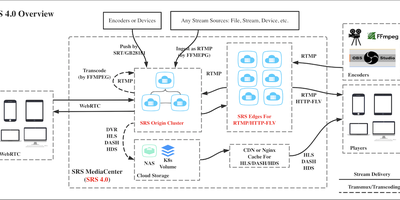
Viewers arrive on browsers, phones, and desktop players, and SRS meets each of them with the right protocol from a single published stream. A broadcaster pushing RTMP can reach browser viewers through WebRTC with sub-second latency, phone apps through HLS, and desktop players through HTTP-FLV, all from the same live source without running parallel encoders. WHIP endpoints accept WebRTC ingest from browser studios and tools like OBS, while WHEP serves WebRTC playback, so an entire publish-to-viewer path can stay on modern web protocols. Operators shape each channel with virtual hosts, authenticate publishers and players through HTTP hooks that consult your own backend, and record live streams to disk as DVR archives for replay. Forwarding republishes a stream to YouTube, Facebook, or another SRS instance, and origin clustering lets edge servers pull from a central origin so one ingest feeds viewers in several regions. The built-in HTTP API reports streams, clients, and server health for monitoring, and GB28181 support ingests surveillance camera networks alongside creator broadcasts. Configuration lives in a single reloadable file, so changing a vhost or enabling HLS rarely means restarting the listeners your audience is attached to. Running on a dedicated VPS on RepoCloud with guaranteed CPU, RAM, and SSD, full root SSH access, and a browser serial console. MIT licensed.
Janus Gateway
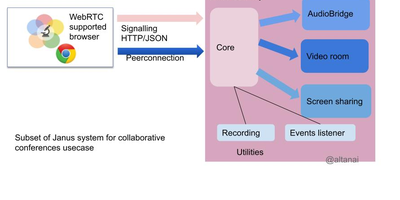
One Janus installation can host a video meeting in one session, stream a camera feed in another, and bridge a browser call into a telephone network in a third, because Janus is a general-purpose WebRTC server whose work is done by interchangeable plugins. The VideoRoom plugin publishes each participant's streams to everyone else in the room with simulcast and viewport selection, so a class or team call adapts quality per viewer instead of forcing one bitrate on all. Streaming mounts live or prerecorded sources, including RTSP cameras and RTP feeds, and hands them to any number of WebRTC viewers, while AudioBridge mixes voices into conference rooms with recording and signed-token access. SIP and NoSIP plugins register with existing VoIP infrastructure and place or receive calls, translating between WebRTC media and telephone audio so a web page can ring a desk phone. Record&Play captures publisher streams to files you can replay through the same server, TextRoom adds data-channel chat rooms, and Lua or JavaScript plugins let you script custom media logic without recompiling the core. Applications talk to Janus over HTTP or WebSocket APIs, with RabbitMQ, MQTT, and NATS transports for bus-driven deployments, and event handlers report session activity to your monitoring stack. Running on a dedicated VPS on RepoCloud with guaranteed CPU, RAM, and SSD, full root SSH access, and a browser serial console. GPL-3.0 licensed.
37Studio
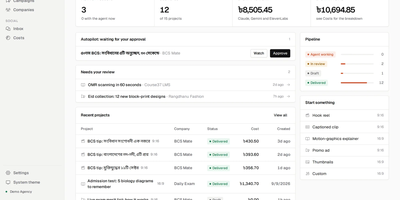
37Studio is a self-hosted AI video studio and social media desk that turns a short brief into on-brand videos, posts them to nine social platforms, and drafts replies to the messages that come back. Paste a company website and it builds a brand library of logos, photos, fonts, and colours, plus a knowledge base every later video and reply draws on. An editor agent builds each video as an animated composition, checks its own rendered frames, and takes revision requests in plain words. The same workflow yields hook reels, captioned clips, explainers, podcast clips, promo ads, and thumbnails, and any finished video can become a template. A two-hour recording becomes a shelf of short clips: transcription runs locally in about 100 languages at no cost, and YouTube or Drive links import directly. Publishing reaches Facebook Pages, Instagram, YouTube, TikTok, LinkedIn, X, Pinterest, Bluesky, and Mastodon in one action, now or scheduled, each with its own caption. Autopilot goes further: state a content plan in one sentence and a fresh video is made before every slot, waiting for one-click approval. Messenger, Instagram, and WhatsApp messages and social comments land in one inbox, with replies drafted in the customer's language under rules each brand sets. Exact AI spend shows on every project, and an MCP server lets your own AI tools run the studio. Running on a dedicated VPS on RepoCloud with guaranteed CPU, RAM, and SSD, full root SSH access, and a browser serial console. MIT licensed.
Reclip
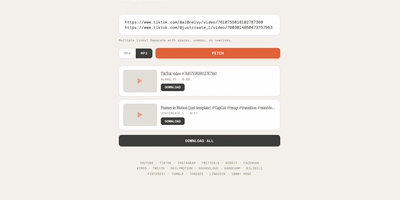
Reclip is a self-hosted web downloader that turns links from YouTube, TikTok, Instagram, and more than a thousand other video sites into MP4 or MP3 files saved on your own server. Paste one link or a whole batch of URLs, and Reclip fetches each video's title, thumbnail, duration, and uploader before you commit to anything. A quality picker lists every available resolution, so a lecture can be grabbed at 360p for a phone while a concert film comes down at full height with the best audio stream merged in. MP3 mode strips the picture away entirely, which makes it painless to archive podcasts, DJ sets, and spoken-word clips as plain audio files. Playlists expand into their individual videos automatically, repeated URLs are deduplicated before any bandwidth is spent, and a Download All button works through the whole queue without babysitting. Each job runs in a background thread with live status in the interface, so the page stays responsive while ffmpeg finishes merging streams behind the scenes. Everything lives behind one clean page with no accounts, no uploads to third-party converters, and no expiring download links, and finished files land in a downloads folder you control. Running on a dedicated VPS on RepoCloud with guaranteed CPU, RAM, and SSD, full root SSH access, and a browser serial console. MIT licensed.
Reloops
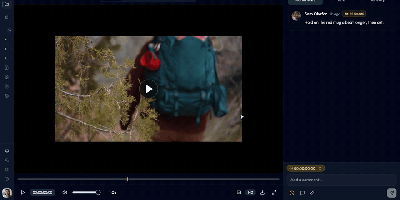
Reloops is a self-hosted creative asset workspace where teams keep every video, design, PDF, audio file, and live website in one library and collect feedback on the files themselves instead of in scattered email threads. Reviewers click anywhere on an image to pin a note to that exact spot, and on video the comments attach to the precise frame, so "fix this bit" always points at the bit in question. Every upload becomes a new version on the same asset, older cuts stay available for side-by-side comparison, and approvals are recorded on the file so nobody ships the wrong export by accident. Clients never need an account: send them a share link or a branded collection and they can watch, comment, and sign off as guests. The library searches the way people remember work, because each asset carries generated descriptions, tags, and metadata filters, so "the approved homepage with the blue button" actually finds something. Day to day, assignments and review queues keep feedback moving, while scoped API keys let agents such as Claude, OpenClaw, Zapier, and n8n upload new versions, post comments, update statuses, and manage share links inside the same workspace. Running on a dedicated VPS on RepoCloud with guaranteed CPU, RAM, and SSD, full root SSH access, and a browser serial console. AGPL-3.0 licensed.
Apache OpenMeetings
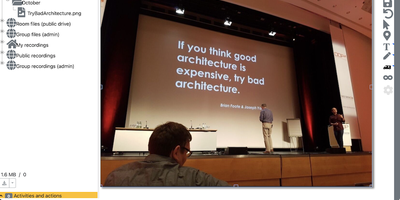
Apache OpenMeetings puts the whole meeting in the browser: cameras, a shared whiteboard, the agenda document, and recording controls, all running on your own server. Participants join rooms with audio and video, audio only, or video only, choose camera resolutions and devices, and present by sharing a screen or a single window at selectable quality. Moderators control the floor person by person: who may draw on the whiteboard, present, share or record the screen, mute others, or speak while everyone else stays muted. Multiple whiteboards hold drawings, text, clip art, and imported documents in PDF, office, and image formats, rescaling to fit every participant's screen, and boards can be saved into the drag-and-drop file explorer for the next session. Every meeting can be recorded with all audio streams exactly as heard, then downloaded as MP4 or played back in the integrated player, and the built-in calendar schedules rooms and sends invitations. Breakout rooms split classes and workshops into groups, polls gather decisions live, private and group chat runs beside the video, and telephone users can dial into rooms through the Asterisk SIP integration. Running on a dedicated VPS on RepoCloud with guaranteed CPU, RAM, and SSD, full root SSH access, and a browser serial console. Apache-2.0 licensed.