Open Source App Cloud Marketplace
Deploy, host, and scale with one click, at half the cost. Then customize with AI agents.
Codex LB Enhanced
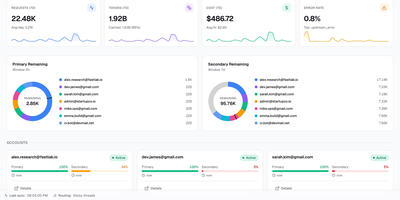
Codex LB Enhanced is a session-aware gateway that pools your ChatGPT accounts so a long Codex session survives quota limits, dropped connections, and paused accounts without losing the conversation. It serves Codex desktop, CLI, and IDE clients through the native Responses protocol and WebSocket transport, and answers any OpenAI-compatible client through the familiar /v1 endpoints. When an account runs out of quota, gets suspended, times out, or drops mid-stream, the gateway classifies the failure, removes that account from the current request, and selects the next one through your load-balancing policy. Verified request history, including interrupted tool-call context, is replayed across the account switch when it is safe, so the client sees a slower answer instead of a dead stream. Every API key carries its own policy: time windows from five hours to monthly, limits by credits, tokens, or cost, and model-specific rules. Usage appears in native Codex quota headers and in a /v1/usage view backed by the same data, so editors and automation agree on what is left. Diagnostics correlate each request with its upstream account, transport, failover stage, and retry count, and a web dashboard manages accounts, keys, usage windows, request logs, and recovery reports. Running on a dedicated VPS on RepoCloud with guaranteed CPU, RAM, and SSD, full root SSH access, and a browser serial console. MIT licensed.
Single Server
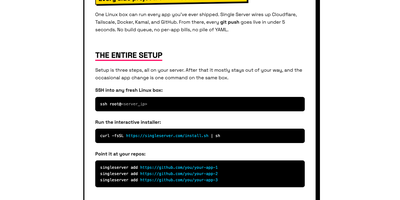
Point it at your GitHub repos and every push goes live in under five seconds: one Linux box becomes the deployment platform for every app you have ever shipped, with no build queue, no per-app bills, and no pile of YAML. An interactive installer wires the box up once, creating a GitHub App for limited, revocable repo access, Cloudflare DNS records and a tunnel so visitors get TLS and CDN at the edge while your server IP stays hidden, and Tailscale access so you SSH in without exposing SSH to the public internet. From then on you just push: the daemon receives the webhook through a Tailscale Funnel, verifies its signature, fetches the commit, builds the image on the server from your Dockerfile or a generated one, and swaps traffic only after the new container passes its health check, so a failed deploy leaves the previous version serving. Each app runs in its own container with its own environment variables and persistent storage, and one CLI on the box handles the rest: add or remove apps, attach a domain in one command, roll back to an earlier commit, stream logs, check status, take backups, or run doctor to diagnose every layer from daemon to DNS. Running on a dedicated VPS on RepoCloud with guaranteed CPU, RAM, and SSD, full root SSH access, and a browser serial console. MIT licensed.
OrcaQ
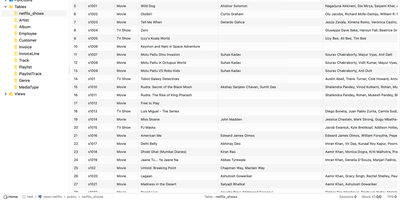
For developers and database administrators who want a full database IDE inside the browser without installing separate desktop clients on every machine, OrcaQ provides a unified workspace for PostgreSQL, MySQL, MariaDB, Oracle, SQLite, Cloudflare D1, Turso, and Redis. Engineers organize connections into named workspaces with SSH bastion tunneling, granular SSL configuration, and color-coded environment tags whose strict mode requires explicit confirmation before executing destructive mutations against production databases. The Quick Query data grid lets users filter, sort, paginate, and edit table rows inline while jumping across foreign-key relationships and inspecting table DDL metadata. When writing complex multi-statement SQL, the Raw SQL Editor provides context-aware autocomplete, query variables, nested script folders, and visual EXPLAIN execution plan analysis. Database architects can render interactive entity-relationship diagrams for single tables or entire schemas, compare two database schemas side by side to generate safe migration scripts, and manage Redis keys across string, hash, list, set, and sorted-set structures in a dedicated workbench. PostgreSQL administrators also gain a visual role-permission matrix, real-time instance health monitoring for active sessions, locks, and replication lag, native backup and restore job tracking, and an optional AI Orca Agent that drafts queries and detects anomalies while requiring human approval before any data modification runs. Running on a dedicated VPS on RepoCloud with guaranteed CPU, RAM, and SSD, full root SSH access, and a browser serial console. MIT licensed.
SyncWatch
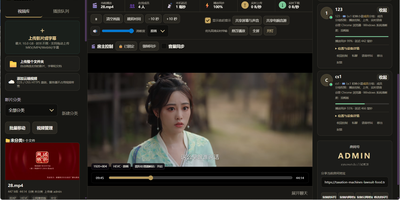
Movie night should not depend on everyone pressing play at the same second; SyncWatch runs your own watch-party server so friends in different places watch the same frame together. The host controls play, pause, seeking, and playback speed for the whole room, and late joiners or drifting clients are corrected back to the shared position automatically. You build the program from uploads or direct HTTPS media links, with subtitles, audio, images, and documents handled in the same library. Rooms can be permanent or temporary, protected by passwords and member limits, with host, admin, and permission-group control over who may operate playback. Between scenes, people talk through public and private chat, on-screen danmaku comments, emoji, voice messages, or full-room voice. Anyone can share a browser tab, window, desktop, or phone screen into the room, so a clip, a game, or a presentation becomes the shared screen. The server also keeps friends, notifications, online presence, bans, registration approvals, and an operations log, so a private community can run itself without a platform account. Uploaded media is analyzed and thumbnailed automatically, with browser-compatible versions generated for awkward formats. Backups, data export, a recycle bin, mail verification, and network diagnostics round out the admin side. Running on a dedicated VPS on RepoCloud with guaranteed CPU, RAM, and SSD, full root SSH access, and a browser serial console. Apache-2.0 licensed.
Zusam
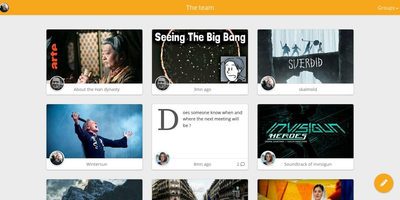
From the German "zusammen," together: Zusam is a private social space for a group of friends - a self-hosted alternative to the family WhatsApp group or the friends Facebook group, with no ads, algorithms, or data harvesting in between. The AGPLv3 project is deliberately modest in scope and stack: a Symfony PHP backend exposing a REST API over SQLite, with a lightweight Preact single-page frontend, designed for a low server footprint that runs comfortably on small hardware. Groups post messages into shared feeds that handle real life well: video and image uploads (with FFmpeg processing), photo albums for trips and events, and rich link previews with inline embeds for YouTube, Vimeo, Imgur, SoundCloud, Twitch, and Bandcamp - so sharing a song or a clip looks the way it should. When something needs to leave the circle, public link generation exposes a single message to non-members without opening the group. The interface is fully responsive and mobile-friendly, targeting Firefox ESR and recent Chrome. It is the small-web answer to a real question: where does a group chat's shared history live when you want it owned by the group instead of a platform?
Swiftwave
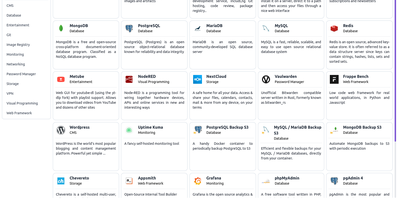
Pick a source, click deploy, and the app is online: Swiftwave turns a Git repository, a Docker image, or an uploaded folder into a hosted application with domains, certificates, and ingress handled for you, skipping the afternoon of YAML and reverse-proxy chores. It detects the language and framework automatically and generates the Docker configuration for projects that lack one. Domains attach with free Let's Encrypt certificates that renew themselves, while managed ingress routes HTTP, HTTPS, TCP, and even UDP traffic to the right containers. An integrated app store turns popular open-source software into fill-in-the-form installations that are ready in minutes. Persistent volumes mount local disks or network shares, and snapshots back them up locally or to S3 for later restoration. When something misbehaves at 2 a.m., the browser-based console opens a shell into any server or application without hunting for SSH keys, and resource monitoring charts CPU, memory, network, and disk across every hosted app. Webhooks redeploy automatically when code changes or a new image lands, and the whole control plane sips resources: the core stack fits in roughly 180 MB of RAM, leaving a 1 GB server room to run three or four real applications. One server runs standalone, or several join a cluster when traffic outgrows a single box. Running on a dedicated VPS on RepoCloud with guaranteed CPU, RAM, and SSD, full root SSH access, and a browser serial console. Apache-2.0 licensed.
Espial
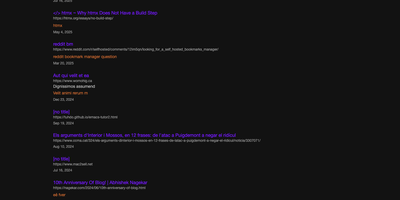
Espial gives your links one permanent address, a bookmarking server you host, reachable from any browser where you can log in instead of vanishing into whichever profile, device, or dead laptop you happened to save them on. Saving a page takes one click on the bookmarklet while you are reading it; a small popup arrives with the URL, title, and any text you selected already filled in, ready for tags and a quick save. Back at the server, bookmarks organize with tags and descriptions so that article from March is findable by what it was about, not by which machine you were sitting at. Years of accumulated browser bookmarks do not need re-saving one by one: import tools bring in Pinboard exports and Firefox bookmark files wholesale, and a sample file makes testing painless. Multiple user accounts keep each person's collection separate on a shared instance, which suits a household or a small team perfectly. Anything that can send an HTTP request can add bookmarks too, through an API endpoint guarded by a personal key you generate in settings, so scripts and automations file links alongside your manual saves. The whole thing stores its data in a single SQLite database, which makes backups a one-file copy and keeps the operational burden near zero. Internationalization support means the interface is not limited to English-speaking households either. Running on a dedicated VPS on RepoCloud with guaranteed CPU, RAM, and SSD, full root SSH access, and a browser serial console. AGPL-3.0 licensed.
Fireshare
FireShare turns a folder of game captures on your server into a browsable library where every clip gets its own permanent link, ready to paste into Discord the moment something worth bragging about happens. Point it at the directories you already record to and it scans what is there: the file people watch is always your untouched original, in MP4, WebM, or MOV, never a recompressed stand-in. Privacy is set per file, public for the feed, link-only for friends, or behind a password, and whole folders can be shared as a single link. It also sorts the chaos for you, detecting the game in each capture and shelving hundreds of timestamped filenames under proper cover art you can search and browse. Trim the dead air off a clip before posting it, add a title, description, tags, and a custom thumbnail, and watch the view count climb. For screens that struggle with huge originals, optional transcoding adds adaptive lower qualities on CPU or an NVIDIA GPU, and HDR captures get tone-mapped to SDR instead of looking washed out. Friends can upload through the browser or by token from scripts, new public clips can announce themselves to Discord or an RSS reader, and accounts come with permissions, profiles, and two-factor sign-in. Running on a dedicated VPS on RepoCloud with guaranteed CPU, RAM, and SSD, full root SSH access, and a browser serial console. GPL-3.0 licensed.
Para
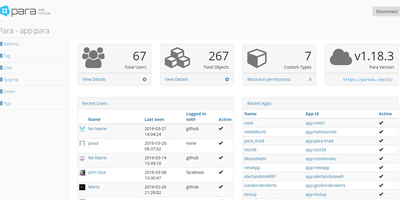
The name means steam in Bulgarian, and the job matches: Para is the boiler room that powers your application's backend so you never build one from scratch. You store plain JSON objects through a REST API and get them back persisted, indexed for full-text search, and cached on every write, without designing schemas or gluing three systems together yourself. One server hosts many applications at once, each with its own table, search index, and cache, so a client project, a side app, and an internal tool can share a single deployment without sharing data. Users sign in with social accounts, LDAP, or SAML and receive JSON Web Tokens, while resource permissions decide exactly which objects each client may touch. Queries go beyond key lookups: field, wildcard, geo point, and more-like-this searches all run against the same stored objects. Signed webhooks notify your own endpoints when data changes, and an MCP server lets AI assistants manage configuration, data, and search against the same backend. The admin Web Console handles users, objects, backups, and permissions from the browser, and client libraries cover JavaScript, PHP, Java, C#, Android, and iOS. Running on a dedicated VPS on RepoCloud with guaranteed CPU, RAM, and SSD, full root SSH access, and a browser serial console. Apache-2.0 licensed.
Plik
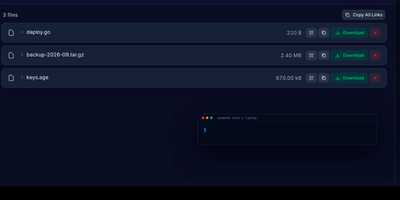
Plik lets you send big files the way WeTransfer does, except the server is yours: upload from the browser or one CLI command and get an expiring link to share. Files can delete themselves after the first download, stream straight from uploader to downloader without touching disk, or sit behind a password until their TTL runs out and cleanup removes them. End-to-end encryption with Age works between the CLI and the web interface, so the server only ever holds ciphertext. Recipients preview code with syntax highlighting, read rendered Markdown and Mermaid diagrams, and play media in the browser without downloading first. Storage lands on local disk, S3, OpenStack Swift, or Google Cloud Storage, with metadata in SQLite, PostgreSQL, or MySQL, and sign-in through local accounts, Google, GitHub, or OIDC. The web interface speaks twelve languages with light, dark, and custom themes, and Prometheus metrics plus an MCP server connect Plik to monitoring and AI assistants. Running on a dedicated VPS on RepoCloud with guaranteed CPU, RAM, and SSD, full root SSH access, and a browser serial console. MIT licensed.
Wag
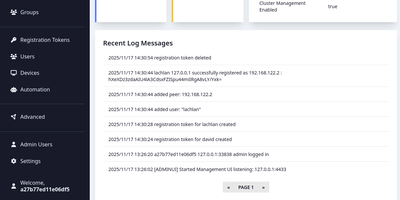
Wag is an authentication gateway for WireGuard that lets each device reach only the routes it should, and asks for a second factor before the sensitive ones open. Admins write access policies for everyone, groups, or single users, marking subnets, hosts, ports, and protocols as MFA-required, always allowed, or denied, and the most specific prefix wins, so one allowed address can sit inside a protected range. Devices join with a registration token, and the public endpoint answers with a finished WireGuard profile. Users then confirm a TOTP code, a WebAuthn security key, an OIDC single sign-on login that maps identity provider groups into Wag groups, or a PAM prompt, and repeated failures lock the account. Session lifetime and idle timeouts decide when they must prove themselves again. The browser portal lists users, devices, rules, registration tokens, and webhooks with real-time notifications, while a command line locks devices, resets MFA, and manages administrators. Webhooks turn JSON from an HR or identity system into new tokens or removed users and devices, and clients can fetch the list of guarded routes from a small API. Remote staff, contractors limited to one host, and homelabs are typical uses. When a server fails, the VPN remains reachable through clustering with witness nodes or an external etcd, and certificates arrive through ACME with HTTP-01 or Cloudflare DNS-01. Running on a dedicated VPS on RepoCloud with guaranteed CPU, RAM, and SSD, full root SSH access, and a browser serial console. BSD-3-Clause licensed.
dyrector.io
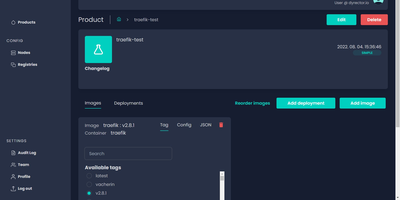
dyrector.io gives teams a visual web interface for deploying and managing containerized applications across Docker, Kubernetes, and Podman environments, replacing repetitive CLI commands and YAML editing with point-and-click configuration. Lightweight Go agents installed on target infrastructure communicate with the central TypeScript platform, enabling deployments to AWS, GCP, Azure, and on-premises servers without requiring infrastructure migration. Unified configuration screens eliminate redundant YAML editing across environments with support for all three container runtimes. Version management lets teams configure OCI-compatible container images once and deploy them as versioned releases with auto-generated changelogs and release notes. Multi-instance deployment enables simultaneous rollouts to multiple nodes with environment-specific configuration overrides, secret management, and instant test environment provisioning from any branch. The fine-grained RBAC system controls user access at project and environment levels, while audit logging tracks every deployment action. Registry integrations support Docker Hub, GitLab, GitHub, Google, and Azure container registries for image sourcing. ChatOps notifications integrate with Slack, Discord, and Microsoft Teams for deployment status alerts. Scheduled releases and workflow support enable automated deployment pipelines triggered by CI events via the REST API with JWT authentication. Running on a dedicated VPS on RepoCloud with guaranteed CPU, RAM, and SSD, full root SSH access, and a browser serial console. Apache 2.0 licensed.
EaseProbe
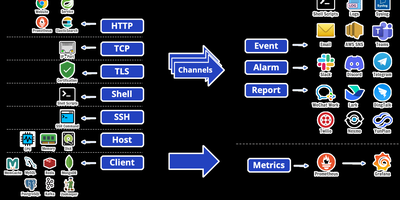
A single binary watches everything you care about and only bothers you when something breaks. EaseProbe is an open-source health and status checker that probes websites over HTTP, TCP ports, ping, TLS certificates, shell commands, SSH hosts, and native clients for MySQL, PostgreSQL, Redis, MongoDB, Kafka, Memcache, and ZooKeeper. Each target gets an interval, timeout, retry checks, and data validation, from HTTP status and XPath evaluation to a Redis key matching an expected value; SSH host probes also watch CPU, memory, and disk so slow saturation gets caught alongside hard failures. When a target flips state, edge-triggered notifications fan out to Slack, Discord, Telegram, Microsoft Teams, email, AWS SNS, WeCom, DingTalk, Lark, SMS providers, log files, syslog, or your own shell script, with repeat alerts and quiet recovery behavior under your control. Availability history accumulates into daily, weekly, or monthly SLA reports delivered through those same channels, plus a live SLA page and JSON endpoint served by the probe itself. Everything it measures also exits as Prometheus metrics with per-target status, latency, and uptime, ready for Grafana dashboards and alerting rules alongside the rest of your stack. Configuration is one YAML file, persistence is one local data file, and the same binary runs on a tiny VPS watching an entire fleet. Running on a dedicated VPS on RepoCloud with guaranteed CPU, RAM, and SSD, full root SSH access, and a browser serial console. Apache-2.0 licensed.
OCI Core
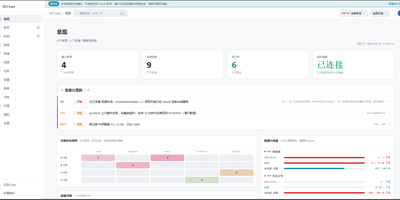
Anyone juggling several Oracle Cloud accounts knows the tab-switching ritual; OCI Core ends it by pulling every tenancy's instances into one self-hosted panel. The cross-account list shows state, shape, volumes, and public IPs for each machine, and you can start, stop, resize, rename, or terminate instances without opening Oracle's console. A creation wizard offers every shape in an availability domain, not just the free presets, while long operations such as IP swaps, resizes, and terminations run as background jobs with visible progress. Capacity hunting watches Oracle's read-only capacity reports and retries creation until a scarce shape appears, notifying you when it lands. Networking tools edit VCNs, subnets, and security rules visually, swap public IPs, enable IPv6, and manage extra network cards. Storage views resize boot and block volumes, and a rescue mode moves a broken system disk to a healthy machine for repair. Billing breaks spend down by service and region, tracks the monthly free egress allowance, and shows real usage for free-tier accounts. Accounts are checked for connectivity, quotas, and credential health, with emails, IPs, and OCIDs masked by default and revealed only on demand. Alerts reach Telegram, WeCom, DingTalk, email, or webhooks, and access is guarded by argon2id passwords, TOTP two-factor sign-in, session controls, and an audit log. Running on a dedicated VPS on RepoCloud with guaranteed CPU, RAM, and SSD, full root SSH access, and a browser serial console. MIT licensed.
Damselfly
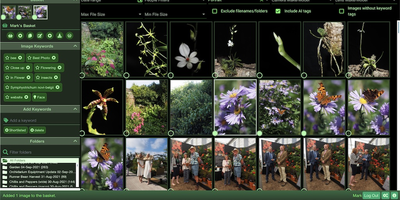
Damselfly puts a searchable brain over a folder-based photo archive, so a library of hundreds of thousands of images stays browsable from any browser. Point it at your existing folders and it indexes everything in the background, generating thumbnails and reading IPTC keywords, EXIF camera data, and file names into one catalogue. Search returns results in under a second even across 500,000 photographs, and advanced filters narrow by date range, camera or lens model, file size, orientation, detected objects, or recognized faces. Face detection and recognition run locally and offline, so you tag a person once and Damselfly finds them in other shots without sending family photos to a cloud service. Keyword tagging writes metadata with ExifTool without re-encoding JPEGs, keeping originals byte-identical while tags travel with the files into DigiKam, Photoshop, or other tools. The Picasa-style basket collects picks from search results for download, watermarked export for social media or email, or upload to WordPress, and baskets can be personal or shared between users. Photos with location metadata appear on a map, visually similar images can be found from a single example, and untagged shots can be listed so nothing stays unlabelled. Accounts with role-based permissions let everyone browse while only editors tag or reorganize, and an optional desktop client syncs basket selections to a laptop for editing. Running on a dedicated VPS on RepoCloud with guaranteed CPU, RAM, and SSD, full root SSH access, and a browser serial console. GPL-3.0 licensed.
Talkyard
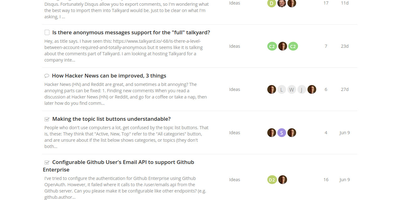
Talkyard combines five discussion formats in one platform: StackOverflow-style Q&A with accepted answers, Reddit-like upvote sorting for ideas, threaded forums, real-time chat channels, and embeddable blog comments. Running separate tools for each conversation type fragments community knowledge across disconnected systems, but Talkyard keeps it all searchable in one place. Question askers mark accepted answers, and community voting surfaces the best solutions for future visitors. Idea topics sort by upvotes for crowdsourced feedback prioritization and product decisions. Chat channels handle real-time day-to-day conversation, while forum threads preserve important discussions that need to remain findable months later. The embedding capability goes beyond blog comments: entire Talkyard forums can live inside iframes on your existing website with automatic deep-linking and iframe auto-resizing, adding community discussion to any page without rebuilding your site. Docker Compose containers run with dropped capabilities, no-new-privileges enforcement, non-root processes, health checks, and automatic log rotation. Multi-site hosting serves multiple communities from one installation with isolated databases and separate domains. Automated upgrades pull new images and restart services without intervention. ElasticSearch indexes every discussion format for instant full-text search. The Scala backend with TypeScript frontend stores data in PostgreSQL with automatic Let's Encrypt HTTPS. Runs on a RepoCloud VPS with guaranteed CPU, RAM, SSD, root SSH, and browser console. AGPL licensed.
BorgWarehouse
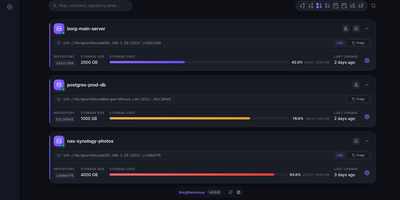
Centralizing BorgBackup usually means hand-creating Unix users, wiring SSH keys, and remembering which machine stopped backing up three weeks ago; BorgWarehouse replaces that terminal work with a dashboard built for exactly this job. Add a repository and it provisions the dedicated user, authorized key, and storage quota for you, then hands back ready-to-paste client commands so a new machine is backing up in minutes. Every repository carries a freshness threshold: when no modification lands within the window you set, its status dot turns red and an alert goes out by SMTP email, through Apprise to Discord, Telegram, Slack, Gotify, or ntfy, or as a signed webhook POST to tools like n8n and Uptime Kuma, rate-limited to one alert per repository per day. Append-only mode is enforced on the server, so even a fully compromised client can add archives but never destroy existing ones, which is the property that keeps ransomware from eating your backup history. The monitoring view tracks storage consumption against each quota, a setup wizard walks new clients through onboarding (with a LAN variant for local transfers), and sign-in can delegate to GitHub, Google, Microsoft, GitLab, or any OIDC provider. A versioned REST API automates provisioning, and your passphrase never reaches the server: backups stay end-to-end encrypted on the clients. Running on a dedicated VPS on RepoCloud with guaranteed CPU, RAM, and SSD, full root SSH access, and a browser serial console. AGPL-3.0 licensed.
Veritas Kanban
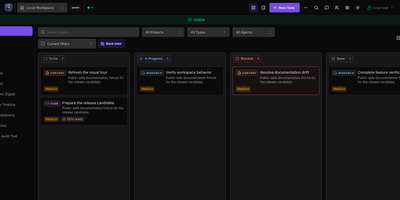
A drag-and-drop task board that works fine on its own and can also hand cards to AI coding agents, Veritas Kanban shows what each agent is doing, what it changed, and what is waiting for your approval. Start with no agents at all. Cards move through To Do, In Progress, Blocked, and Done, and each one carries subtasks, dependencies, time tracking, comments, and an activity log. When you are ready, connect Codex, Claude Code, Copilot CLI, Hermes, or OpenClaw, give every agent an Intern, Specialist, or Lead permission level, and follow each agent's status and model on a live dashboard. Let a task run in its own Git worktree, read the diff, leave inline comments, approve or request changes, and open a GitHub pull request from the task panel. Squad Chat gives agents one shared channel that posts spawned, completed, and failed events. Workflows chain steps with parallel branches, loops, and human approval gates. Policy rules allow, deny, or hold agent actions for review. Assistants reach the board through an MCP server, a command-line client, or a REST API. Running on a dedicated VPS on RepoCloud with guaranteed CPU, RAM, and SSD, full root SSH access, and a browser serial console. MIT licensed.